Management and Diagnostic Console
81
To create an application profile:
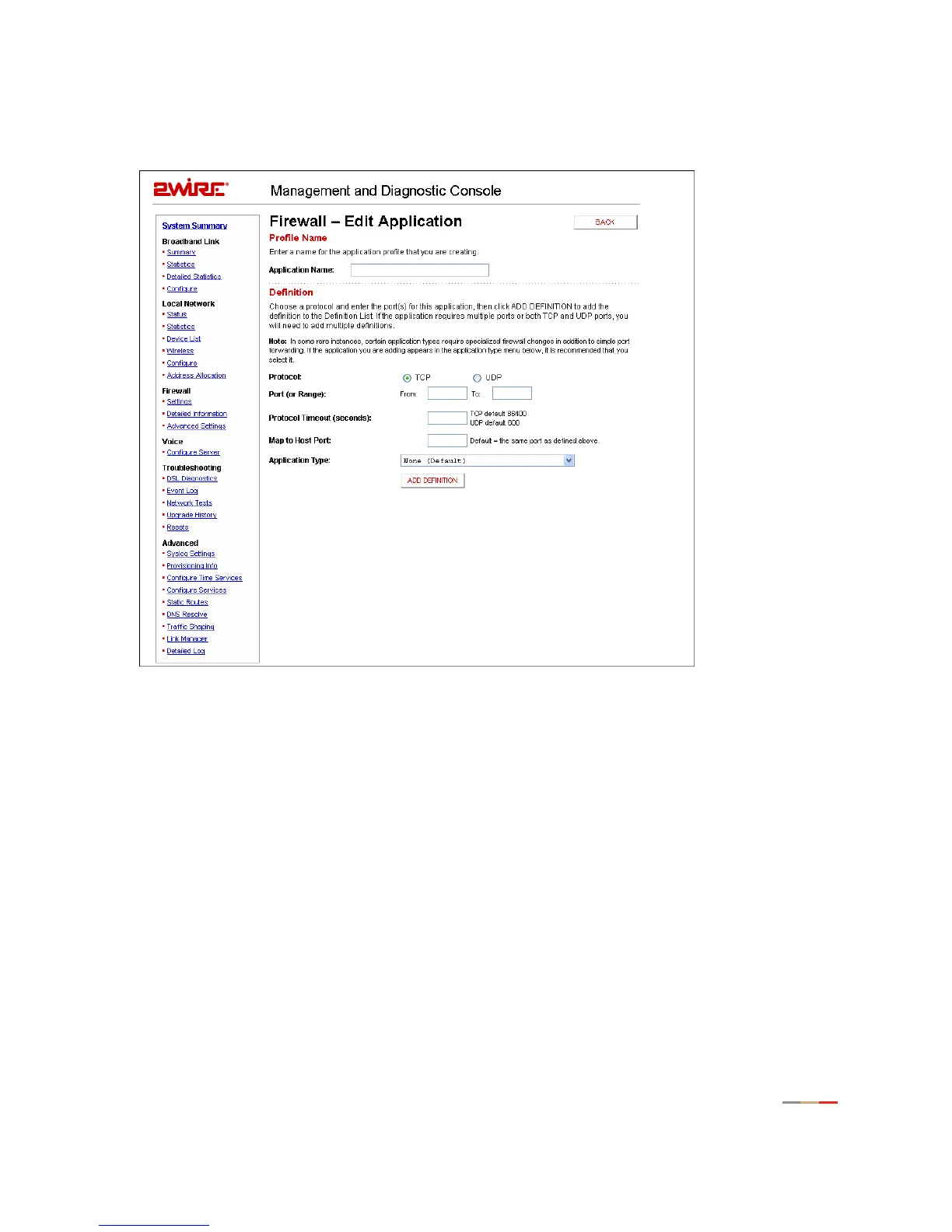
1. Click the Add a new user-defined application link. The Edit Application page opens.
Figure 36. MDC Firewall Edit Application Page
2.
In the Application Name field, enter a name for the application profile.
3. In the Protocol field, click the TCP or UDP radio button. If both protocols are required, you must create a
definition for each.
4. In the Port (or Range) field, enter the port or port range used by the application.
5. In the Protocol Timeout (seconds) field, enter the amount of time (in seconds) that the connection in
the specified range should remain open when there is no data transfer. In most cases the default value
is appropriate.
6. In the Map to Host Port field, enter the value that provides the mapping offset to the local computer. For
example, if this value is set to 4000 and the range being opened is 100 to 108, the forwarded data to
the first value in the range will be sent to 4000. Subsequent ports will be mapped accordingly; 101 will
be sent to 4001, 102 will be sent to 4002, etc.



 To Next Page