5.14 [27 Calibration] Weight Calibration
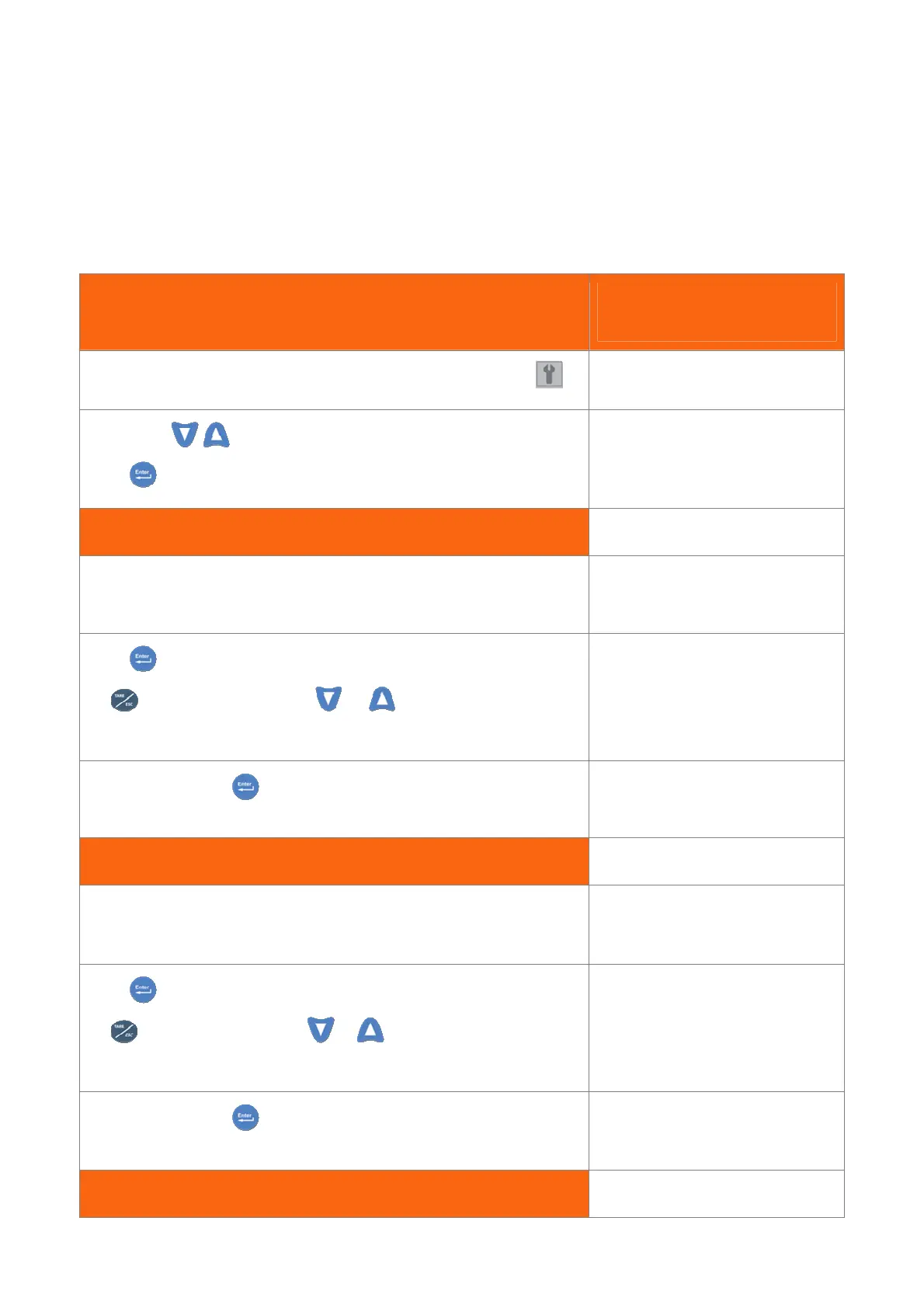
This procedure allows you to make a weight calibration.
You remember that you must confirm the operative mode, before to start the calibration.
PROCEDURES STATUS
IN THE CONTROL AREA
Follow steps in 3.5 paragraph to select and enter the menu parameters
Pressing the
keys, seek the page as shown on the right.
Press to get in.
A 68 L 8.1 W 1.2
27 CALIBRATION
Hook Weight:
This Step is required when you want to change the Hook Weight value during
calibration.
WEIGHT CALIBRAT 0
Hook Weight .0
Press and insert the value;
By key move asterisk and by or change the value (Ex: .60 =
600Kg. ).
*
Hook Weight .0
When you finish press .
WEIGHT CALIBRAT 0
Hook Weight .60
Lift Weight:
This Step is required when you want to change the Lift Weight value during
calibration.
WEIGHT CALIBRAT 0
Lift Weight .0
Press and insert the value;
By key move asterisk and by
or change the value
(Ex: 2.60 = 2.600Kg. ).
*
Lift Weight .0
When you finish press .
WEIGHT CALIBRAT 0
Lift Weight 2.60
Load Radius:


 To Next Page