1
1 General Description
This manual will take you through the VIEW TECH-LMI installation and service procedures.
The software version installed is VIEW TECH_v X.X
This REFINED LOAD CALIBRATION MANUAL must be intended to be an extension of TECHNICAL ASSISTANCE
MANUAL. For the Authorized Personnel only when a Load Calibration is required in following cases:
•
••
• Re-calibration for obtaining better accuracy.
•
••
• Calibration of a pre-memorised load table following the installation of its relevant equipment.
•
••
• Calibration of a new equipment which load table has been transmitted by E-mail from MCI.
In this case Lap-top is required. Therefore this is the 3rd access level to the system requiring the
2nd password introduction.
Anyway it is not possible to modify the LOAD TABLES Data or Initial Programming Parameters (that
require the 3rd password).
For password introducing, display reading and commands, automatic and Manual selections, as well
as sensors alignment, please refer to the Manual. Mainly, the target of this Manual is the Refine
Load Calibration.
Main system characteristics:
•
••
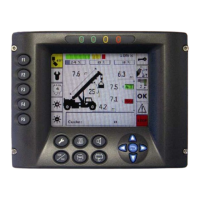
• Data are screened on the graphic display located in the cabin.
•
••
• The accessories stored in one EPROM, available today. They can be activated directly from the
display panel (by means of the 2nd password).
•
••
• Extremely easy calibrations procedures. They can be performed directly from the display located in
the cabin. There are protections in order to avoid unauthorized personnel to enter into the system
(passwords).
•
••
• Three different levels of access in order to protect the system by unauthorized personnel.
1st PASSWORD is dedicated to the Technical Personnel just to replace sensors. Both of them can be set by the
Manufacturer .
Following menus are available through 1st password:
•
••
• 32 Config Language / Measure System Selection
•
••
• 15 Angle Trasd Calibration Angle
•
••
• 16 Boom Trasd Calibration Length
•
••
• 01 Save Save Parameters


 To Next Page