120 CHAPTER 8: VLAN-VPN CONFIGURATION
You can execute the vlan-vpn enable or vlan-vpn uplink enable command for a port,
but do not execute both of the two commands for a port.
When the TPID field is set to the default value (that is, 0x8100), a port can serve as an
uplink port no matter whether or not you enable the VLAN-VPN uplink function for
the port. However, if the TPID field is not set to 0x8100, you need to enable the
VLAN-VPN uplink function for the port if you want to make the port an uplink port.
VLAN-VPN
Configuration
Example
This Section contains a VLAN-VPN configuration example.
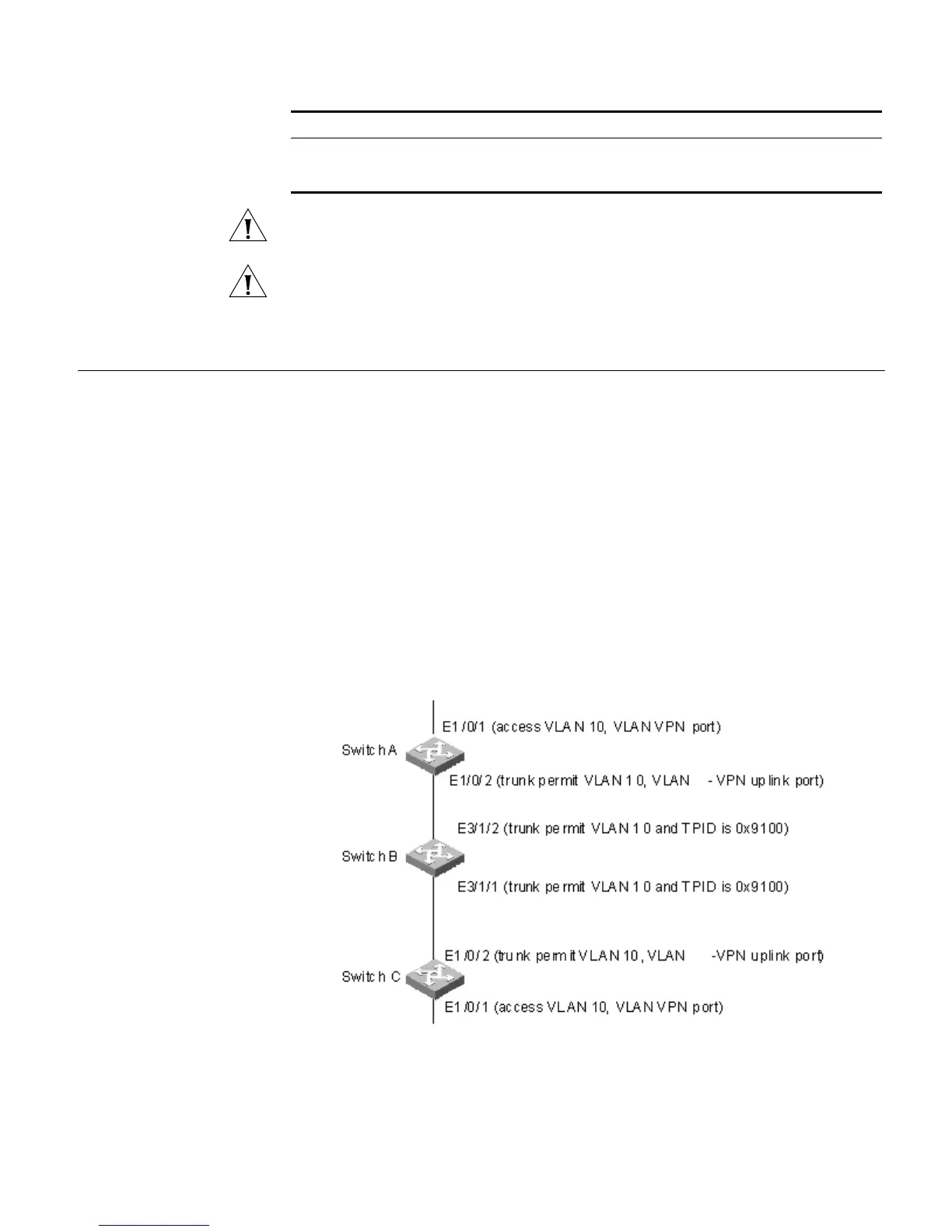
Network requirements
■ Switch A and Switch C are S5500 series switches. Switch B is a switch comes from
another vendor, which uses a TPID value of 0x9100.
■ Two networks are connected to the Ethernet1/0/1 ports of Switch A and Switch C
respectively.
■ Switch B only permits packets of VLAN 10.
■ It is desired that packets of VLANs other than VLAN 10 can be exchanged between
the networks connected to Switch A and Switch C.
Network diagram Figure 31 Network diagram for adjusting TPID values
Display VLAN-VPN
configuration information
about all ports
display port
vlan-vpn
You can execute the display command in any
view.
Table 108 Adjust TPID values for VLAN-VPN packets (continued)
Operation Command Description















 To Next Page