RSPAN Features 385
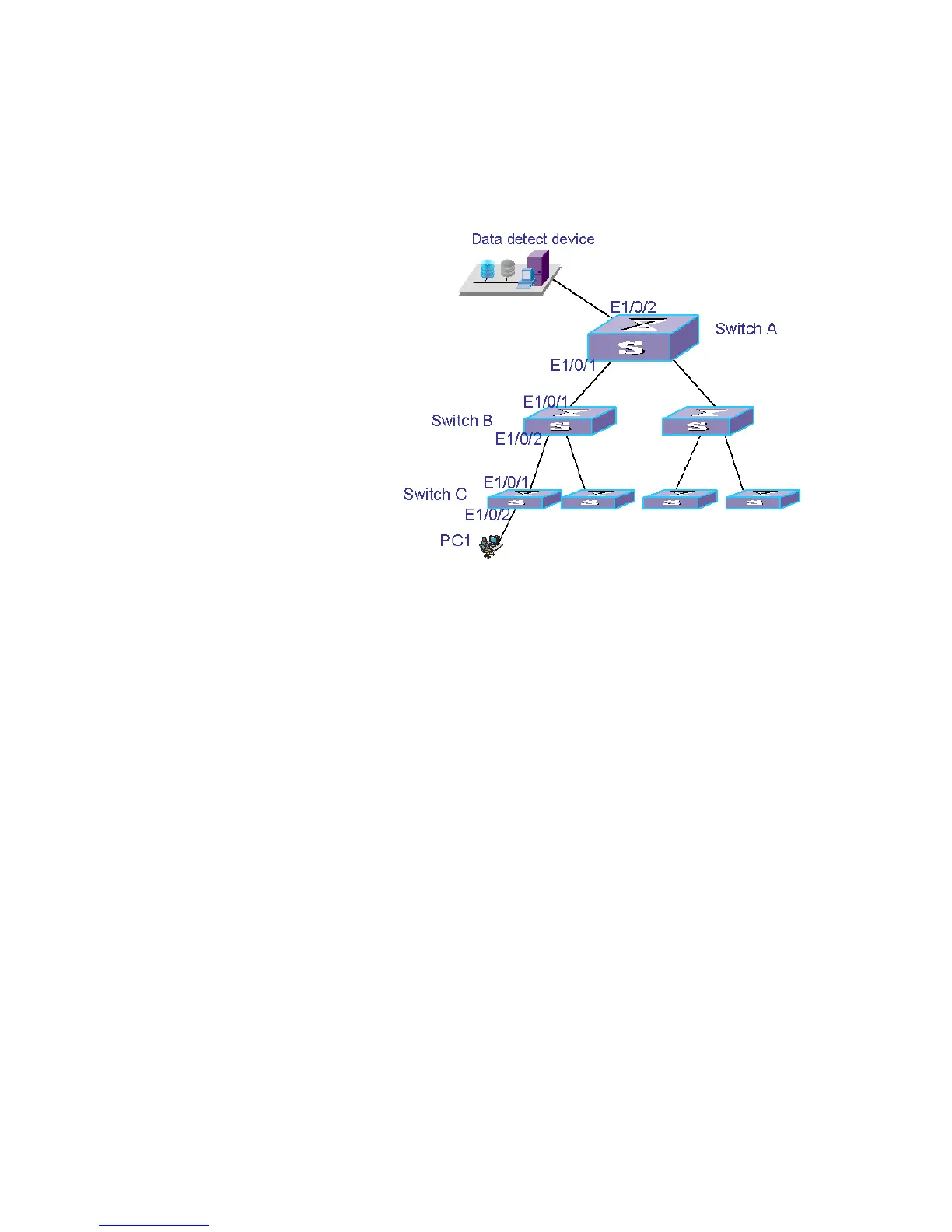
■ Configure Switch C to be the source switch, Ethernet1/0/2 to be the source port of
remote mirroring, and Ethernet1/0/5 to be the reflector port. Set Ethernet1/0/5 to
be Access port, with STP disabled.
Network Diagram
Figure 102 Network diagram for RSPAN
Configuration Procedure
1 Configure Switch C.
<S5500> system-view
[S5500] vlan 10
[S5500-vlan10] remote-probe vlan enable
[S5500-vlan10] quit
[S5500] interface ethernet1/0/1
[S5500-Ethernet1/0/1] port trunk permit vlan 10
[S5500-Ethernet1/0/1] quit
[S5500] mirroring-group 1 remote-source
[S5500] mirroring-group 1 mirroring-port ethernet1/0/2 outbound
[S5500] mirroring-group 1 reflector-port ethernet1/0/5
[S5500] mirroring-group 1 remote-probe vlan 10
[S5500] display mirroring-group remote-source
2 Configure Switch B.
<S5500> system-view
[S5500] vlan 10
[S5500-vlan10] quit
[S5500] interface ethernet1/0/1
[S5500-Ethernet1/0/1] port trunk permit vlan 10
[S5500-Ethernet1/0/1] quit
[S5500] interface ethernet1/0/2
[S5500-Ethernet1/0/2] port trunk permit vlan 10
3 Configure Switch A.
<S5500> system-view
[S5500] vlan 10
[S5500-vlan10] remote-probe vlan enable
[S5500-vlan10] quit
[S5500] interface ethernet1/0/1















 To Next Page