17
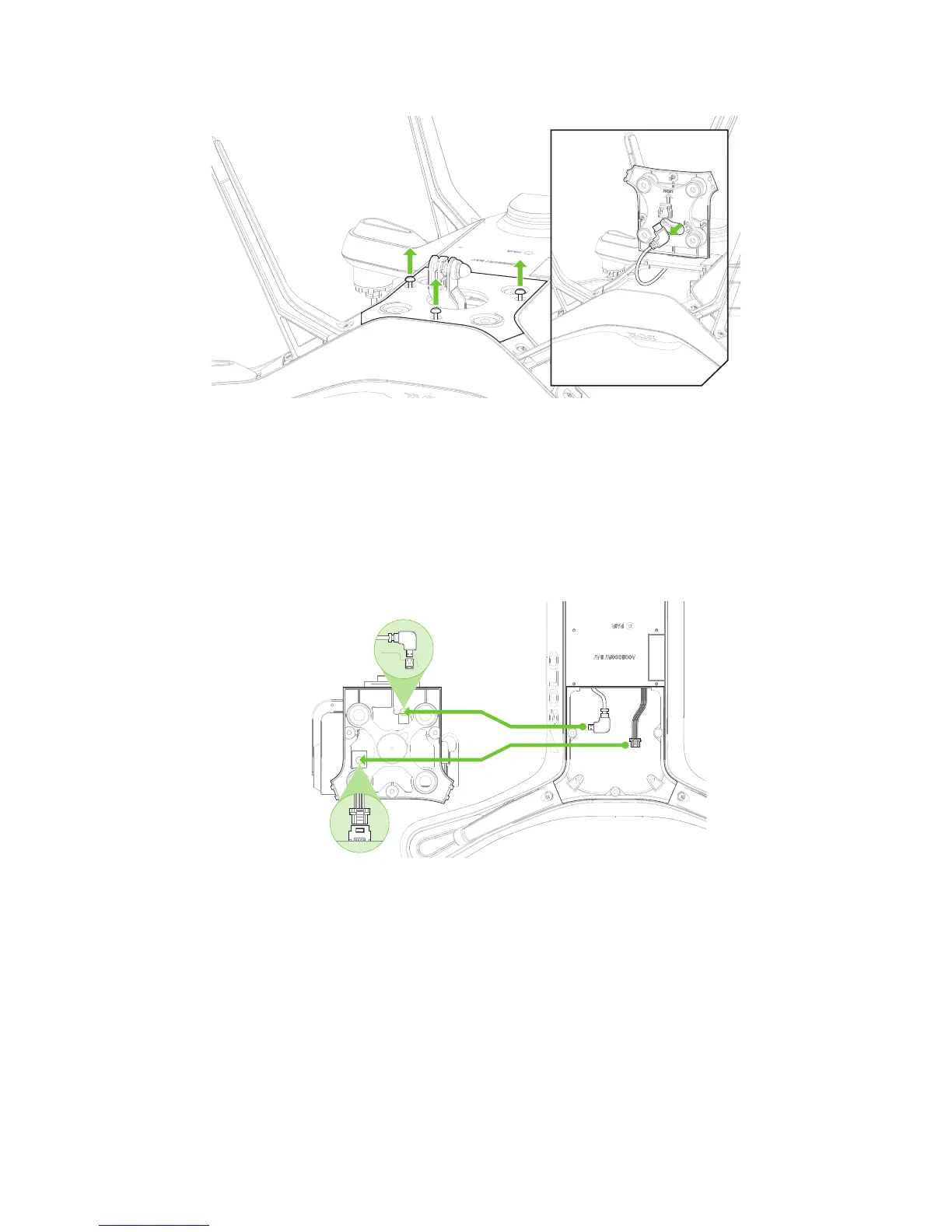
Figure 3.2.1.1: Removing The Fram
Turn over Solo.
Loosen the three screws
securing the mount.
Gently
detach
the plate.
Free the cable,
and remove the mount.
e
3.2.2 Connect Gimbal
1. Remove the foam insert holding the gimbal in place and set it to the side (this piece is used to help protect
the gimbal during travel).
2. On the bottom of the gimbal plate are two ports: one for the HDMI cable and one for the gimbal cable. Plug
in the cables running from Solo to their respective ports on the gimbal, as shown following.
Connect
gimbal cable.
Connect
HDMI cable.
Figure 3.2.2.1: Connecting cables
3.2.3 Position Cables
With both cables now connected to the Solo Gimbal, it is important to position each cable out of the way of other
internal components. When configuring the HDMI and gimbal cables, the HDMI cable should rest on top of the
gimbal cable.
1. Position the gimbal cable out out of the way by pushing any slack towards the front of the Solo Shell.





 To Next Page