66
10.5 Battery Tray
The battery tray holds the battery and GPS in place, and allows you to access the main electronics bay. This section
covers how to remove to tray to access the interior of Solo.
10.5.1 GPS Cover
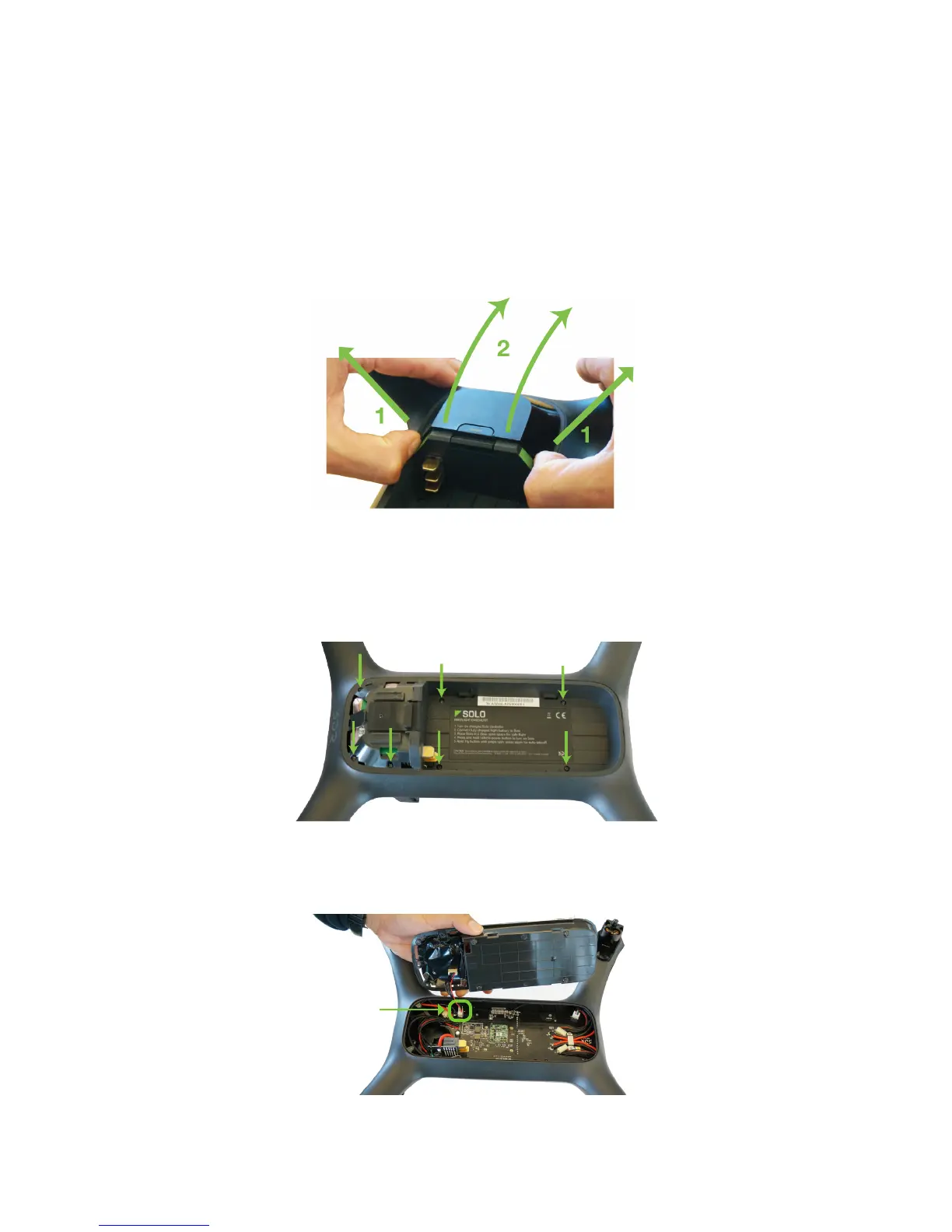
The GPS cover is the flat, black end cap in front of the battery tray. To remove the GPS cover, use your fingernails
(1) to release the side clips outward. Next, lift slightly while pushing forward (2) to pop the cover off completely.
Figure 10.5.1.1: GPS Cover Removal
10.5.2 Battery Tray Removal
To detach the battery tray and access Solo’s main electronics bay, use a small Philips screwdriver to remove the
seven screws securing the battery tray to Solo.
Figure 10.5.2.1: Battery Tray Removal
The battery tray is still connected to Solo via the GPS cable, so carefully lift out the tray just enough to access the
board beneath.
Figure 10.5.2.2: Battery Tray
GPS connector
Detachment





 To Next Page