2
1.2 Aircraft Overview
1.2.1 Smart Battery
The battery connects to Solo’s battery bay. Solo’s power button is located on the battery; Solo can be powered only
when the battery is connected.
1.2.2 Motors and Propellers
Solo’s arms are labeled 1 through 4 on the ends of the arms. Motors on arms #1 and #2 spin counterclockwise
and use clockwise-tightening propellers with silver tops. Motors on arms #3 and #4 spin clockwise and use
counterclockwise-tightening propellers with black tops.
1.2.3 Orientation LEDs
Each arm contains an LED for ground-to-air directional awareness; when armed for flight, the two front arms (#1 and
#3) display white, and the two rear arms (#2 and #4) display red. This LED scheme mimics the headlight and taillight
style of a car.
1.2.4 Fixed Camera Mount and HDMI Cable
Solo includes a GoPro® The Frame fixed mount to mount a GoPro® HERO camera. The HDMI cable connects to
the GoPro® to output video during flight.
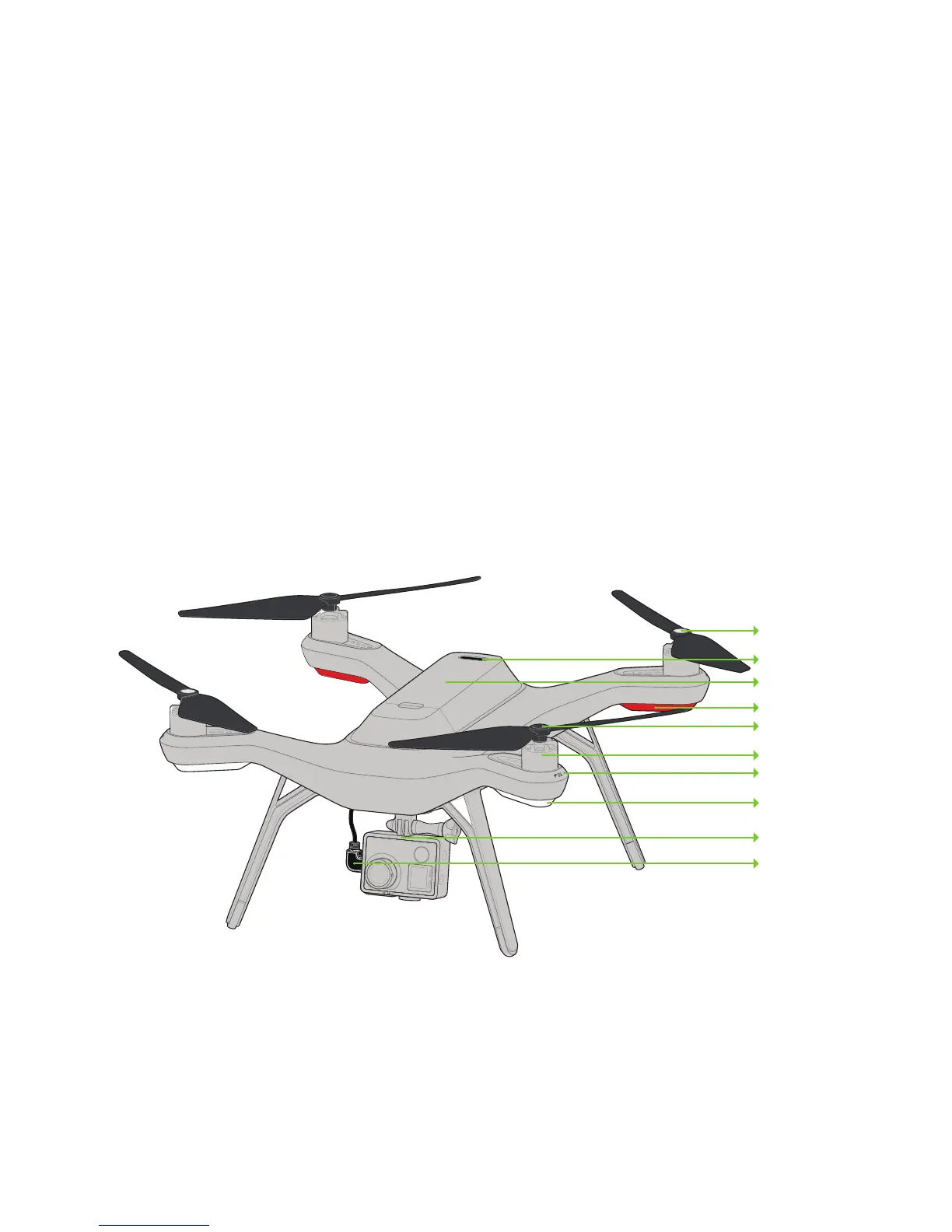
Figure 1.2.4.1: Solo Overview
Silver-top propeller
Power button
Battery
Rear orientation LEDs
Black-top propeller
Motor
Arm numbering
Front orientation LEDs
Fixed camera mount
HDMI cable
Height: 10.2”
Motor-to-motor: 18.1”
Weight (no camera): 3.3 lbs.





 To Next Page