34
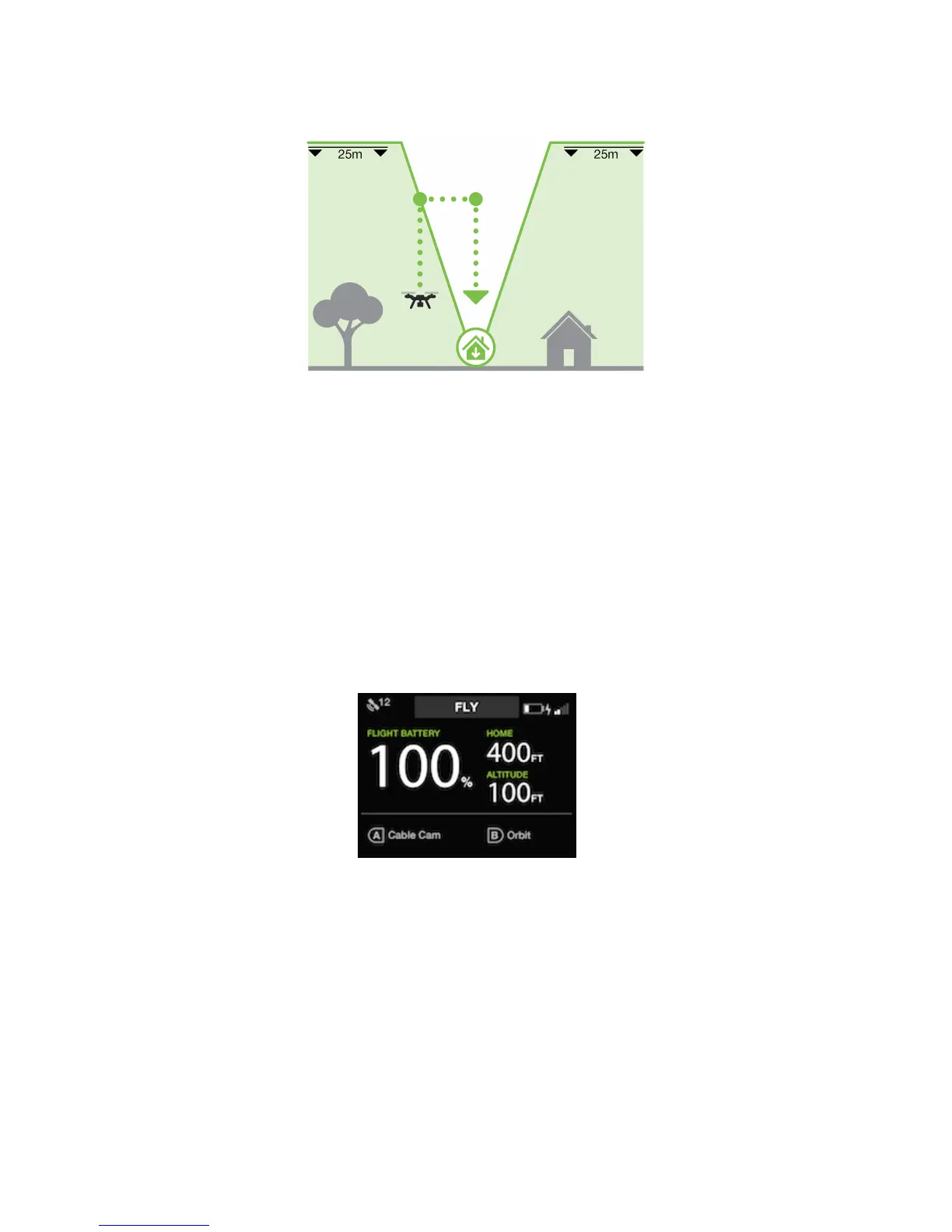
Case #3: Below the Return Home Altitude and Outside the Cone
Figure 5.4.2.3: Below Return Home and Outside the Cone
The radius of the Cone Zone expands at a 1:3 ratio of lateral distance to altitude. This means that the Cone radius
is directly related to the Return Home altitude. As Solo’s altitude increases, so does the radius of the cone. If Solo’s
lateral distance from the Home Position exceeds this ratio, it is then outside the cone. In the occurrence of a call to
Return Home, Solo:
1. Either climbs to the boundary of the cone or to the Return Home Altitude, whichever happens first
2. Moves to the Home Position
3. Descends and lands
5.5 In-Flight Data
Use the controller’s main data display to monitor Solo’s status in flight.
Figure 5.5.1: Controller - In-Flight Data
1 Flight battery percentage remaining
2 GPS signal strength and number of active satellites
3 Active mode or Smart Shot (“Fly” indicates standard flight.)
4 Controller battery level
5 Solo Wi-Fi signal strength
6 Horizontal distance from the home position (launch point)
7 Current altitude
8 Currently assigned functions of controller A and B buttons
2
3 4
5
6
7
8
1





 To Next Page