39
6.1.1 Main Interface
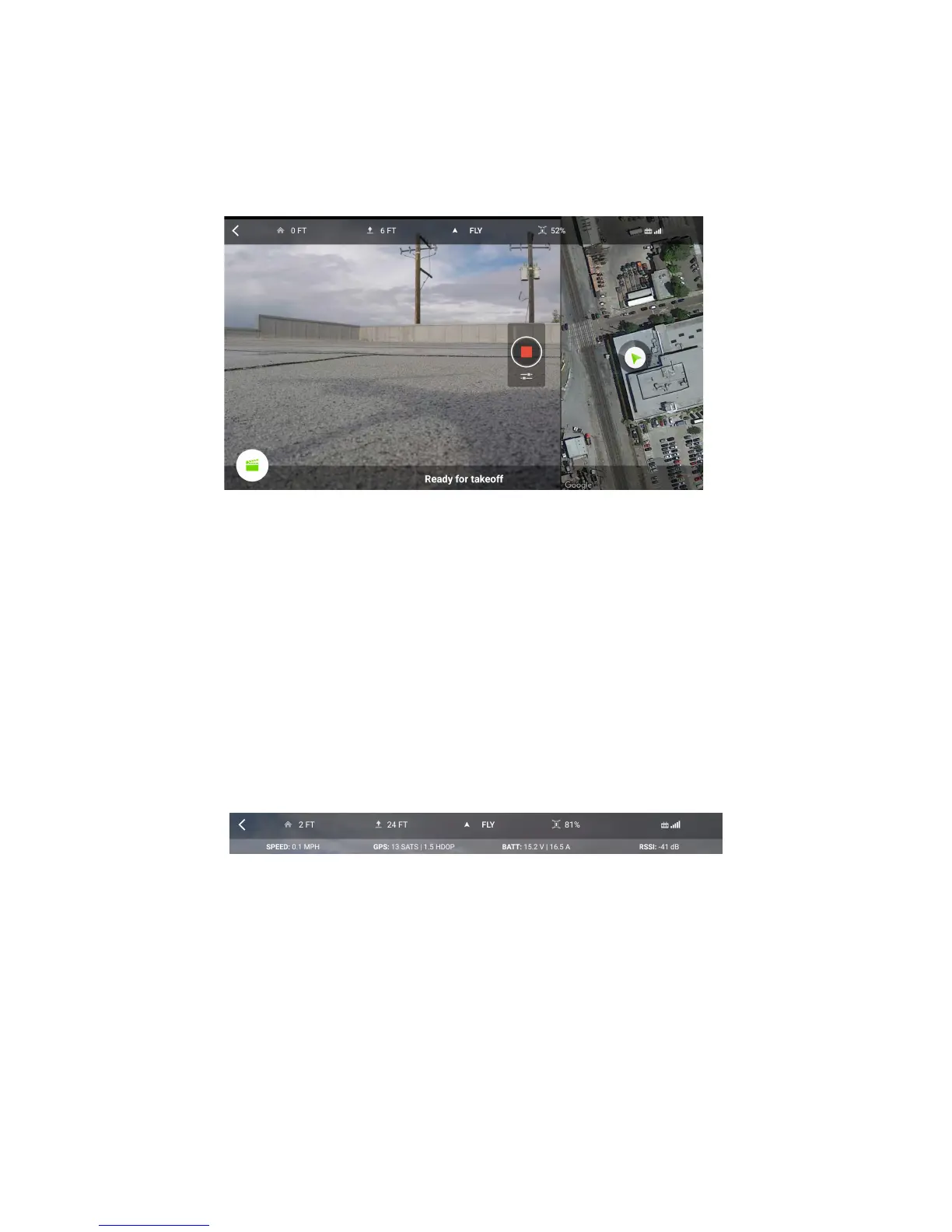
This is the screen you’ll use most of the time when flying Solo. It’s available by tapping Fly Solo on the home screen.
The main screen provides the live video feed from the GoPro camera, telemetry statistics, access to Smart Shots
and the map view, and more.
Figure 6.1.1.1: App - Main
8
11
2 3 4 5 6 7
9
10
1
Interface
1. Live video feed
2. Go to home screen
3. Horizontal distance from launch point
4. Altitude
5. Current flight mode
6. Solo battery percentage remaining
7. Controller signal strength
8. Shot List
9. Map view (see following for details)
10. Camera controls (see Section 6.1.3 for details)
11. Alerts and instructions
To toggle advanced telemetry data, tap any of the telemetry readouts at the top of the screen: item 3, 4, 6, or 7. The
additional information appears as follows:
Figure 6.1.1.2: Advanced teleme
1 2 3 4
try data
1. Solo’s current air speed
2. Number of satellites and HDOP
3. Solo battery voltage and amperage
4. Wi-fi signal strength between Solo and Controller





 To Next Page