4.4 Scan Options and Settings
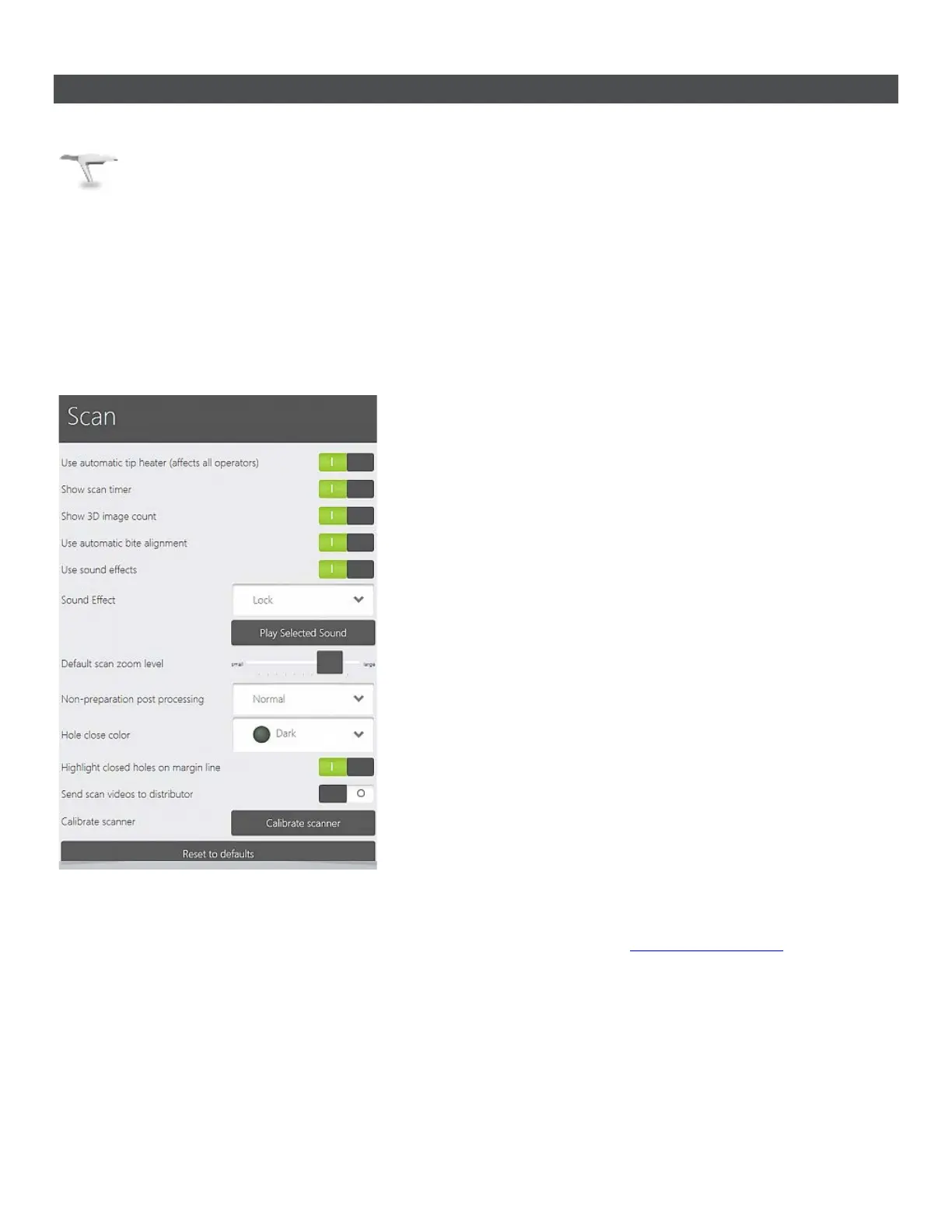
Scan settings frame contains parameters activated with the buttons on the right:
• Show scan timer - The scan timer is displayed
during the scanning process in the upper left
corner of the window.
• Show 3D image count -
taken images during scanning.
• Use automatic bite alignment - The system
automatically attempts to align the bite after
each bite scanning.
• Use sound effects - A selectable sound is
played back when the scan data is being
acquired. The sound indicates an optimal data
capture. The preferred sound can be selected in
the Sound Effect drop-down menu (and the
sound can also be played using the Play
Selected Sound button).
• Default scan zoom level - Allows you to
adjust the default zoom level for scanning.
• Non-preparation post processing - Sets the
precision level of the models without
preparation. Applies to antagonist and study
orders.
• Hole close color - Select the color shade to
indicate closed holes on the model.
• Highlight closed holes on margin line -
Closed holes on the margin line are highlighted.
• Send scan videos to distributor -
Automatically sends scan videos to distributor
when enabled.
• Calibrate Scanner - Allows you to calibrate
your TRIOS scanner. See
Scanner Calibration
chapter for details.
• Reset to defaults - Resets all settings to the
factory default values.
55



 To Next Page