Installing MX-ONE
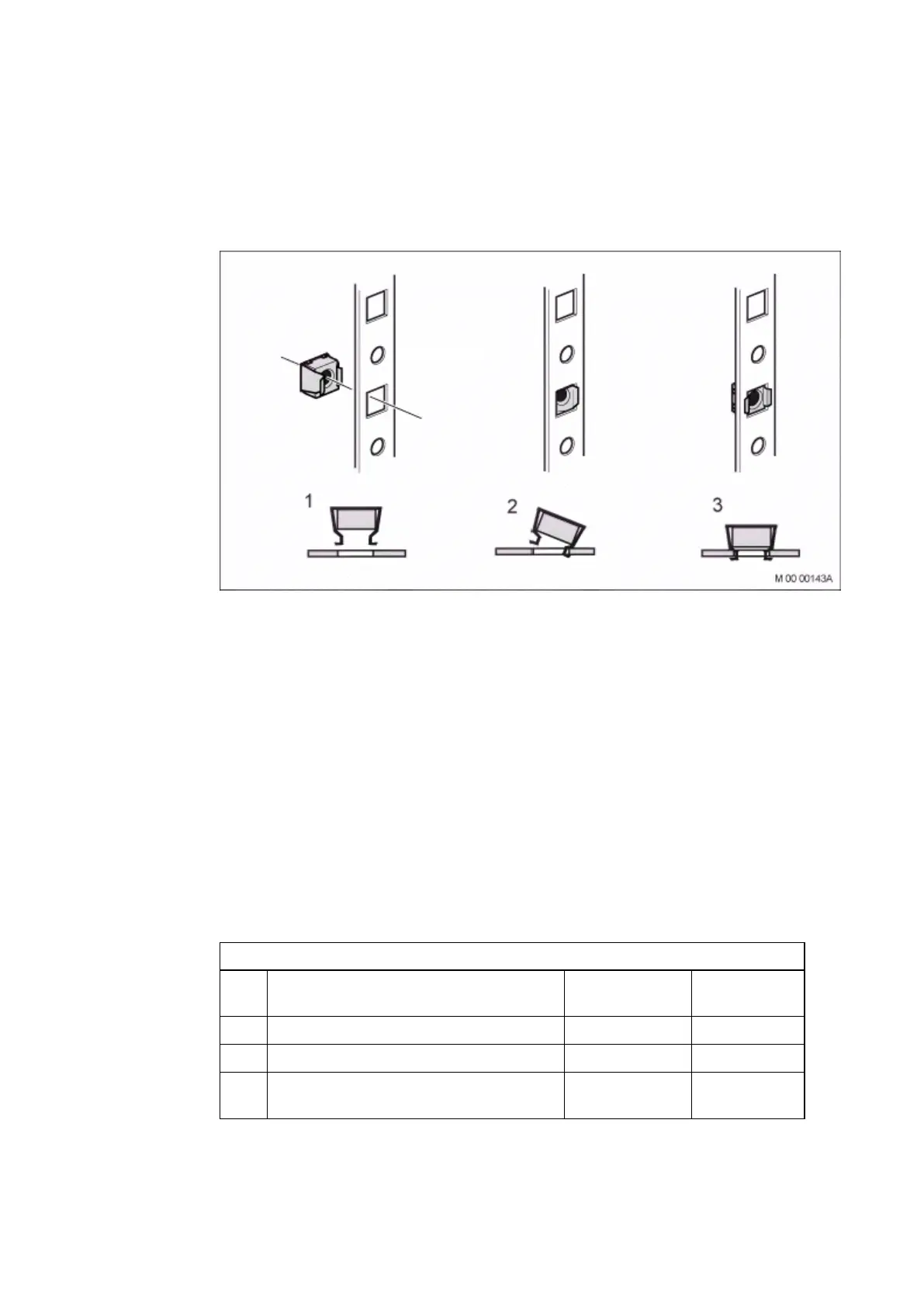
Note: Check that the mounting bars for the captive nuts are positioned at
least 100 mm behind the door.
Figure 27 Mounting the Captive Nuts in the Rack
4.5 Installing Batteries
This section describes the installation of 31-Ah and 62-Ah batteries. Make
sure to leave room in the cabinet for the bigger batteries (62 Ah) even when
installing smaller batteries.
Begin battery installation by installing the battery shelf that is supplied with the
mounting set for the power equipment at the bottom of the cabinet, Page 43
4.5.1 Installing Battery Shelf
Use the following material set when installing the battery shelf:
Table 15 Material Set for Battery Shelf
NTM 144 266 Material set for battery shelf in 19-inch cabinet or frame
Pos. Title/Function
Product
Number Quantity
B Battery shelf
1
L Strapping belt
1
K Set of 10-mm spacers for separating
battery blocks
1
42 6/1531-ASP 113 01 Uen J2 2008-07-17



 To Next Page