MEDIA
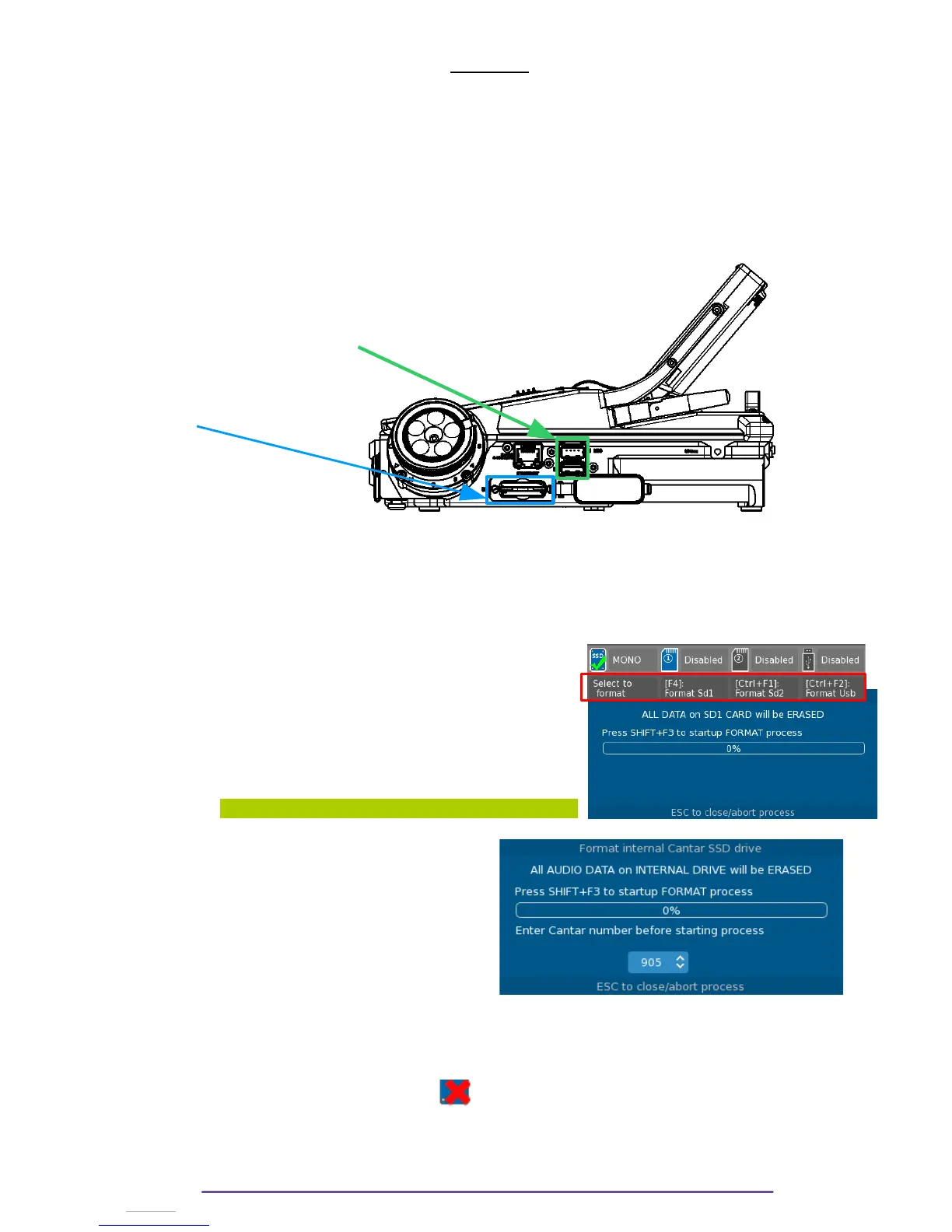
The Cantar can record on 4 medias : an internal M.2 SSD drive ; 2 SD cards and 1 USB media
(the first media connected to any of the Cantar’s USB port).
• The SSD is located on the Cantar's mother board, not accessible.
• The SD card slots are located on the right side of the Cantar.
• 2 Usb slots are availabe for a Usb media on the right side of the Cantar . Only one Usb
media will be recognized : the first one to be plugged.
Usb ports
SD slots
Usb Ports
I. Formatting
All medias need to be formatted using the FAT-32 file system.
It is recommanded to format your media using the Cantar. It is done in the SESSION menu
(while the Main Selector is in the 2 o’clock position).
Select the field beneath the appropriate media to format it and
press the OK button, a confirmation Window will open.
(or simply press the according shortcut displayed underneath
each media)
Confirm by pressing the Shift + F3 buttons.
WARNING: All information contained on the media is erased.
NB: In order to prevent mistakes, formatting the
internal Drive is protected by the need to enter
the Cantar number with the Plus(+) and Minus(-)
buttons.
This number may be found in the Stop Menu.
NB 2 : An enabled media which is Full or which is not correctly formatted will have the same
icon as a missing media : with a red ‘X’
Cantar X3
10



 To Next Page