MULTIMEDIA
262
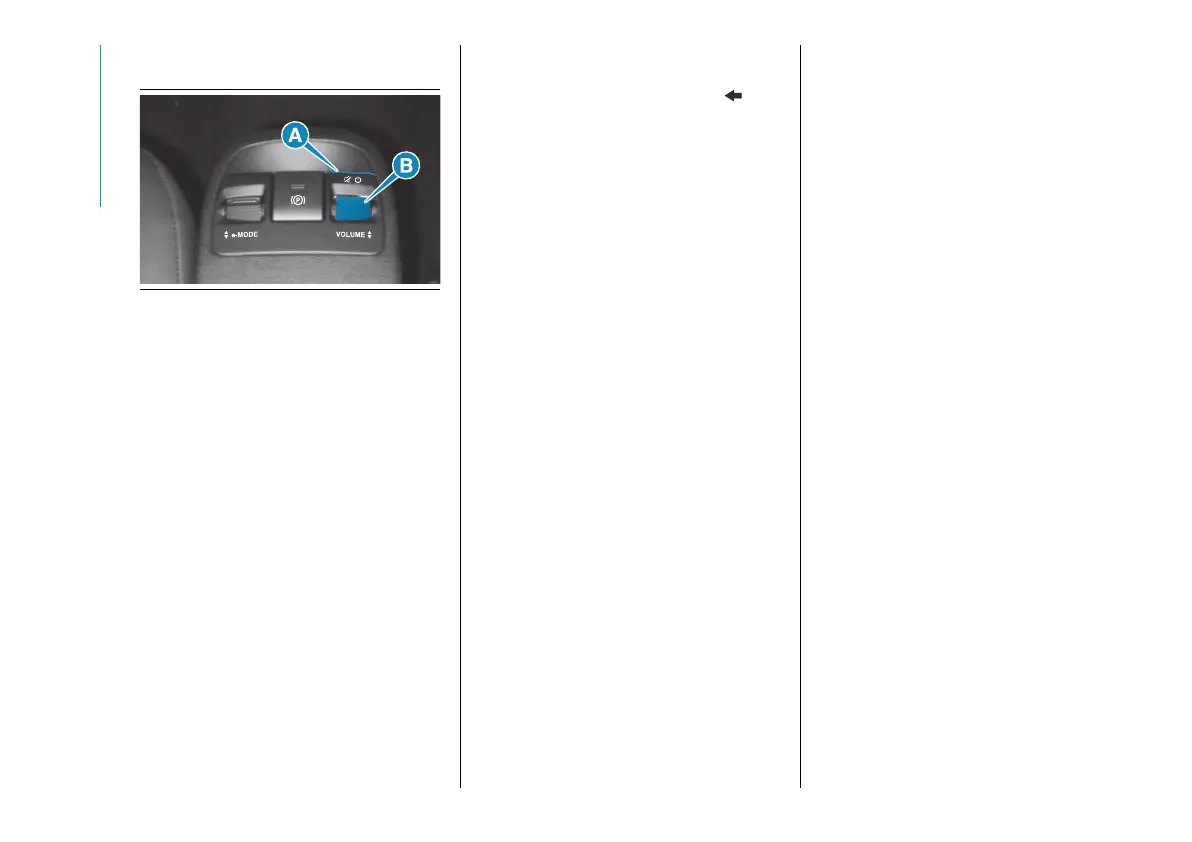
CONTROLS ON CENTRAL
CONSOLE
234 AB0A0503
(A) (long press) Uconnect™ on/off
button
(A) (short press) Mute on/off (mutes
the playback of audio tracks, radio
stations, streaming from App and the
ringing of incoming calls).
(B) Volume adjustment knob
TOUCHSCREEN
FUNCTION
The system uses the touchscreen
function; to interact with the different
functions, press the graphic buttons
displayed.
To confirm the selection, press the
graphic button "OK" or tick the required
selection. Confirmation of some
functions or settings is accompanied
by a dedicated chime.
To go back to the previous screen,
press the "X" (Delete) graphic button or,
depending on the active screen .
To go back to the home screen
or home position press the HOME
graphic button.
The touchscreen function can be used
to access and view the available lists of
music tracks, phone numbers, settings,
etc.
Move your finger on the screen to scroll
lists and selections. Hold your finger
down and move up to display the list
items at the bottom; move down to
display the list items at the top. Hold
your finger down on the screen and
move your finger rightwards, to see
the lists to the left; move your finger
leftwards, to see the lists to the right
of the screen. The same operation can
be performed to move between pages.
Press your finger on the chosen field or
button to select the field or perform the
function associated with the button.
HOT BUTTONS
Up to 4 hot buttons (D) fig. 231 can be
set on the status bar.
Press the button below the time ((E)
fig. 231) to open the drop-down menu
with the list of available apps. Hold the
desired app pressed and drag it to the
app to be replaced on the status bar.
NOTE Customisation is only active
when the car is stationary. If an attempt
is made to customise with the car in
motion or to resume driving without
having completed the operation,
a warning message will appear on
the display and the operation will be
ended.
MEDIA MODE
Press the "Media" graphic button to
listen and manage your music, view the
available lists and select your preferred
audio settings.
WARNING Applications used
on portable devices may be not
compatible with the Uconnect™
system.
After Media mode is selected, the
following information is shown on the
display:
Upper part: Selection of the different
pages of the "Sources", "Playback",
"Browse", "Audio settings" function.
Left part: Display of the user's three
favourite sources. To choose the
source, select "Sources" and then
choose the source to display. The
source being played is shown in red.
Middle part: Display of information
about the track being played and
playback control buttons:



 To Next Page