
 Need help?
Do you have a question about the ABL eMS home and is the answer not in the manual?
Overview of the manual's scope, formatting, and safety symbols used.
Describes the eMS home as an energy and load management system for private households.
Details how to identify the eMS home using rating plates and their information.
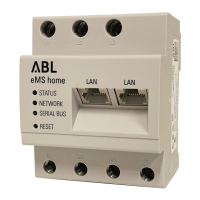
Identifies and describes the physical connections and control elements on the eMS home unit.
Outlines cable requirements and connection diagrams for RS485 communication interfaces.
Instructions for correct phase rotation setup when installing wallboxes for system functionality.
Guides for direct and indirect electrical connection of the eMS home, including transformer usage.
Details on wiring wallboxes to the eMS home via data cables and data line termination.
Instructions for connecting the eMS home to a PC and configuring it using ABL software.
Steps for starting the eMS home system and accessing its web interface for initial setup.
Procedure for checking and updating the eMS home's internal software (firmware).
Guides for configuring mains connection and registering individual wallboxes via the web interface.
Explains the dashboard's energy balance and phase values widgets for system monitoring.
Details the Health Check app for managing and viewing system messages and notifications.
Describes the Smart Meter app's display of power, energy, and phase measurements.
Covers the Wallbox app's visualization of charging status for connected devices.
Explains the Data store app for logging energy data and exporting it in CSV format.
Covers system info, network, FTP, email, CSV export, serial interfaces, and backup operations.
Lists general, power supply, and measurement circuit specifications for the eMS home.
Details on ambient temperature operation, data cable recommendations, and PIN allocation.
Explains LED indicators and procedures for restarting and resetting the eMS home.
Provides lists of abbreviations, error codes, and FAQs for common issues.
Describes the structure and content of CSV files exported from the Data Storage app.
Information on proper device disposal and the manual's intellectual property and copyright.
 General
| Communication Interface | Ethernet |
|---|---|
| Protocols | Modbus TCP |
| Storage Temperature | -40°C to +70°C |
| Humidity | 5% to 95% (non-condensing) |
| Certification | CE |

 To Next Page