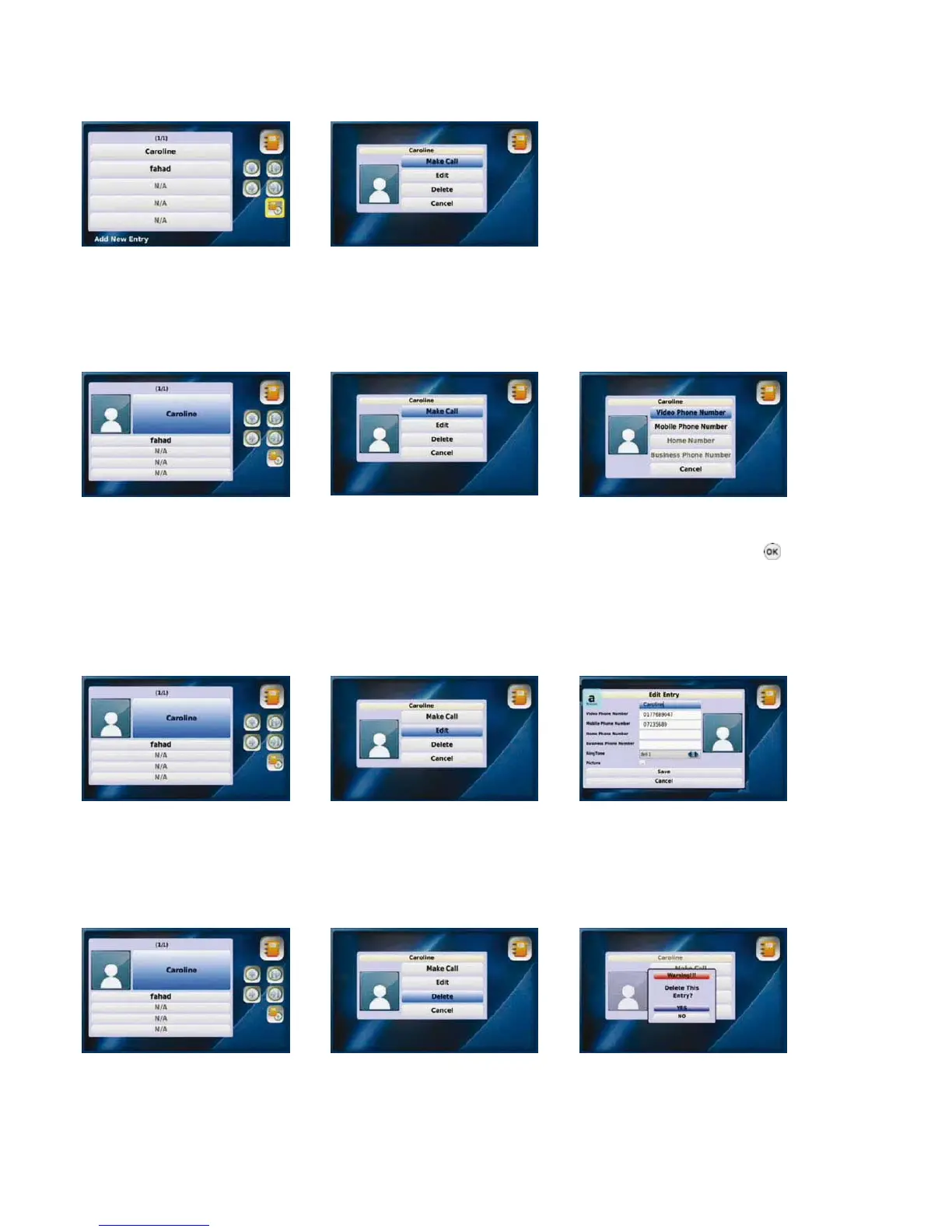
3-4-1-1. ADD NEW ENTRY
“Add New Entry” enables you to add new contact information such as name, phone number, set up a corresponding ring tone, as well
as a photo of the contact. After entering the information select “Save”. If you do not want to save the information, select “Cancel”.
Select “Add New Entry” from Enter information and
the All Contacts menu select “Save
3-4-1-2. PLACE A CALL
You can place a call to anyone listed in your “All Contacts” list by selecting the name and number you would like to call.
Select the contact from your Select the “Make Call” option Select the number you would like to
“All Contacts” list call and press the “OK” button
3-4-1-3. EDIT A CONTACT
You can edit information such as phone number, name, ring tone and the photo of the contact. Once you have edited the information,
select “Save” to save your changes. If you do not want to save, select “Cancel”.
Select the contact from your Select the “Edit” option Enter information and
“All Contacts” list select “Save”
3-4-1-4. DELETE A CONTACT
You can delete contact information that you no longer need.
Select the contact from your Select the “Delete” option Select “YES” to delete
“All Contacts” list
18



 To Next Page