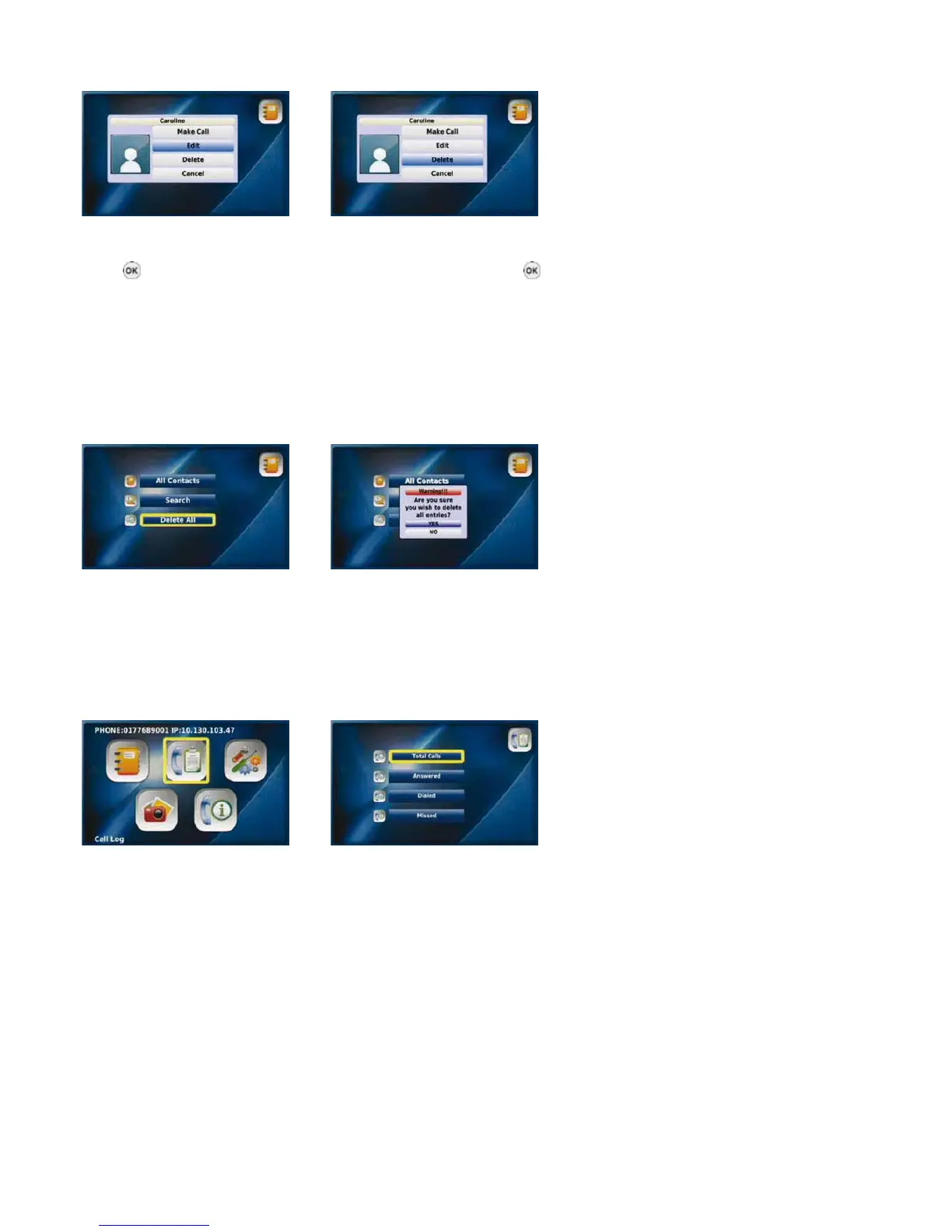
Updating information Deleting information
Select “Edit” and press the “OK” To “Delete” a contact, select “Delete”
button
to update an entry, and then press the “OK” button .
then select “Save” Select “Yes” to confirm the deletion
3-4-3. delete All
You can choose to delete all of the information in your Phonebook by selecting “Delete All”, followed by “Yes”.
WARNING: SELECTING “YES” WILL AUTOMATICALLY DELETE ALL ENTRIES IN YOUR PHONEBOOK. YOU WILL NOT BE
GIVEN THE OPTION TO CONFIRM THAT YOU WOULD LIKE TO DELETE ALL ENTRIES AFTER SELECTING “YES”, AND YOU
WILL NOT BE ABLE TO RETRIEVE THE DELETED ENTRIES.
Select “Delete All” from the Select
Phonebook menu “Yes” to confirm the deletion
3-5. CAll log
You can view all your answered calls, dialled numbers and missed calls, and choose to directly call a number and save it to or delete it
from your Phonebook.
Select “Call Log” Call Log menu
from the Main Menu
NOTE: A maximum of 300 calls (answered calls, dialled numbers and missed calls) can be saved in your Call Log. Should you exceed
this amount your oldest calls will be deleted first.
20



 To Next Page