3-4-2. seArCh
You can search for a contact stored in your Phonebook by name or number and directly place a call, edit or delete the contact
information.
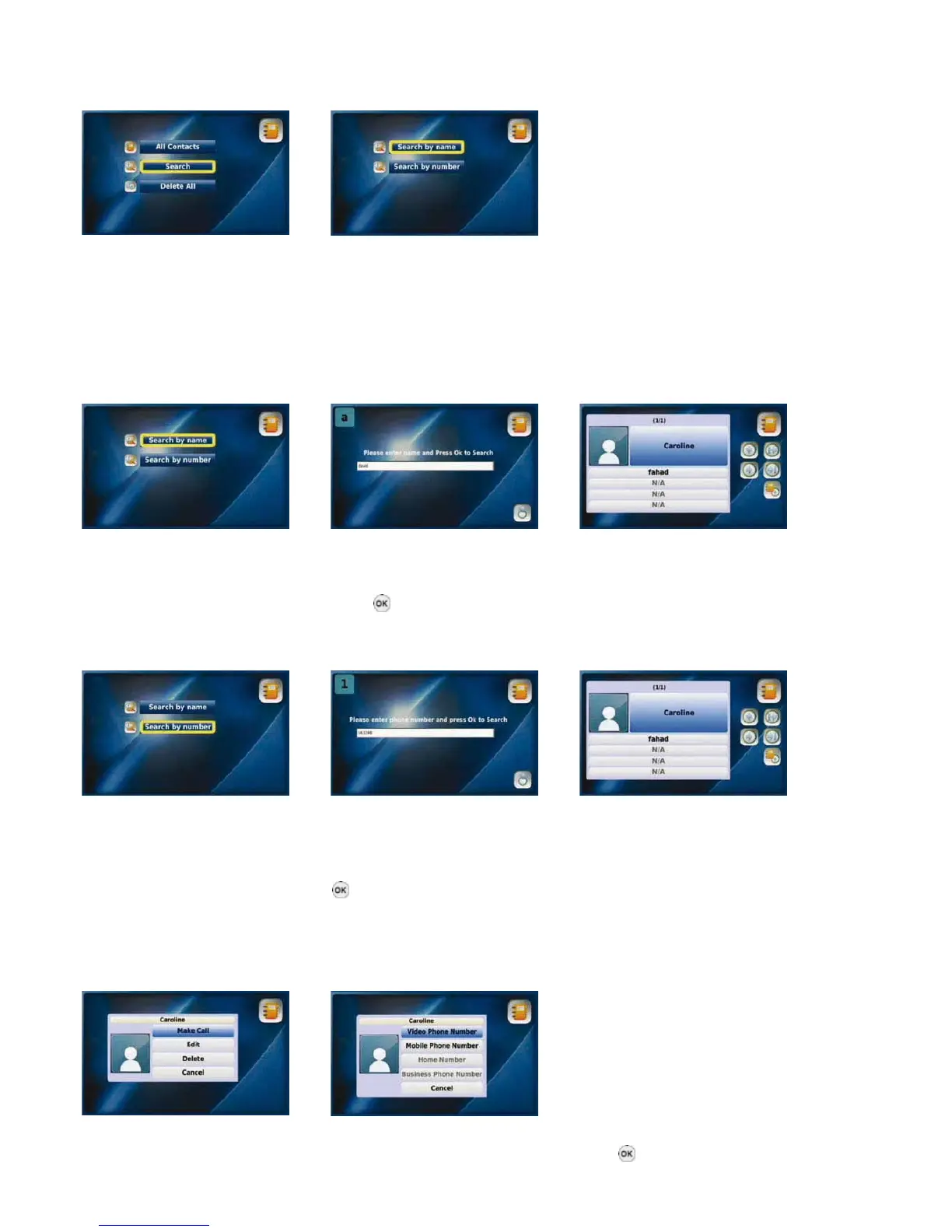
Select “Search” from the Search menu
Phonebook menu
3-4-2-1. seArCh BY NAMe
You can search for a contact by name in your Phonebook by selecting “Search by name”.
NOTE: You should enter all characters using upper and lower case letters accordingly.
Select “Search by name” from the Enter the name that you would The contact information will be
Search menu like to find and press the “OK” displayed
button
3-4-2-2. seArCh BY NuMBer
You can search for a number that has been saved in your Phonebook
Select “Search by number” from Enter the number you would like The contact information will be
the Search menu to find and press the “OK” button displayed
3-4-2-3. plACiNg A CAll, updAtiNg ANd deletiNg iNForMAtioN
You can place a call to a number in your Phonebook, or update or delete your saved contact information.
Placing a call
Select “Make Call” Select the number
you would like to call and press the “OK” button
19



 To Next Page