Section 3 Measuring operations
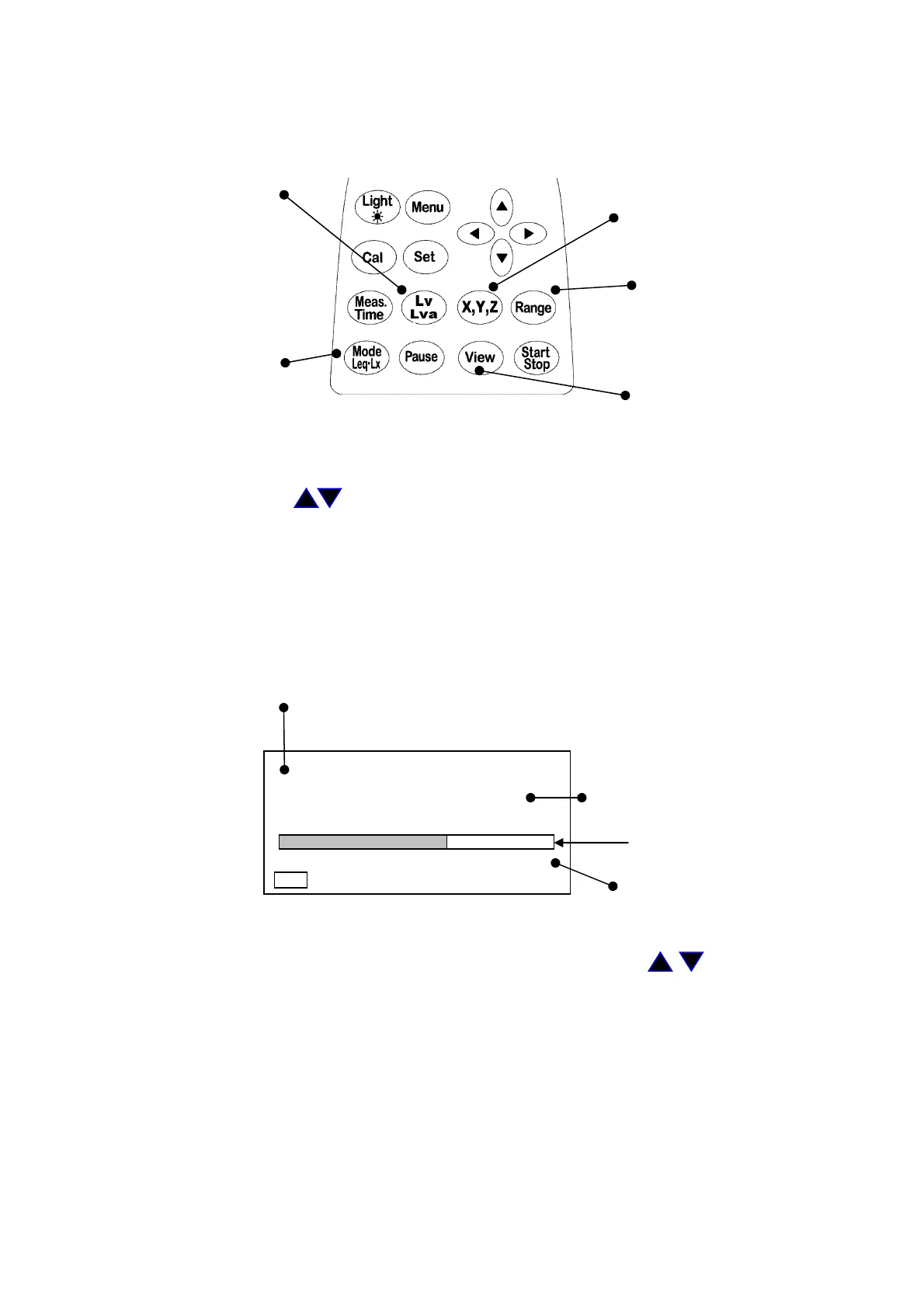
1. Measurement of vibration level (Lv)
Filter key
ch switching key
Range key
Measurement mode key
Screen switching key
<Operations>
1) Switch the screen into the normal screen display with the View key.
2) Select the channel to be set with the
X, Y, Z
key.
3) Select the range in direction with the Range key and set with the Range key.
4) Set so that the measurement mode display becomes Lv display with the
Lv
,
Lva
key and
Mode Leq・Lx key.
5) Likewise, change the channel with the
X, Y, Z
key to set.
6) After setting, the vibration level in each channel can be measured with the
X, Y, Z
key.
7) When checking the three channels simultaneously, switch to 3ch screen display with the
View key.
<Display>
Channel to be set is changed with the
X, Y, Z
key.
X → Y → Z
Digital display
Bar display
This flashes with the Range
key.
Select the range with the cursor
key , and set with the
Range key.
・ The digital display is updated every one second, and displays the present vibration level.
・ The bar display is updated every 0.1 seconds to be displayed.
・ There is no particular need to press the Start key.
1s 000h00m00s
X
Lv
dB
50 110
Manu



 To Next Page