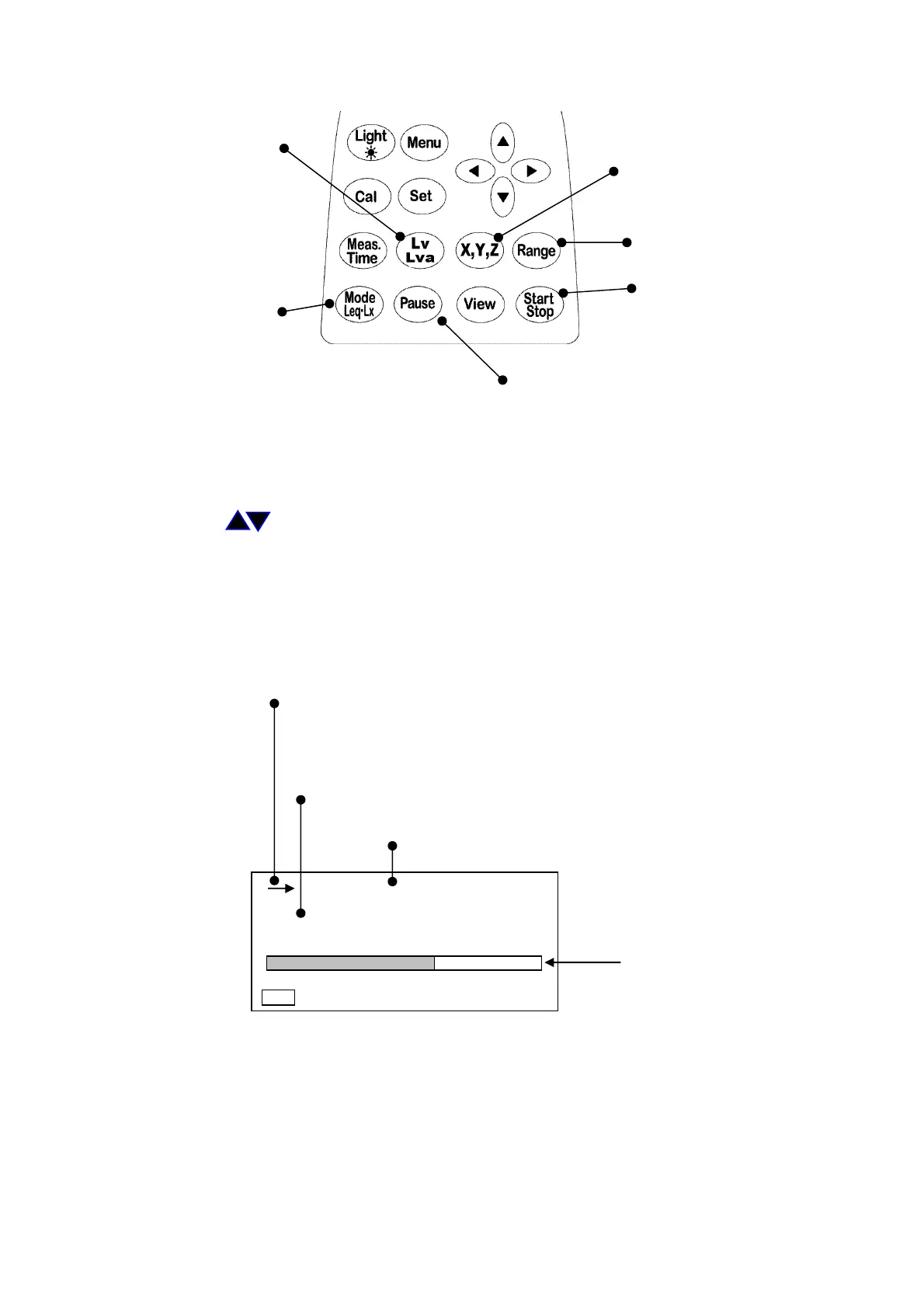
3. Measurement of power average level (Lveq)
Filter key
ch switching key
Range key
Start Stop key
Measuring mode key
Temporary stop key
<Operations>
Operations are the same as that in the “Measurement of vibration level (Lv).”
1) Select the channel to be set with the
X, Y, Z
key.
Select the range in which approx. 2/3 of the bar display is colored with the
Range
key and
cursor key , and set with the Range key.
Select the
Lv
with the
Lv, Lva
key, and set with the Mode
Leq・Lx
key so that the
measurement mode display becomes Lveq.
2) Start measurement with the Start・Stop key. When the
Start・Stop
key is inputted, the data
at that time is calculated and displayed. (When the
Pause
key is inputted, measurement is in
a temporary stop state, and when the
Pause
key is pressed again, measurement starts)
<Display>
→: When the
Start・Stop
key is inputted, this is switched into the
measuring state. Lights
■: When the
Pause
key is inputted, this is switched into temporary stop
state. Lights
The displayed ch changes with the
X, Y, Z
key.
X → Y → Z
The display changes with the
Meas. Time
key.
Bar display
1s 000h00m00s
L
V
eq
dB
50 110
Manu
66.0
X



 To Next Page