13
Chatper 2 - Connections
www.adcom.com
GFR-700 Owner’s Manual
Connections Overview
The GFR-700 is the heart and soul of your entertain-
ment system. All roads lead to it (from your input
devices), and all roads lead from it (to your output
devices). In this chapter, you will connect the GFR-
700 to the various components in your home theater
system. These connections are presented in three
stages:
Input Connections
These are the input connections for your source com
-
ponents, such as DVD, CD and tape players; cable
boxes, satellite receivers and HDTV tuners; or anten-
nas for AM & FM broadcast reception:
• AM/FM antennas ....................................14
• Basic audio/video components ...................15
• DVD players .........................................16
• Component/Progressive Scan components .....17
• Digital audio components .........................18
• HDMI components ..................................19
• External decoders ................................. 20
• CD/Tape players ................................... 21
Output Connections
These are the output connections for devices that
display the video imagery, produce sound, or record
the video and audio signals:
• TV/Monitors ........................................ 22
• Speakers ............................................ 23
• External amplifiers ................................ 25
• Video recorders ................................... 26
• Tape recorders ..................................... 27
• Secondary amplifiers/receivers ................. 28
Other Connections
These are the devices that control or power your sys
-
tem, including:
• IR sensors ........................................... 29
• Triggers ............................................. 29
• PC/Control systems ............................... 29
• Power sources ..................................... 30
Before You Begin
Before you begin connecting your devices, it is recom-
mended that you read all instructions, including the
instructions for each device you plan to connect.
• For complex setups, it is useful to draw both a
logical and physical diagram of how and where
you plan to set up your components.
• DO NOT CONNECT THE GFR-700 POWER CORD,
DEVICE POWER CORDS OR TURN THE POWER TO
THE GFR-700 OR DEVICES UNTIL ALL GFR-700
AND DEVICE CONNECTIONS ARE COMPLETE.
CONNECTING OR DISCONNECTING INPUT OR
OUTPUT DEVICES WHILE THE RECEIVER AND/
OR THE DEVICES ARE POWERED CAN RESULT
IN SEVERE DAMAGE TO THE RECEIVER AND/OR
THE DEVICE.
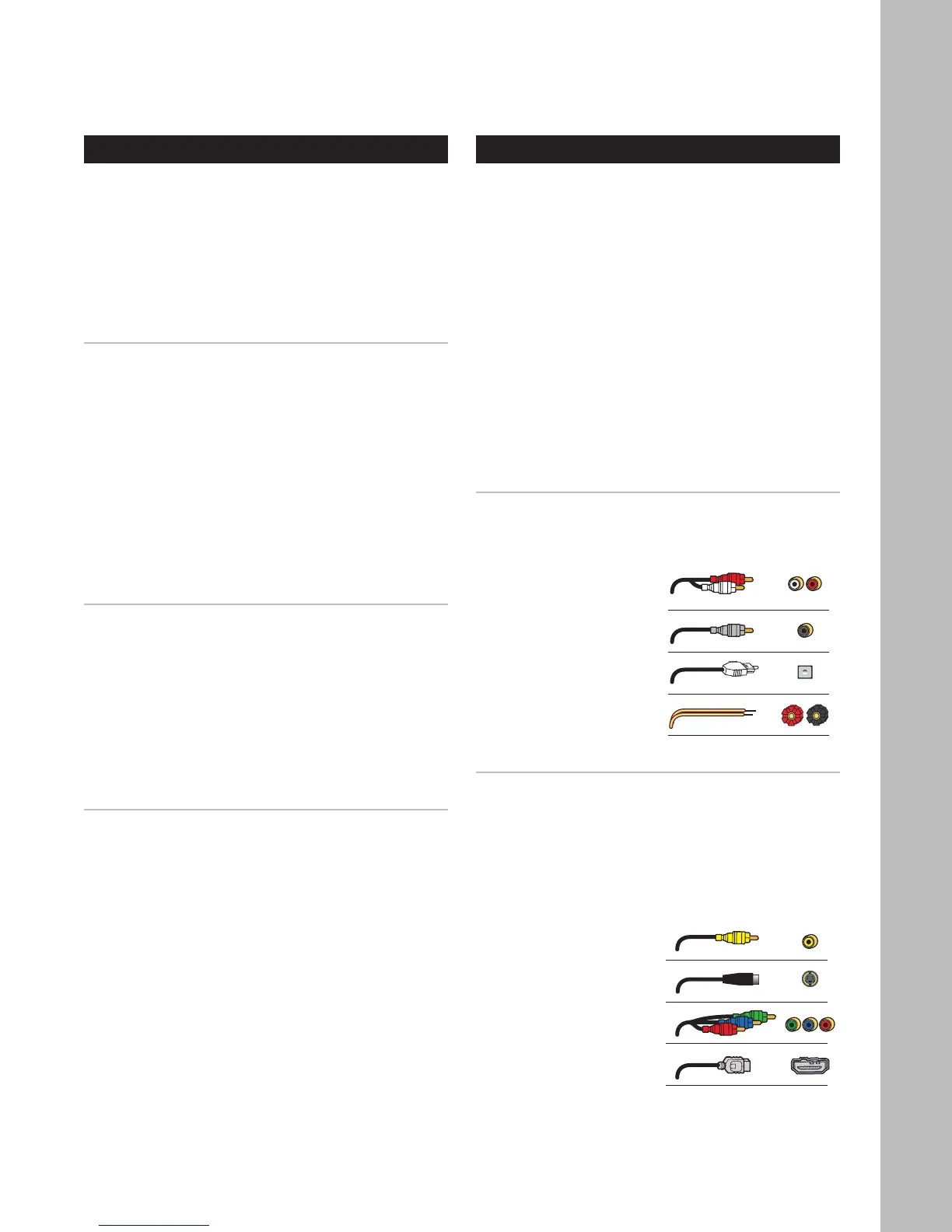
About Audio Cables
• RCA Cables - Use for stereo audio connec
-
tions. Match red to red and white to white.
• Digital coaxial cable - Use for digital audio
connections.
• Digital optical cable
(aka “Toslink”)
- Use as an alter-
native to coaxial
cable for digital
audio connections.
• Speaker cables
- Use for speaker
connections.
About Video Cables
• Video cable - Use for composite video
connections. Match yellow to yellow.
• S-Video cable - Use for higher qual
-
ity video connections to standard
TVs and analog components.
• Component video cables - Use for best qual-
ity video connections to digital TVs and com-
ponents. Match
green, blue, and
red respectively.
• HDMI cables - Use
for superior, all-
digital audio/video
quality to and from
HDMI compatible
components.
Chapter 2 - Connections



 To Next Page