27
Chatper 2 - Connections
www.adcom.com
GFR-700 Owner’s Manual
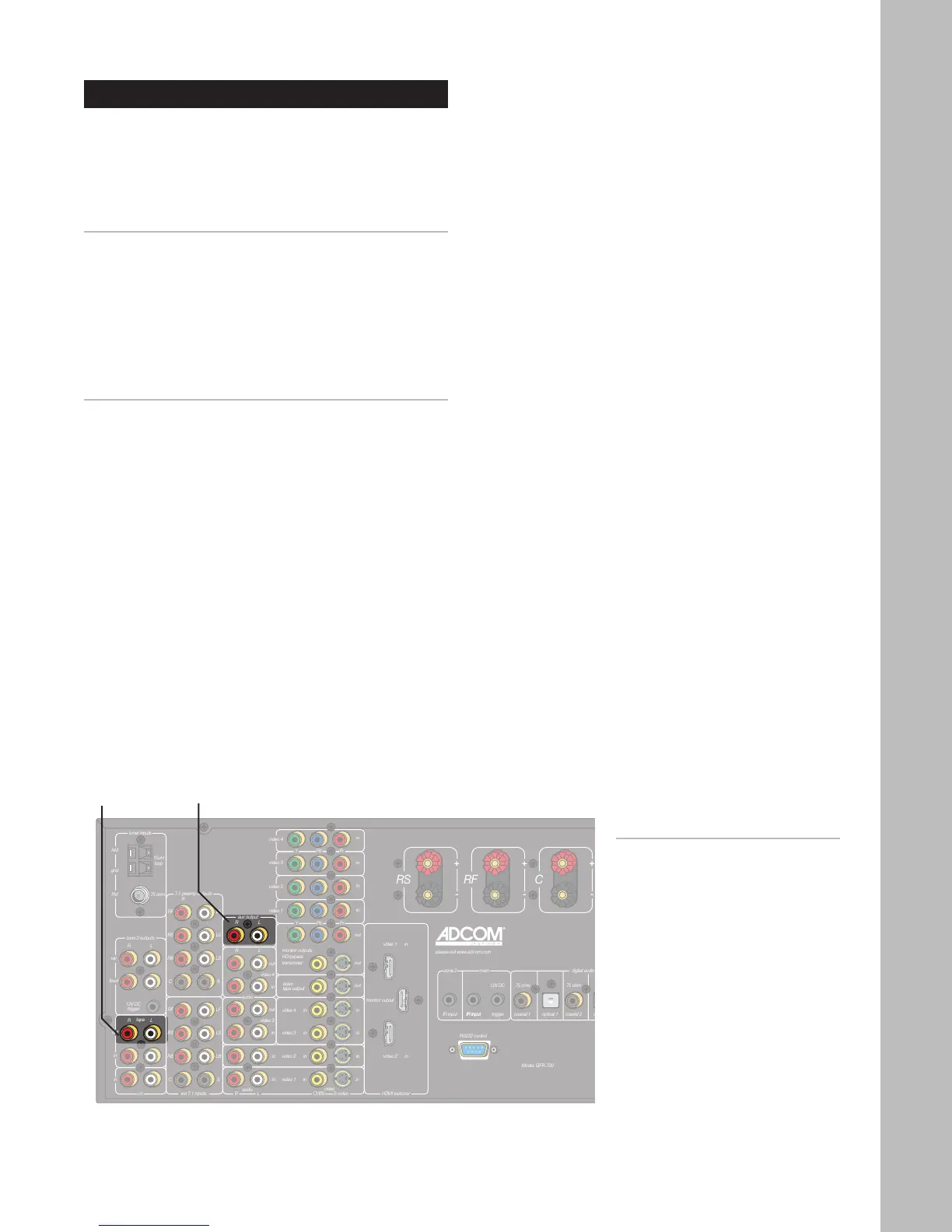
Tape Out/Aux Connections
The GFR-700 includes two additional sets of RCA out-
puts for connection to a tape recorder and/or audio
system. Follow these steps to connect your audio
output device to the GFR-700.
Connecting a Tape Recorder
1 Connect the tape recorder.
• Using RCA cables, connect the Tape outputs
on the GFR-700 to the audio inputs on your
tape recorder.
2 Monitor the tape recording.
• Press the Tape button on the remote control
or front panel to monitor the tape output.
Connecting an Auxiliary Audio Device
1 Connect the audio device
• Using RCA cables, connect the Aux outputs
on the GFR-700 to the line inputs on your
audio device.
• The audio signal from the Aux output will
switch according to the Video 1~4 or CD in-
put.
Notes:
• To turn the Tape Monitor
on/off, press the Tape button
on the remote control or front
panel.
• For Tape operations, see page
52.
Tape
Output
Aux
Output



 To Next Page