46
Chapter 3 - Setup
GFR-700 Owner’s Manual
Programming Remote Commands
Once you’re familiar with the preprogrammed com-
mands, you may wish to program specific buttons on
the GFR-700 remote to control your source compo-
nents. To do this, you will need:
• Your source component remote control, which
will teach the new command.
• The GFR-700 remote control, which will learn
the new command.
Programming a Command
1 Place your source remote “head-to-head” with
the GFR-700 remote.
• The two remotes should be in line with each
other, about 2 to 3 inches apart.
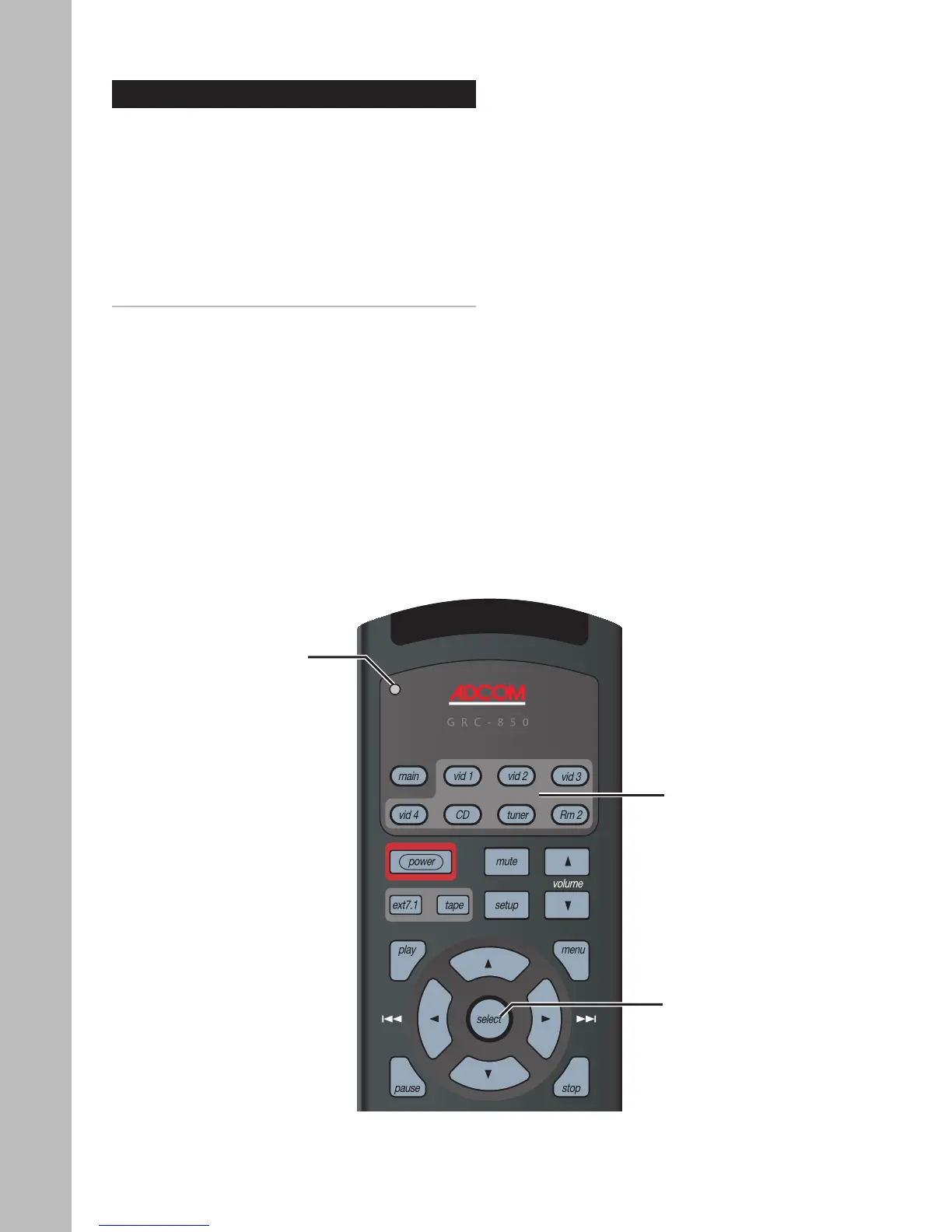
2 On the GFR-700 remote, press the applicable
Source and Select buttons simultaneously.
• The orange status LED and the Source button
glow and remain lit.
3 On the GFR-700 remote, press the button to be
taught.
• The orange status LED begins flashing.
4 On the Source remote control, press and hold
the button to be copied.
• The green status LED glows and remains lit.
5 Release the button on the Source remote con
-
trol.
• The orange status LED begins flashing again.
6 Press the button on the Source remote control a
second time.
• The green status LED blinks twice and then
goes back to steady orange to indicate that
the command has been saved.
• Repeat steps 4~6 for any other commands
you want to teach your GFR-700 remote for
that Source component.
7 Press the Source and Select buttons simultane-
ously to save.
• The orange status LED blinks twice and turns
off.
Status LED
(Orange/Green/Red)
Source
buttons
Select
button



 To Next Page