56
Chapter 4 - Operations
GFR-700 Owner’s Manual
Tuner Operations
Follow these steps to use the GFR-700’s built-in AM/
FM tuner. Before you begin, make sure the AM/FM
antennas are properly connected; see page 14.
Selecting Tuner Mode
To select Tuner mode:
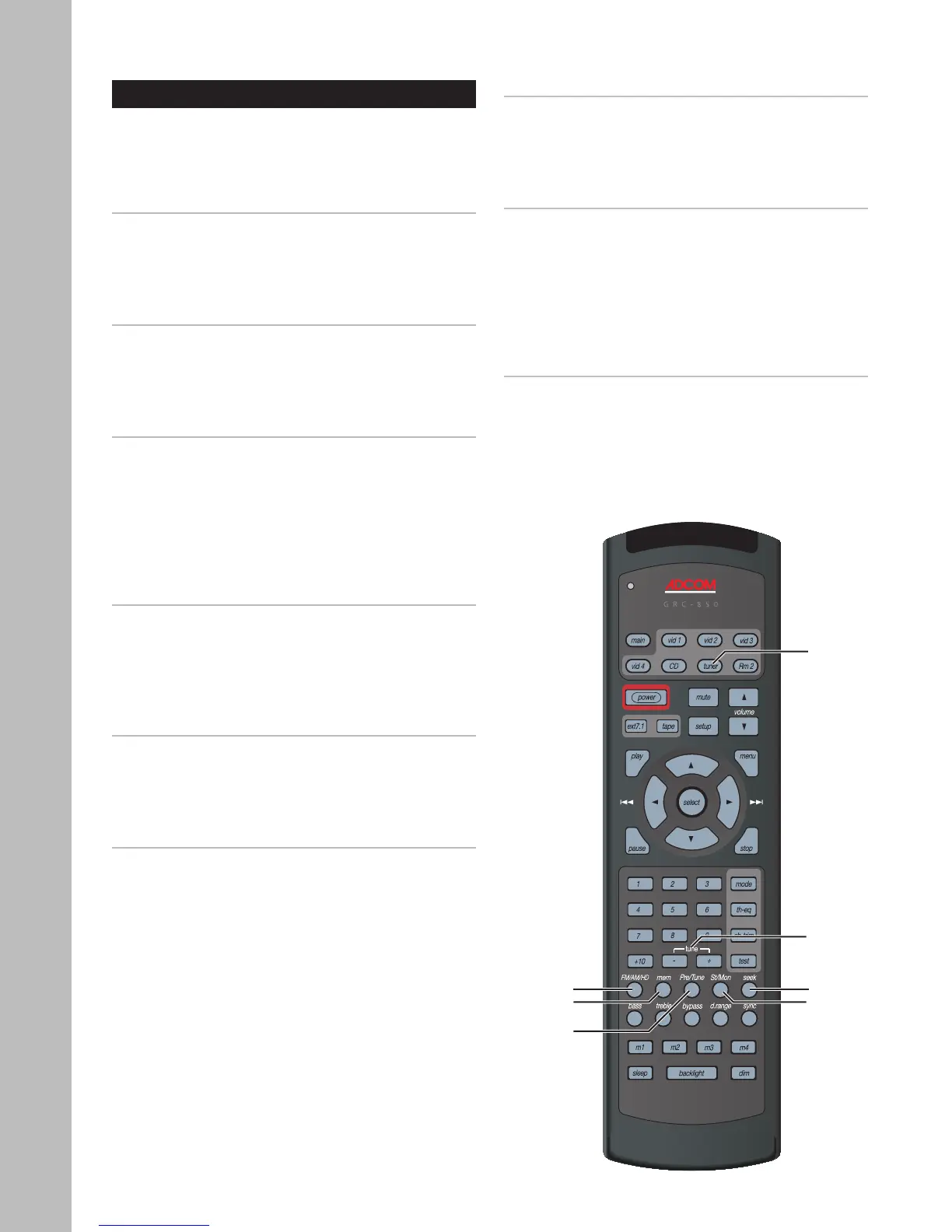
• Press the Tuner button on the remote control.
or
• Press the FM/AM button on the front panel.
Selecting the Tuner Band
To switch between the AM/FM bands:
• Press the FM/AM/HD button on the remote control.
or
• Press the FM/AM button on the front panel.
Switching between Manual and Preset tuning
Manual tuning is used to tune stations and store pre
-
sets. Preset Tuning is used to select and scan preset
stations. To switch between manual and preset tun-
ing:
• Press the Pre/Tune button on the remote control.
or
• Press the Tuner/Preset button on the front panel.
Tuning Stations Manually
To manually tune stations:
• Press the Tune +/- buttons on the remote con
-
trol.
- The AM tuner steps in 10KHz increments.
- The FM tuner steps in .05MHz increments.
Tuning Stations Automatically
To automatically scan for stations:
• Press the Seek button on the remote control.
or
• Press the Up/Down buttons on the front panel.
Storing Stations as Presets
The GFR-700 allows you to store up to 64 presets
(32 for each band). To store the selected station as
a preset:
1 Press the Mem button on the remote control.
2 Assign a preset number.
• Pressing the Mem button automatically as
-
signs the selected station to the next avail-
able preset number.
• To assign the preset to a different number,
use the Tune +/- buttons to select the de-
sired preset number, and then press the
Mem button to save.
Selecting Preset Stations
To select preset stations:
• Press the Tune +/- buttons on the remote control.
or
• Press the Up/Down buttons on the front panel.
Scanning Preset Stations
To automatically scan your presets:
1 Switch to Preset mode.
2 Press the Seek button on the remote control to
start scanning presets.
• The GFR-700 will play each preset station for
a few seconds in sequential order.
3 Press the Seek button again to stop scanning.
Improving Tuner Reception
To improve tuner reception:
• Press the St/Mono button on the remote control
to switch between Stereo and Mono reception.
Sometimes a poor quality stereo signal will im
-
prove when switched to Mono mode.
Tuner
FM/AM
Mem
Tune +/-
Seek
St/Mon
Pre/Tune



 To Next Page