11
Chapter 1: Looking at the Work Area
elcome to Adobe Photoshop Elements.
Photoshop Elements gives you an
efficient work area and user interface to
create and edit images for both print and the Web.
Getting familiar with the
work area
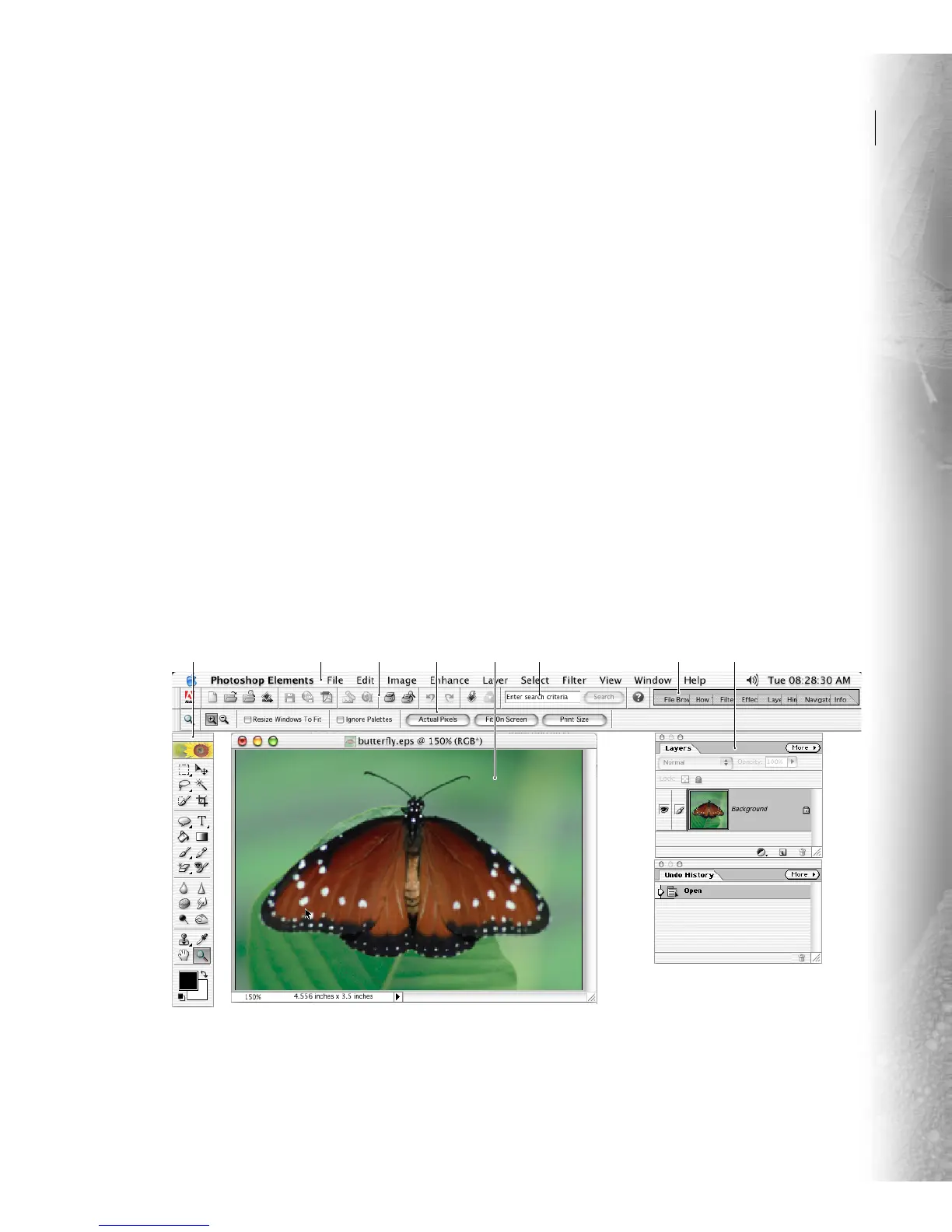
The Photoshop Elements work area is arranged to
help you focus on creating and editing images. The
work area consists of the following components:
Menu bar The menu bar contains menus for
performing tasks. The menus are organized by
topic. For example, the Layers menu contains
commands for working with layers.
Shortcuts bar The shortcuts bar displays buttons
for executing common commands. (See “Using
the shortcuts bar” on page 13.)
Options bar The options bar provides options for
using a tool. (See “Using the options bar” on
page 12.)
Toolbox The toolbox holds tools for creating and
editing images. (See “Using the tools” on page 12.)
Palette well The palette well helps you organize
the palettes in your work area. (See “Using the
palette well” on page 13.)
Palettes Palettes help you monitor and modify
images. (See “Using palettes” on page 14.)
Photoshop Elements work area
A. Toolbox B. Menu bar C. Shortcuts bar D. Options bar E. Active image area F. Search field G. Palette well H. Palettes



 To Next Page