3.20 Inline Printer
A Printer option is not included in the standard T-1000 package and must be purchased
separately. Used for product identification, a Printer option prints information, graphic images
or bar codes directly to the surface of the film.
APPI offers two printers as an option: 1) Thermal Inline
Transfer Printer - prints text, graphics and bar codes,
formatted in a separate software program. The label
formats, saved in a database structure can be recalled and
"downloaded" to the printer. 2) Hot Stamp Printer - prints
text (part numbers, date codes, lot numbers, etc.).
Individual characters are placed onto a "grooved plate"
which, when heated will transfer the ink (ribbon) directly
onto the bag. Also, magnetic plates are offered.
Both the Thermal and Hot Stamp printers use ribbon (foil) to transfer ink to the surface of the
bag. To enable Printer operation on the Thermal Transfer (TT) Printer, press the highlighted
Printer button.
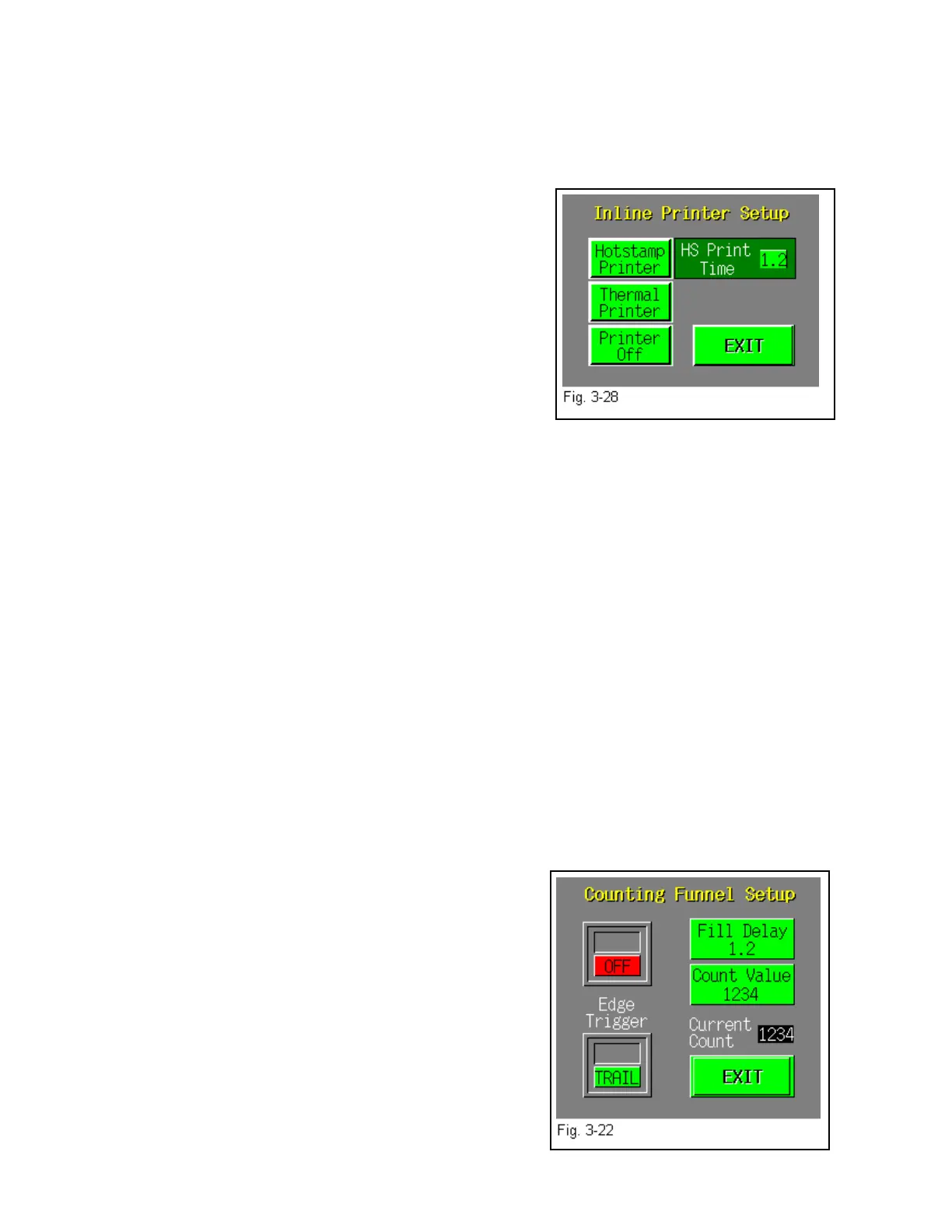
Press the highlighted Hot Stamp (HS) Printer button to enable operation of that Printer and press
Printer Off to disable the operation of the printer. See Fig. 3-28.
If the HS Printer button is pressed, a secondary setup screen will automatically appear for further
settings. To enhance text/graphics print quality, adjust the Print Time (time, in seconds that the
ribbon will be stamped on the bag) until required print quality is met. Press <EXIT> when
finished.
3.21 Counting Funnel
The Counting Funnel option is not included in the standard T-1000 package and must be
purchased separately. Used to count products entering the bag, the counting funnel may operate
in conjunction with the Accumulating Funnel to load a predetermined number of a product into
the bag, manually fed or automatically fed. Products fed into the funnel from a vibratory bowl or
infeed conveyor can be counted while entering the bag or while being collected in the
accumulating funnel. Various infrared "eyes" are available which will "see" even the smallest of
parts. The Eye typically mounts to the top of the funnel seeing the product as it enters the
funnel. Once the preset count is reached, the product is loaded and the bag is sealed and torn off
automatically. Once another bag is in position, the Eye
continues to detect product entering the bag or funnel.
To turn the Counting Funnel ON, press the <Count
Funnel> menu option to bring up the Counting Funnel
Setup screen. The Fill Delay setting is the amount of time
between the point the final count is reached and the
bagger begins the seal operation. To adjust the Fill Delay
value, press the <Fill Delay> button, then use the key pad
to type in the number of parts to be counted. Set the value
of parts to be counted by pressing the <Count Value>
button. See Fig. 3-22.
38



 To Next Page