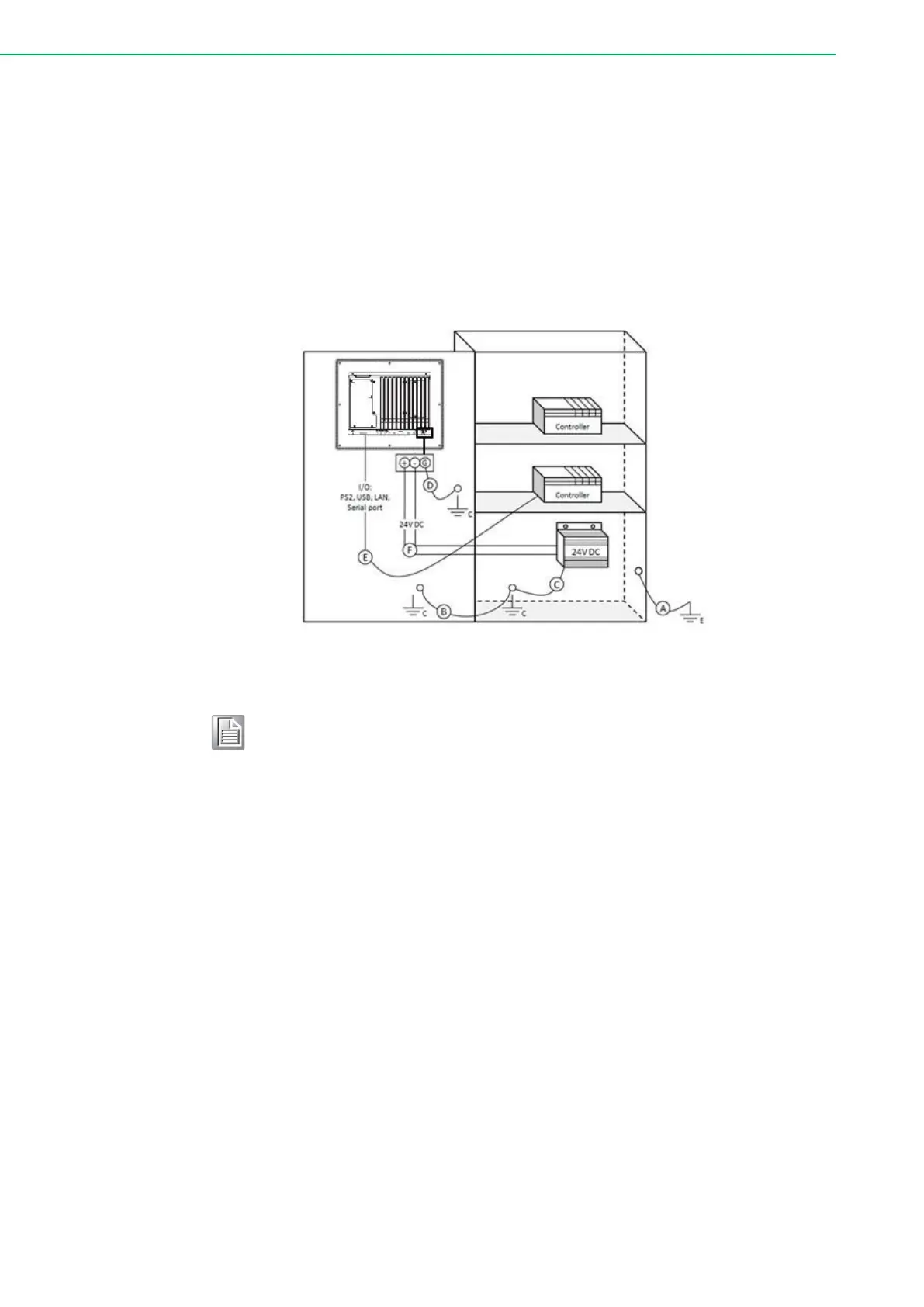
2.3.2 System Wiring
1. Ground the cabinet to earth.
2. Ensure proper grounding for all cabinets.
3. Connect the power supply ground to the cabinet.
4. Connect the TPC-B520 system's ground pin to the cabinet.
5. If necessary, connect I/O to the controller.
6. Connect the power supply's V+ and V- to the TPC-B520 system.
7. Proceed step by step through steps 1 to 6, then power on the TPC-B520
system.
Make sure all wires follow the installation guidelines to avoid perfor-
mance issues.
Power/Digital Ground and Earth Ground
The purpose is to block all the external interference on the chassis, and prevent
any possibility of bad grounding design to cause electric shock of people. This is
so called level 1 isolation which consumer PCs do not implement.
1. TPC Chassis and Earth (Power pin3) are short,
2. TPC Chassis and Power / Digital GND are OPEN.



 To Next Page