20
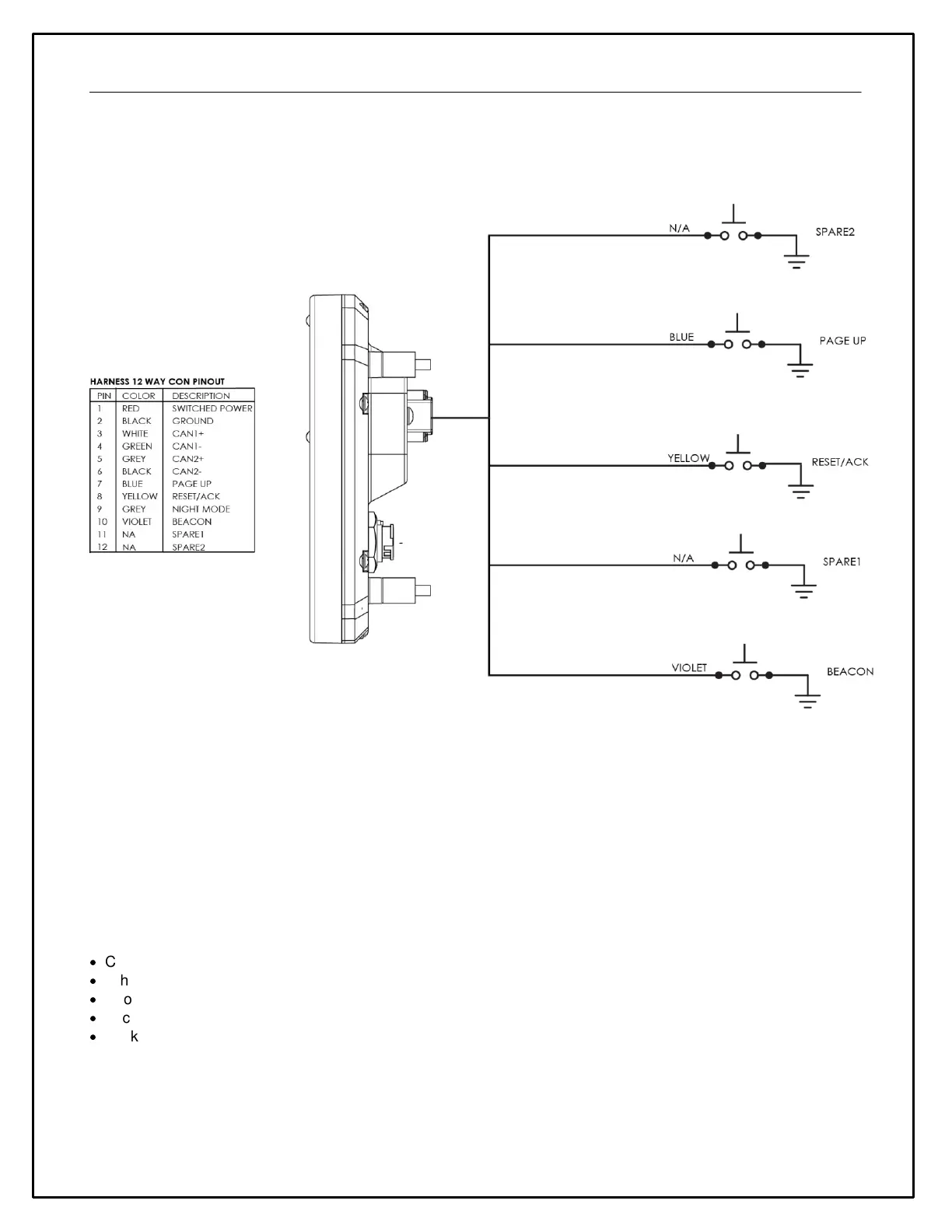
Wiring Schematic
Installing AEM DashDesign
AEM DashDesign is distributed as a single install executable. To install, run AEM DashDesign Setup.exe and follow
the on-screen instructions including those requiring you to restart your PC if necessary.
Installing USB Drivers
The installation program will automatically install the USB drivers required by AEM Dash. However, on rare
occasions, it may be necessary to install the USB drivers manually. To do this:
·
Connect the AEM Dash to the PC.
·
When the add new hardware wizard appears, select "Install from a list or specific location" and click Next.
·
Choose "Search for the best driver in these locations" and check "Include this location in the search"
·
Click the Browse button and navigate to the Drivers folder sub folder in the AEM DashDesign installation directory.
·
Click the Next button and the driver installation will proceed automatically.
Air/Fuel Sensors and Devices to Dash
The AEMNet CAN message transmission is enabled by default on the following devices. Refer to your harness
documentation to identify the CAN terminals.


 To Next Page