21
30-03X0 X-Series UEGO
30-4900 Wideband Failsafe
30-4911 Flex Fuel Failsafe
30-2340 4Ch UEGO
Series 2 EMS and EMS-4 to Dash
The AEMNet CAN output must be enabled in your ECU before the dash can receive messages. Select Wizards |
Setup Wizard and choose Telemetry: AEMNet from the Wizard Types column. Left click on the Configuration
Name AEMNet Datastream and click the Apply button to enable.
Infinity to Dash
The AEMNet CAN message transmission is enabled by default on Infinity ECUs. No additional software setup in
your ECU calibration is required. Refer to your harness documentation or Infinity hardware specification document to
identify the CAN terminals.
VDM to Dash
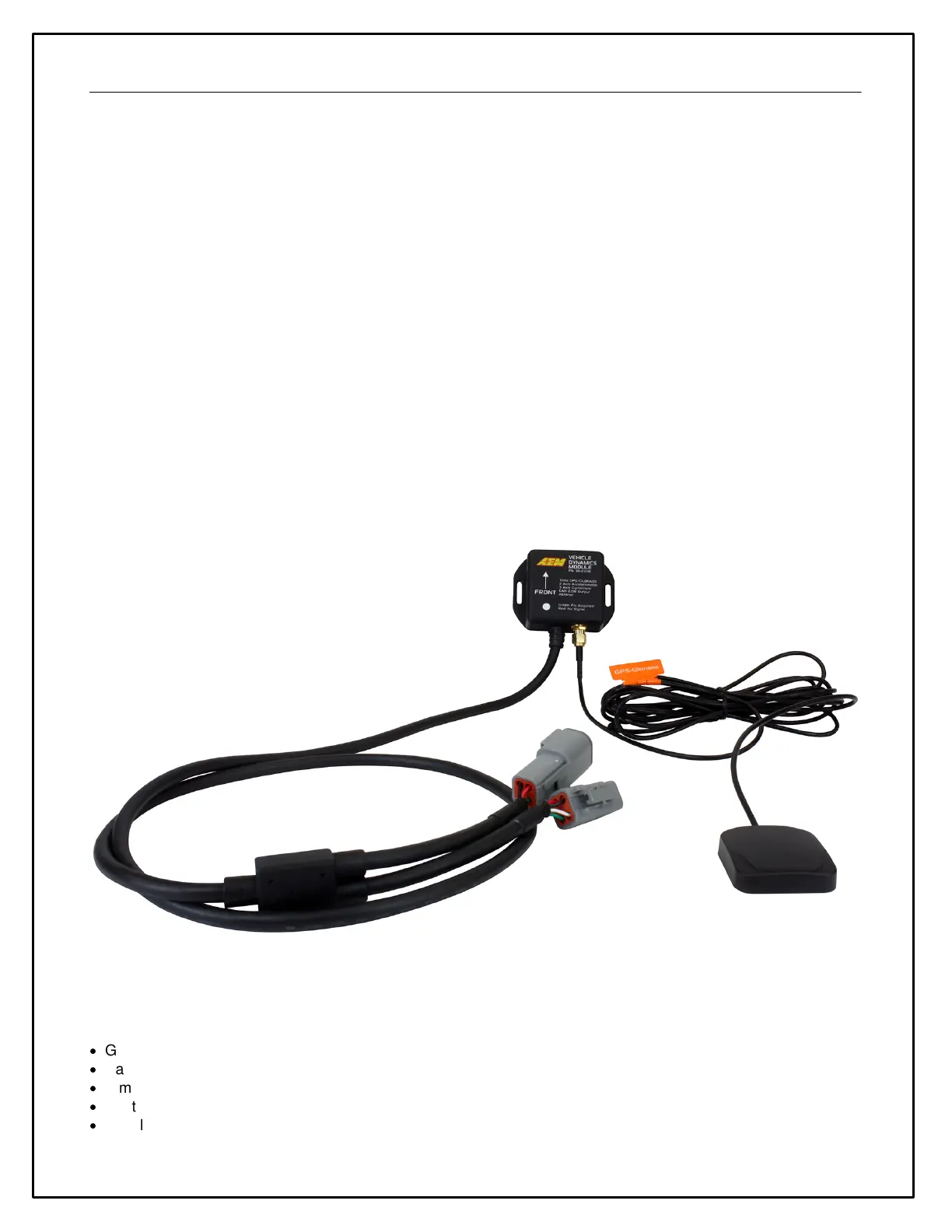
The AEM Vehicle Dynamics Module, PN 30-2206 can be used in conjunction with the AEM dash for lap timing and
track mapping features.
VDM Features:
·
GPS latitude & longitude delivers AEMdata track map functionality via AEMnet CAN bus
·
Easily Add GPS, lateral G, altitude, pitch and roll data to engine data logs
·
Simply install it in the correct position, connect to AEMnet and the data streams through AEMnet CAN bus
·
Continuous time data can be used for Infinity USB log file naming
·
Accelerometers supply all 3-axis acceleration data for chassis tuning


 To Next Page