27
·
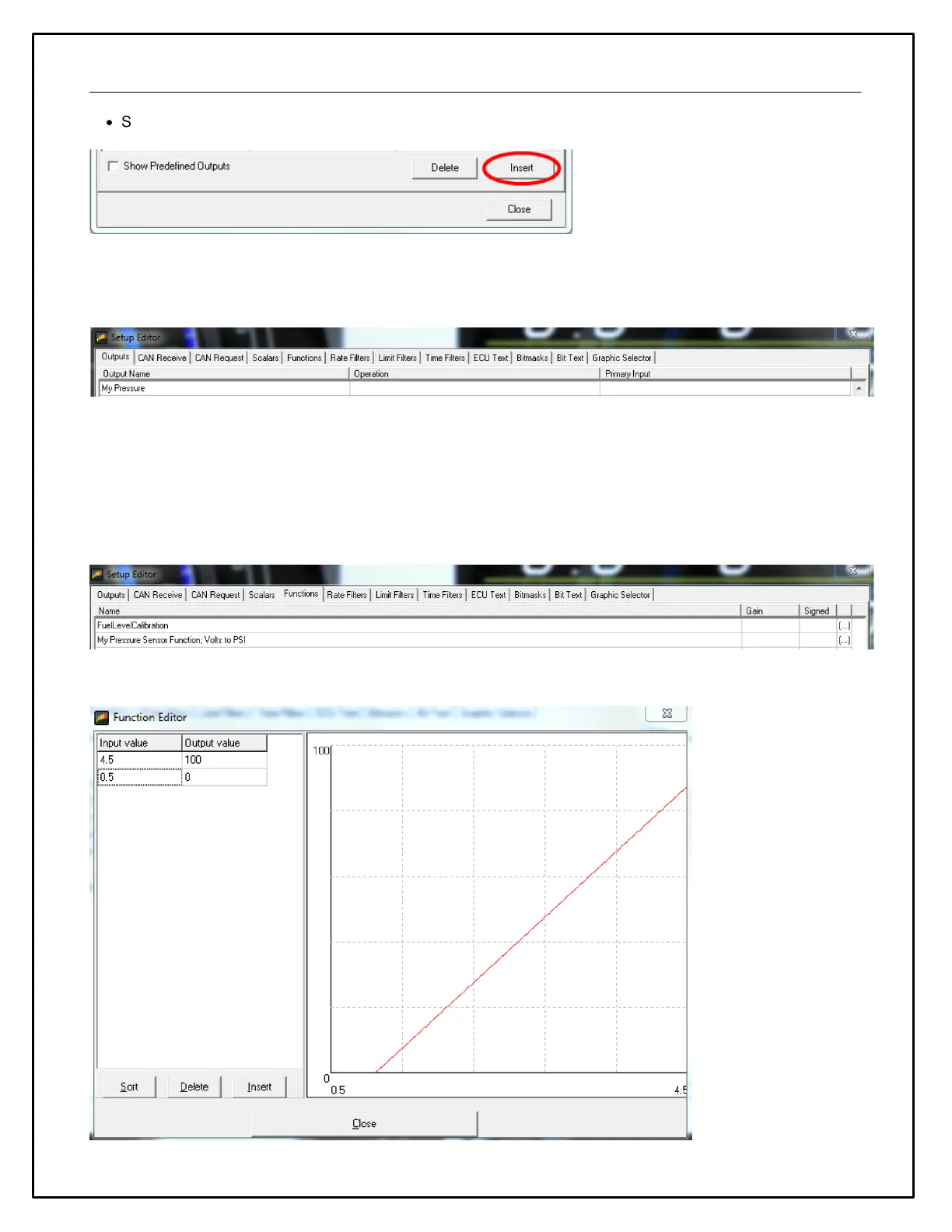
Select the input from the drop down list.
In our example below, we will create a new scaled pressure sensor output that can be used to drive a gauge on the
dash. It will use the Analog 3 input from the 30-2206 on Pin 7. Three things are required. 1.) You must create a
new Output Name. 2.) You must add an Operation to scale the voltage into pressure units. 3.) You must define a
Primary Input. First create the new Output Name. We will use My Pressure.
For this example, let's assume that the sensor is a typical 0-5V analog sensor that is calibrated as follows: 0.5 volts
= 0 psi and 4.5 volts = 100 psi. Consult your sensor documentation for proper calibration values. There are several
options but the easiest method is to use a Function table. Lets create a new Function to define this calibration.
In the Functions tab, create a new Function. We will call it My Pressure Sensor Function; Volts to PSI. It will
convert voltage to PSI.
Click on the (...) symbol to define the function table. Enter the data as shown below to create the calibration curve.


 To Next Page