2.5 Gimbal
Aeroo Pro has a 3-Axis Brushless Gimbal with 90° tilt for stable footage and a full
range of motion.
• The gimbal pitching speed and smoothness can be adjusted in Settings >
Gimbal. A slower speed will create a more cinematic feel and a faster speed
will be more effective for quick scouting.
• Under “Advanced Settings” in the app, you can allow upward gimbal rotation.
• If the gimbal is not holding level with the horizon, it can be manually corrected
using the symbol in the app, and pressing the “+” or “-” buttons.
• If the gimbal is consistantly not holding level, perform a gimbal gyroscope
advanced calibration in Settings > Gimbal > Advanced Settings.
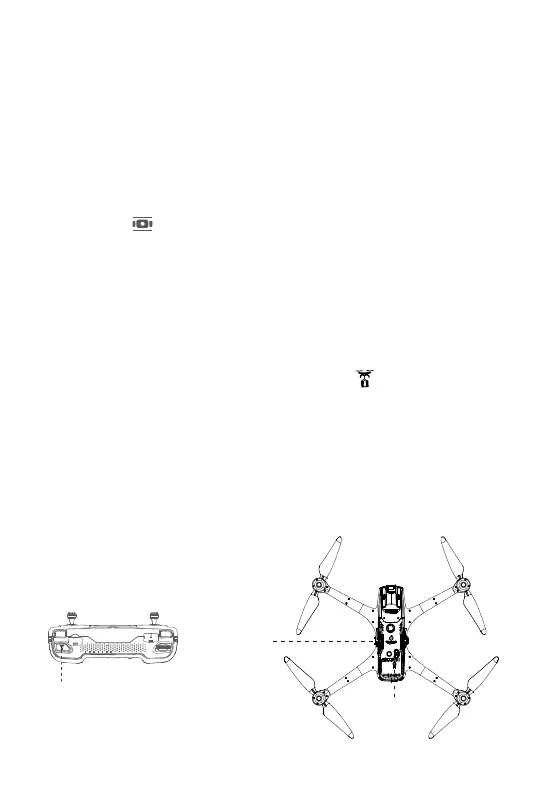
2.6 Payload Release Mechanism
Aeroo Pro has an integrated electronic payload release mechanism with inbuilt
safety/failsafe features and a powerful release motor.
The release pin can be opened and closed by pressing the button:
• On the Remote Controller, or
• In the top right corner of the app flight interface.
There is also a “Quick Attach” payload button on the underside of the aircraft which
opens and closes the release pin.
IMPORTANT: Never exceed the maximum safe payload of 1KG, read the “Flight” and
notably the “Fishing” and “Delivery” sections of this manual fully before flying with a
payload attached.
Payload Release
Pin
Payload Release
Button
Payload Release
Button
14


 To Next Page