Takeoff:
Once the aircraft has acquired satellites and the flight interface indicates the
aircraft is “Ready to Fly” the aircraft can takeoff automatically or manually. Note
the aircraft must be stationary and on flat ground, with >15% battery.
Auto-Takeoff: Press the button on the left of the app interface. The aircraft
will ascend to ~2m and hover.
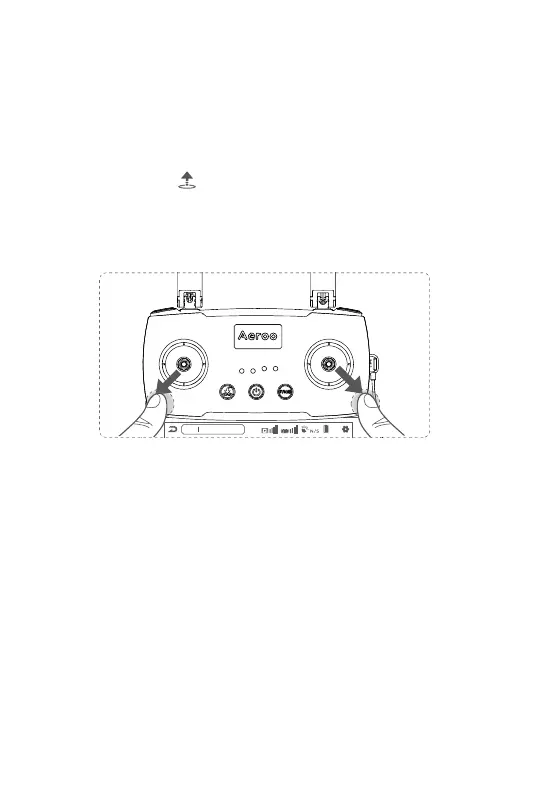
Manual-Takeoff: Push both control sticks down and outwards (below) to start
the motors. Release both sticks and then ascend with the left stick (mode 2).
Emergency Stop: Follow this same procedure while in flight to emergency stop.
This will cause the aircraft to fall out the sky to avoid danger. You can enable this
as failure only or anytime in the app - use with caution!
N
8.2V
100%
Aircraft Disconnected
Ocean 1
Return To Home (RTH)
The aircraft will acquire satellites after startup. Once more than 6 satellites are
acquired (usually before takeoff), the current aircraft position will be marked as the
home point. The home point can be adjusted anytime by opening the map interface
and holding your finger on a specified point.
There are 3 types of RTH, Smart RTH, Low Battery RTH and Failsafe RTH.
5.4 Takeoff/RTH/Landing
34


 To Next Page