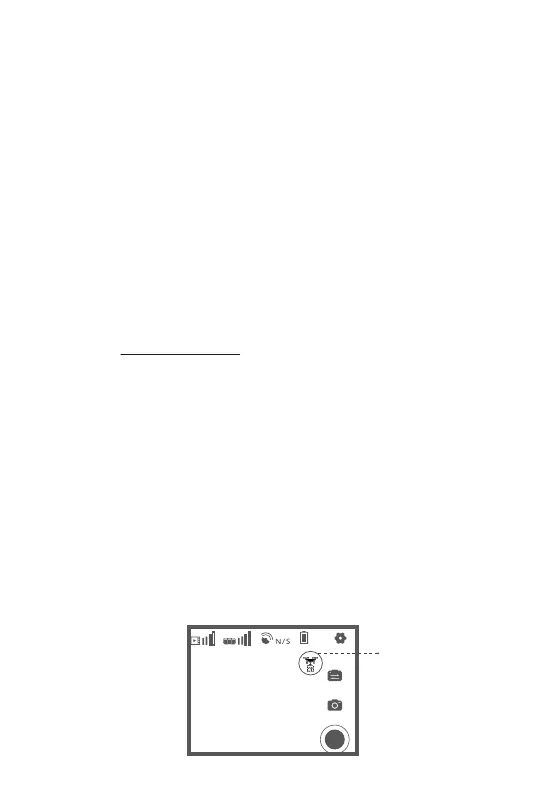
Drop Point Autopilot allows you to save previous drop points and program the
aircraft to fly autonomously to these points.
1. Fly to the location of your desired drop point and press the payload release
button on your mobile device.
2. A pop up will open in the app with the option to save this drop point.
3. After saving, a pin will appear on the map (lower left corner)
4. When you would like to return to this point (aircraft must be already flying),
tap on the map menu and the desired drop point.
5. Set the desired flight parameters. We do not recommend exceeding 10m/s
while carrying a payload.
6. Hit “Go” and the aircraft will autonomously fly to this point.
7. Once the aircraft reaches this point, you can release and return home as
normal.
Please note the aircraft will not automatically release the payload at this point.
8.2V
100%
Payload Release /
Save Drop
Location
Aeroo Pro is equipped with multiple AI flight modes, which allow you to
effortlessly create professional videos and perform autonomous flight.
Always check the environment to ensure there are no possible obstacles the
aircraft could hit while flying autonomously.
During autopilot flight, you can press the red “X” on the left side of the app
interface to switch back to manual flight.
5.10 AI Flight Modes
5.10.1 Drop Point Autopilot
45


 To Next Page