EasyManua.ls Logo

Aim Smartycam - User Manual

Aim Smartycam
44 pages
Print Icon
To Next Page IconTo Next Page
Loading...
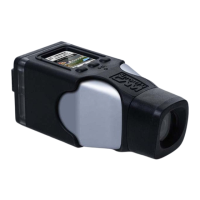
SMARTYCAM
User Manual

Table of Contents

Question and Answer IconNeed help?

Do you have a question about the Aim Smartycam and is the answer not in the manual?

Summary

Chapter 2 - Data Sampled by SmartyCam Stand Alone;Slave

Chapter 3 - SmartyCam Connections

Connecting SmartyCam in Slave Expansion Mode with ECU Bridge

Details connecting SmartyCam via an ECU Bridge for data acquisition.

SmartyCam in Slave Expansion Mode with AIM Loggers

Describes connecting SmartyCam to AIM loggers for advanced data.

Chapter 4 - SmartyCam Battery Charging

Battery Charging via USB

Explains the procedures and recommendations for charging via USB.

Chapter 5 - SmartyCam Configuration

Chapter 6 - How to Use SmartyCam

How to Switch SmartyCam On;Off

Details the methods for powering the SmartyCam on and off.

SETTINGS Option

Explains how to access and use the SETTINGS menu for configuration.

How to Record Videos

Guides on starting and stopping video recording.

Chapter 7 - Downloading Data and Viewing SmartyCam Videos

Appendix A - Technical Specifications

Appendix B - SmartyCam Pinout

Appendix C - SmartyCam Cables Pinout

Appendix D - ECU Bridge Pinout

Appendix F - Connection Scheme with AIM Loggers

Summary

Chapter 2 - Data Sampled by SmartyCam Stand Alone;Slave

Chapter 3 - SmartyCam Connections

Connecting SmartyCam in Slave Expansion Mode with ECU Bridge

Details connecting SmartyCam via an ECU Bridge for data acquisition.

SmartyCam in Slave Expansion Mode with AIM Loggers

Describes connecting SmartyCam to AIM loggers for advanced data.

Chapter 4 - SmartyCam Battery Charging

Battery Charging via USB

Explains the procedures and recommendations for charging via USB.

Chapter 5 - SmartyCam Configuration

Chapter 6 - How to Use SmartyCam

How to Switch SmartyCam On;Off

Details the methods for powering the SmartyCam on and off.

SETTINGS Option

Explains how to access and use the SETTINGS menu for configuration.

How to Record Videos

Guides on starting and stopping video recording.

Chapter 7 - Downloading Data and Viewing SmartyCam Videos

Appendix A - Technical Specifications

Appendix B - SmartyCam Pinout

Appendix C - SmartyCam Cables Pinout

Appendix D - ECU Bridge Pinout

Appendix F - Connection Scheme with AIM Loggers

Aim Smartycam Specifications

General IconGeneral
SensorCMOS
GPSYes
Frame Rate60 fps
ConnectivityWi-Fi
MemoryMicroSD card
Battery TypeLithium-ion

Related product manuals