AirNav RadarBox Manual
58
Copyright 2010 by AirNav Systems
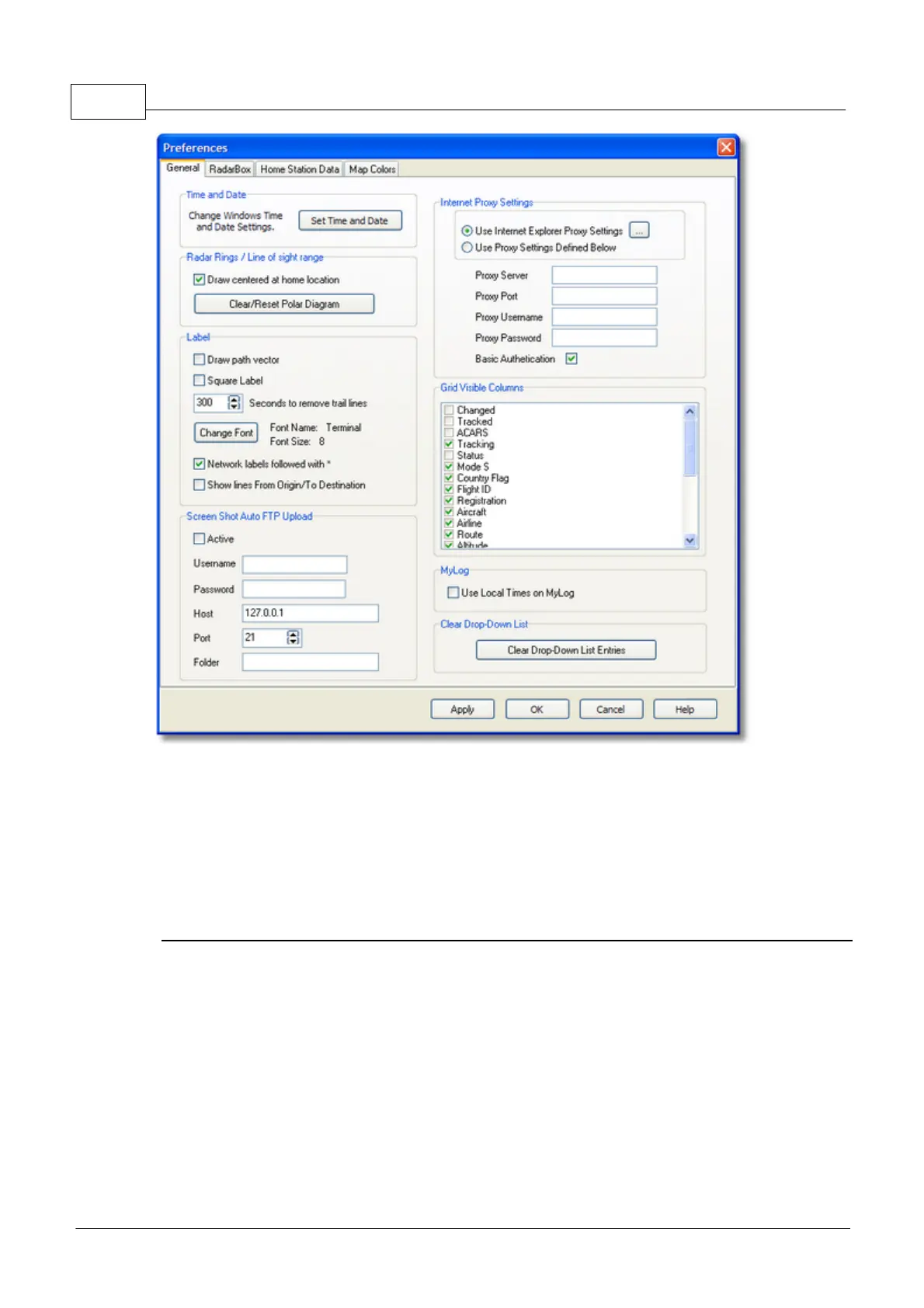
· Set Time and Date: opens Windows Time/Date properties box
· Radar Range Rings: draw centered at Home location
· Clear Reset Polar Diagram: Reset the diagram before testing a new antenna location
· Use Local Times on MyLog
· Aircraft Label Settings: type, size, prediction vectors and trail line and other settings for the
map display
· Internet Proxy Settings
· Grid Visible Columns: choose which columns are visible in the MyFlights and Network grids
Screen Shot Auto FTP Upload
This function allows the automatic FTP upload of a jpg screen shot to a location of your choice. The
upload is delayed by 5 minutes in order to meet international restrictions on the display of live air
traffic data. As RadarBox Network data is already delayed by 5 minutes, this will result Live aircraft
positions being at least 5 minutes old and Network positions being 10 minutes old. Users should
ensure that they are not breaking any local laws by uploading data to the web.
Active: Tick to activate the Auto FTP upload
Username: The Username provided by your ISP to access your web domain
Password: The Password used to access your web domain
Host: Host name to access you web domain e.g. homepages.demon.co.uk
Port: Port for FTP upload - normally Port 21



 To Next Page