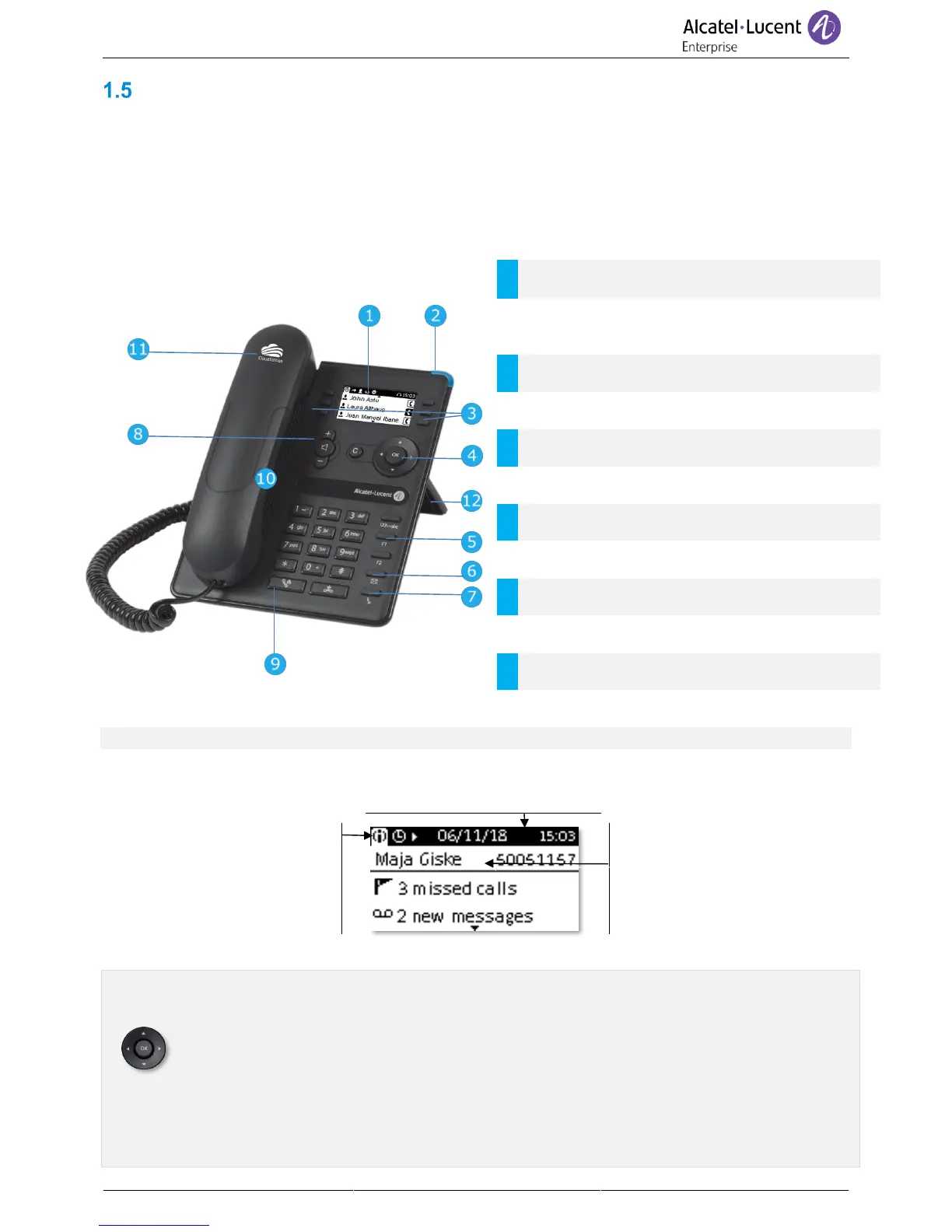
8008 Cloud Edition DeskPhone
This phone is part of the IP phone range. In addition to a clear monochrome display with six dedicated
function keys and an intuitive navigation key, the 8008 Cloud Edition DeskPhone provides high audio
fidelity for telephone calls either in hands-free mode or using the comfortable handset. It is compatible
with teleworking. Consequently, it is perfect for use at your office in your enterprise or at home
(teleworking).
1.5.1 Phone description
LED
Flashing blue: incoming call / Appointment
alarm.
6 dedicated functions keys.
Navigation, ok and cancel keys.
3 preprogrammed keys with LEDs: Alpha-
numeric key, F1, F2.
Messaging key to access various mail services.
A corded headset can be connected via RJ9 connector.
1.5.2 Main screen and navigation keys
Top bar (date, time, status icons)
Display the page by selecting
the corresponding tab.
The default homepage shows
information about the phone
(name, number, number of
missed calls, number of new
messages, forwarding
status).
Right navigator:
Open the menu to access features for configuring the phone or managing calls.
OK key:
Use this key to validate your choices and options while programming or configuring (Short
press). Used to access features for managing the call log such as delete a log, delete all
logs, display missed calls only and acknowledge missed calls (In idle state).
Left-right navigator:
Used to move from one page to another and display information about current calls (call in
progress, calls on hold, incoming call).



 To Next Page