Volume/Mute key
• Volume (during conversation): Short successive presses to change the handset volume level (3
levels).
• Mute (during conversation): Long press to activate or deactivate mute mode.
• Location of the battery.
If the Bluetooth® handset is on its base, you do not need to press the Off-hook/On-hook key to take or
terminate the call. Just off-hook/on-hook the Bluetooth® handset.
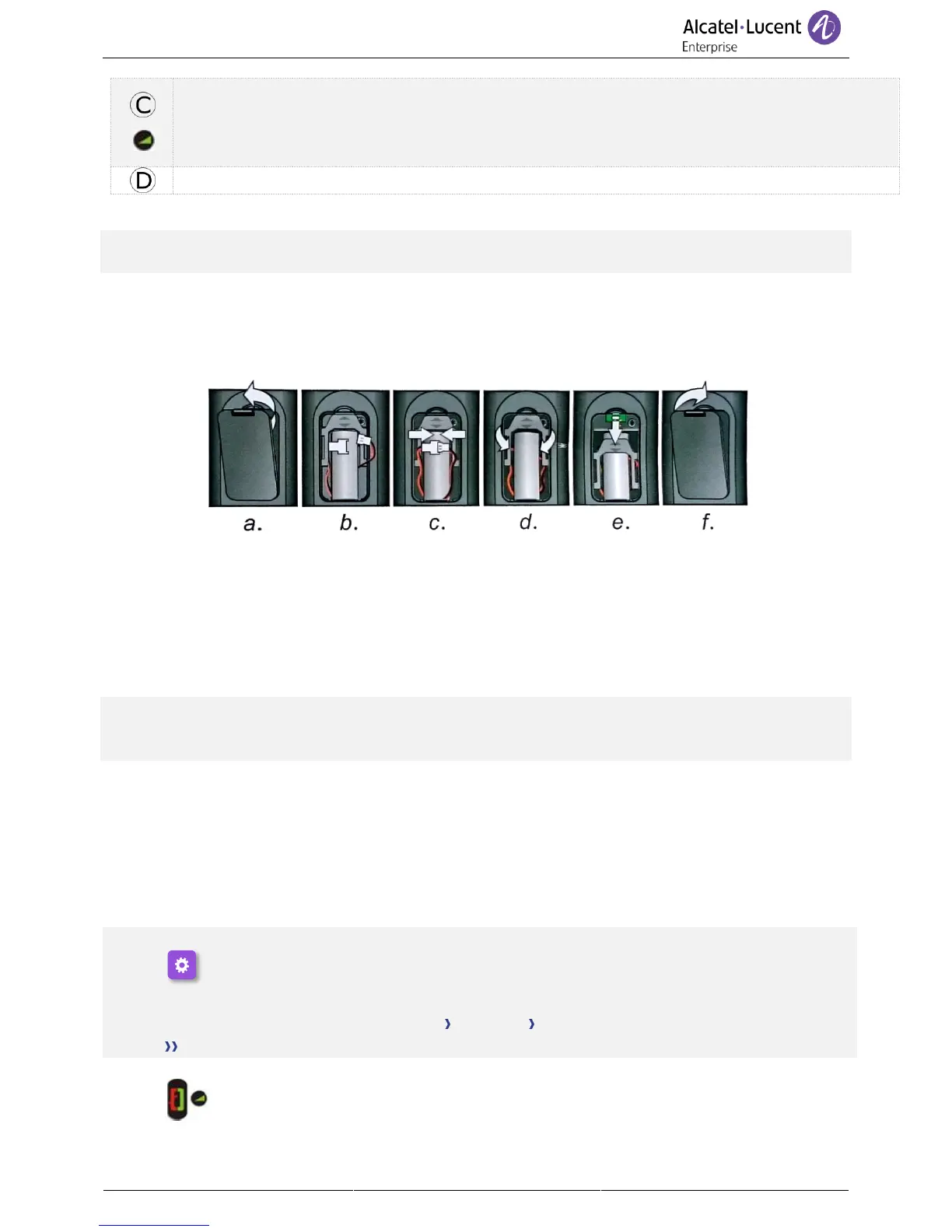
1.12.1 Installing or replacing the Bluetooth® handset battery
At the first use, you have to connect the battery to the handset. The battery is placed in its compartment
but it is not connected. To install a new battery, follow instruction:
a) Lift up the battery cover.
b) Take the 2 connectors.
c) Assemble the 2 connectors.
d) Arrange the battery, the cable and the
connectors in the battery compartment
(place the connected side of the battery in
the bottom of the compartment)
e) Slide out the battery holding part.
f) Replace the cover.
The battery recharges when the Bluetooth® handset is on its base.
Switch on / off the Bluetooth® handset: long press on the off-hook/on-hook key.
Defective batteries must be returned to a collection point for chemical waste disposal.
1.12.2 Pairing and connecting the Bluetooth® wireless handset
1.12.3 Installing a Bluetooth® Wireless Technology handset (pairing)
This feature is only available with compatible Bluetooth® deskphone. Otherwise the corresponding menu
is not displayed or is inactive.
Before the Bluetooth® handset can be used, it must be correctly paired to the terminal.
1- Set your deskphone to 'discover' the Bluetooth® wireless handset
• Select the settings icon from the phone menu (see the navigation section of your phone
model).
• Press the keys associated with: Phone Bluetooth Add device.
• Scanning starts.
2- Put the handset in detectable mode
• Keeping the handset turned off, press and hold the 2 Bluetooth® handset keys (B, C) at
the same time. You will hear a 3 note signal and the LED will flash green and orange
alternately.



 To Next Page