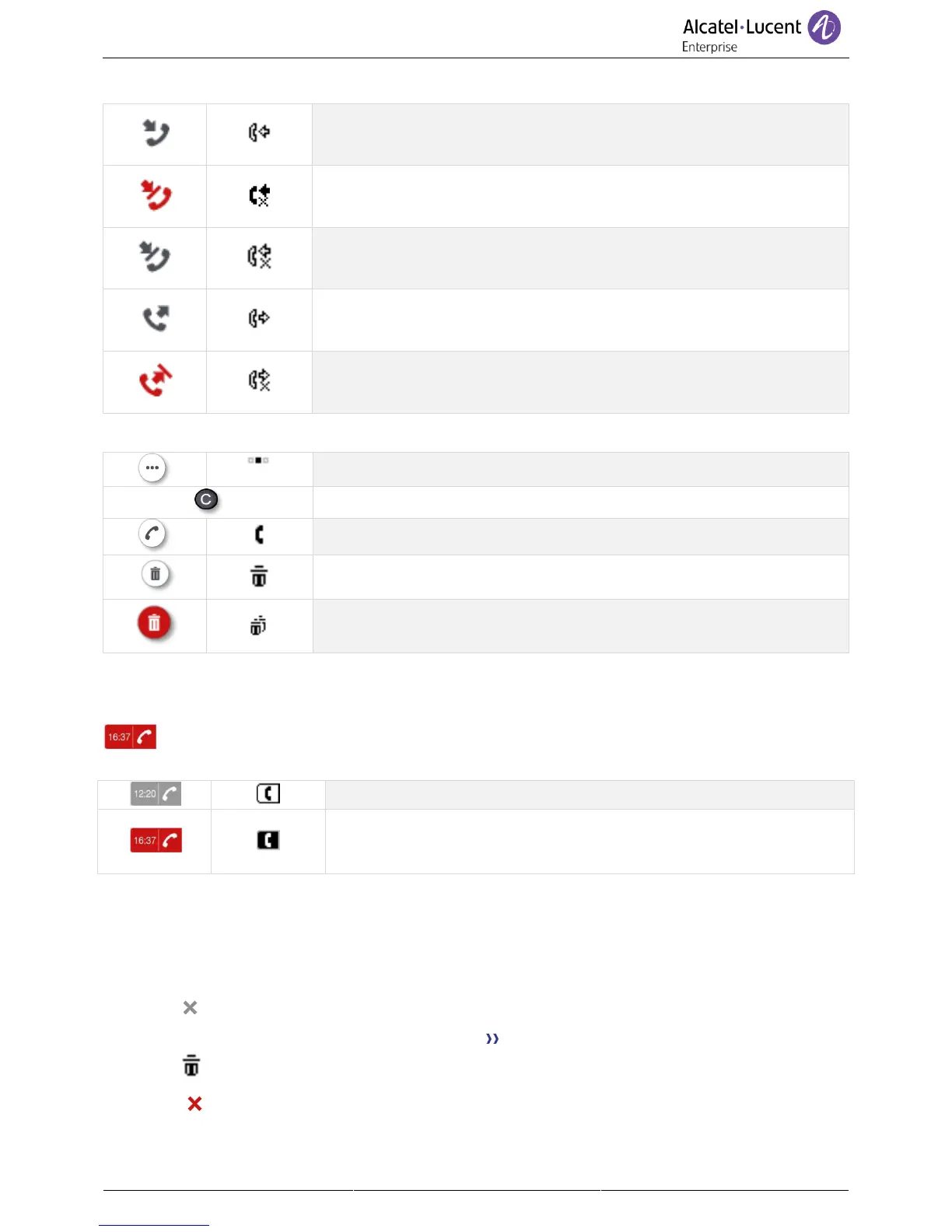
All call logs associated with the selected contact are displayed with an icon showing the type of call.
Unanswered incoming calls.
Unanswered incoming call that has been acknowledged.
Unanswered outgoing calls.
Actions are available from the call log.
Navigate between different pages.
Press the call key to call back the selected contact.
Delete the selected entry. Note that no confirmation is requested.
Delete the entire log associated with the selected contact. Note that no
confirmation is requested.
Using the up and down navigation key to scroll through the log.
Call your contact back by selecting the call log key (right side)
This icon means the call was answered or acknowledged.
This icon means the call was not answered (missed call).
You can acknowledge a missed call by opening the associated contact
card or by calling your contact back.
Down navigation key – To display additional pages of the call log
Using the up and down navigation key to scroll through the log.
OK key – To manage the call log
Allows management of the call log by deleting filtering and acknowledging logs.
• Delete
Press the delete key to delete specific logs All call logs are displayed on the screen.
Press the 'delete' key.
• Delete all
Press the key associated with the 'delete all' icon to delete all call logs. Please note that no
confirmation is required before deletion.



 To Next Page