Date, time and connectivity area
This area displays time, date, connectivity and customization information (wake-up on,
intercom mode on).
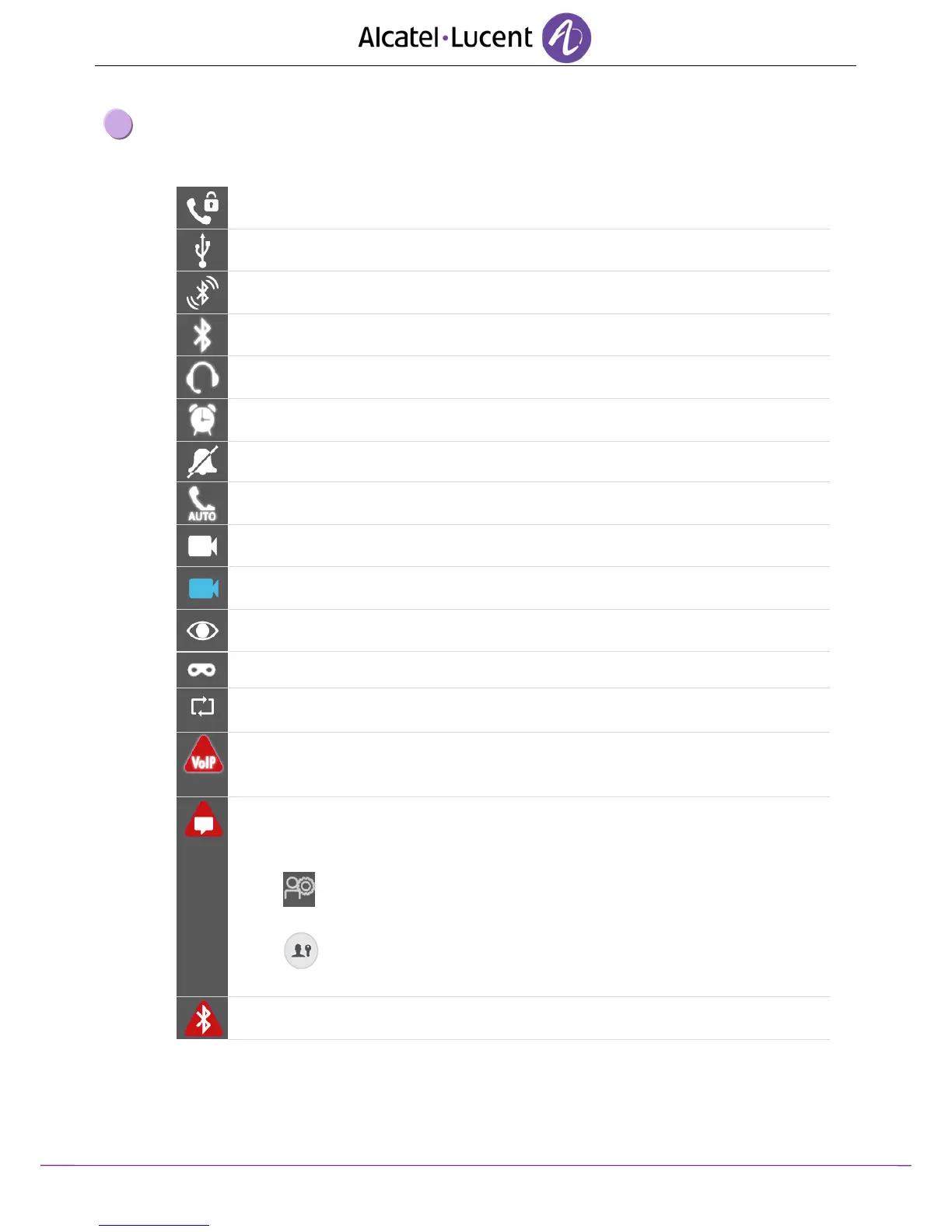
Security mode (encrypted audio communication).
USB Accessory or storage device connected to USB port.
Bluetooth® device pairing in progress.
Bluetooth® device connected (Other than your Bluetooth® handset).
Interphony (See chapter: Receiving intercom calls).
External camera plugged in. (white color).
Your phone is a supervisor phone or is supervised.
Identity secrecy activated.
Upgrade download. All features of the set are available during the upgrade.
This icon is displayed until the upgrade is complete.
No VoIP connection.
Communication is not possible. For more information, contact your installer or
administrator.
This icon appears when you are not connected to the data server (safe mode,
authentication failed or problem with the server).
All features are unaccessible. You can still call using the dialpad.
Make sure your password is correct.
User Information
Login
Enter your password
Bluetooth® device not connected












 To Next Page