Publication 1734-UM014A-EN-P - November 2010
88 Adapter Web Dialogs
– Carrier Sense Errors
– Frame Too Long
– MAC Receive Errors
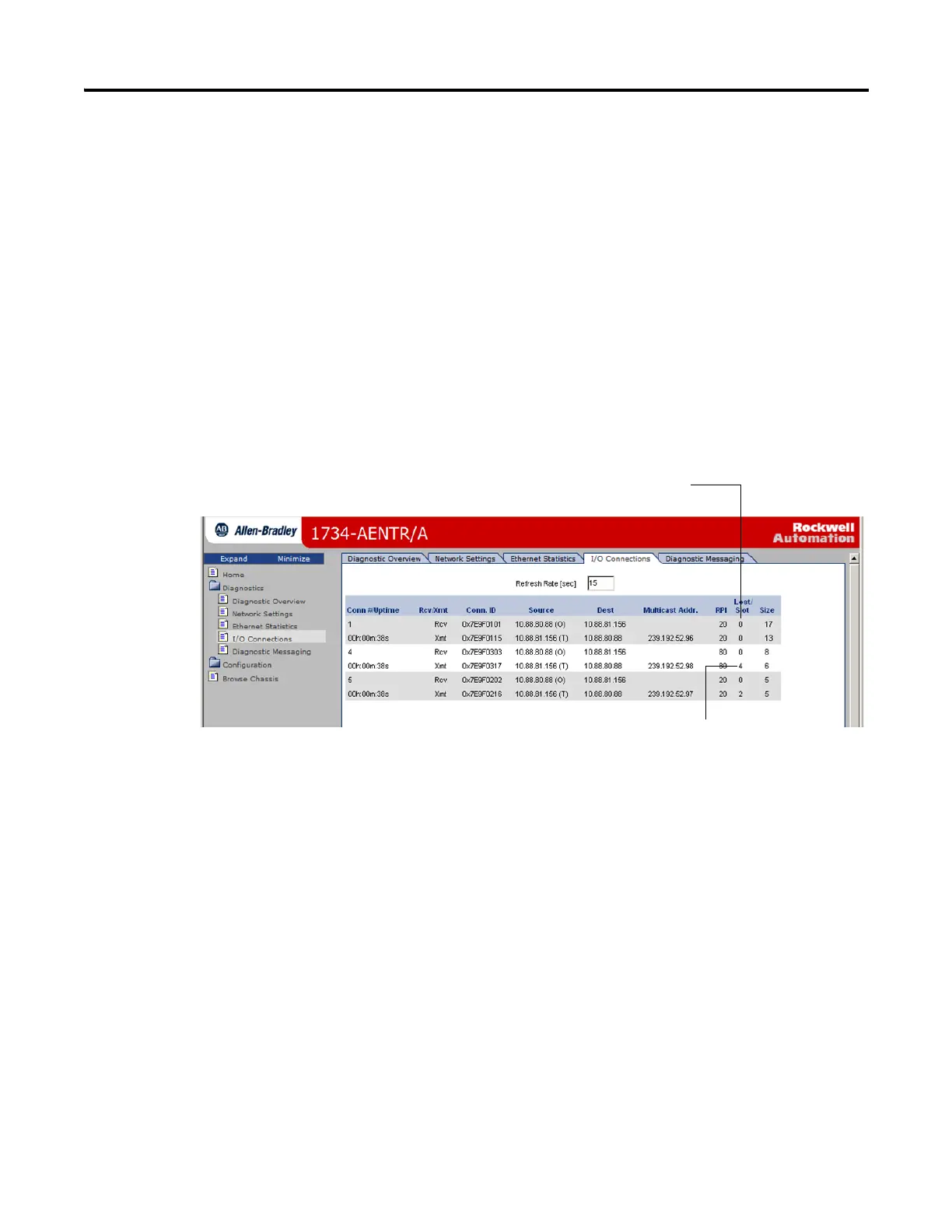
Use the I/O Connections Page
To use the I/O Connections page for CIP I/O (Class 1) connection
information, follow this procedure.
1. Click I/O Connections from the tab at the top of the page or panel on
the left.
The I/O Connections page opens.
2. From the I/O Connections page, view the following:
• Connection Number
•Uptime
• Receive and Transmit (Rcv/Xmt)
• Connection ID
• Source IP Address with an indication of the following:
– (O) for originator
– (T) for target
• Destination IP Address
• Multicast Address
• Requested Packet Interval (RPI)
The value for Slot shows
the slot number of the I/O
module this connection is
controlling.
The top value in this column representing Lost shows
the number of packets from the missing source.


 To Next Page
 Loading...