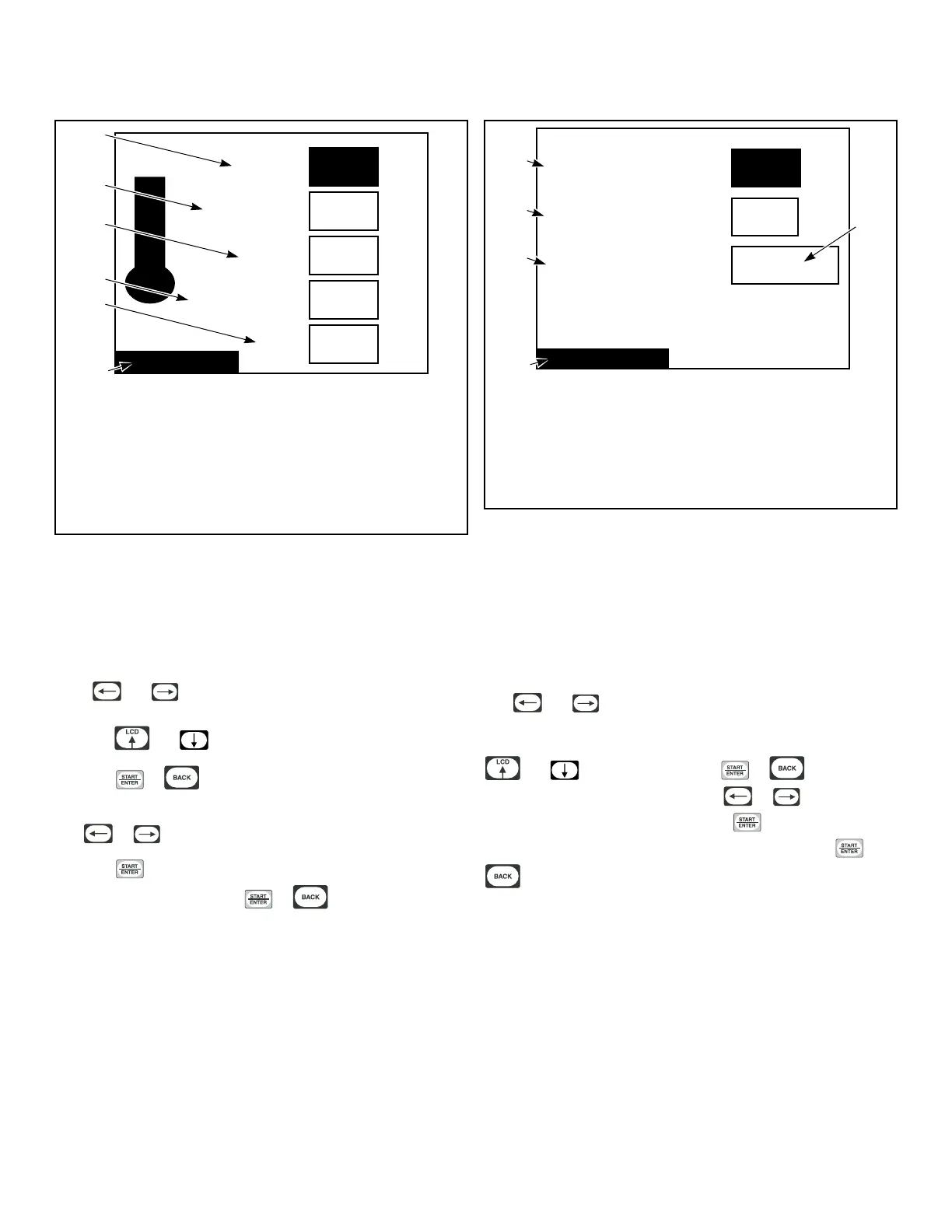
Temperature Menu
Temperatures
190
High (H)
160
Medium (M)
140
Low (L)
Units
120
Very Low (VL)
°F
°F
°F
°F
°F
TMB1361R_SVG1
1
6
5
4
3
2
1. Temperature
2. Units
3. Very Low (VL)
4. Low (L)
5. Medium (M)
6. High (H)
Figure 35
The Temperatures Menu allows the user to set global tempera-
tures for High, Medium, Low, Very Low and what unit of meas-
ure to display them in. These temperature ranges are restricted to
those allowed by Auto-Dry configurations for a given machine
capacity.
Press and keypads to move the highlighted box through
the different items in the menu. Once the item is highlighted,
press the and keypads to change the values.
Press the or keypad to jump to the Save Changes
Menu.
Use or to move highlighted box to “Yes” or “No”.
Press the keypad to return to Global Setup Menu. If no
changes were made, press the
or keypad to return to
Global Setup Menu.
Reverse Cylinder Menu (if equipped)
Rotate Time
Stop Time
Advanced Reversing
Reverse Cylinder
6
No
S
S
30
TMB1461R_SVG1
1
4
5
3
2
1. No
2. Reverse Cylinder
3. Advanced Reversing
4. Stop Time
5. Rotate Time
Figure 36
The Reverse Cylinder Menu allows the user to set the rotate and
stop time for Reverse Cylinder action and cycle specific rotate
time, stop time and Advanced Reversing. Rotate and Stop Times
valid for a heat cycle are those available through global Reverse
Cylinder parameters. If Advance Reversing is enabled, the user
will be able to view and edit cycle specific reversing parameters
within Cycle Programming. Refer to Figure 25 .
The and keypads are used to move the highlighted box
through the different items in the Reverse Cylinder Menu. Once
the item is highlighted, the value can be changed by using the
and keypads. Pressing the or keypad will
jump to the Save Changes Menu. Use or to move high-
lighted box to “Yes” or “No”. Press the keypad to return to
Global Setup menu. If no changes were made, press the or
keypad to return to Global Setup Menu.
Global Setup
©
Copyright, Alliance Laundry Systems LLC -
DO NOT COPY or TRANSMIT
30






 To Next Page