Test Cycle
Outputs:
Inputs:
RPM:0Temp:90 F
Step04: Temp Index - 50, 75 -170 (12)
Moisture:1%
PRESS
DM FM FW RV HT EA IR
DR LD AFS FCRSFCLS CL SL1 SL2 IL
RS DIP1 DIP2 DIP3 DIP4 DIP5 DIP6 DIP7 DIP8
TMB1424R_SVG1
1
2
3
4
5
7
8
6
1. Outputs:
2. Inputs:
3. RPM:0
4. Moisture:1%
5. PRESS
6. Test Cycle
7. Step04: Temp Index - 50, 75-170 (12)
8. Temp: 90F
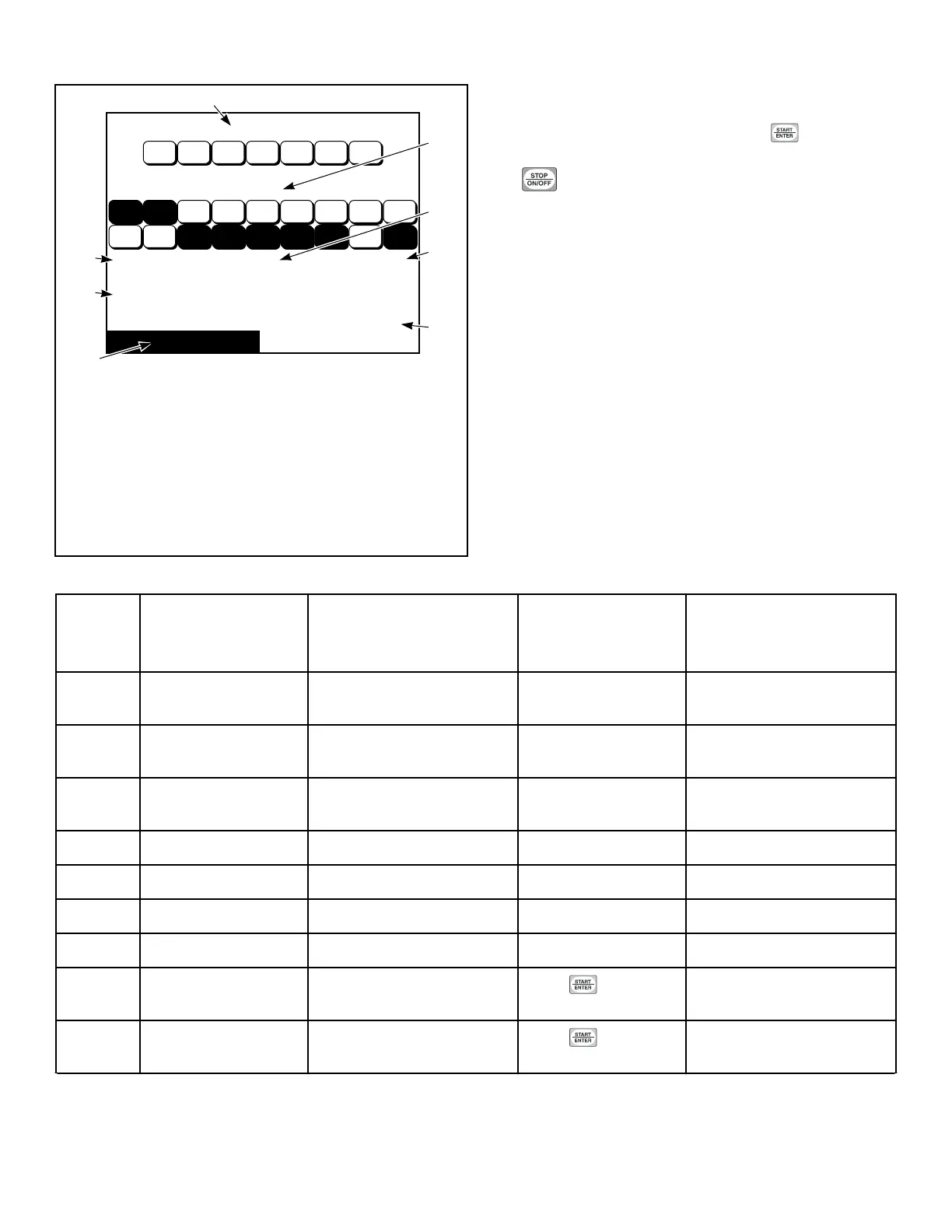
Figure 43
It is similar to the Inputs/Outputs Menu except that the test step is
shown at the bottom of the display and a key press prompt mes-
sage is shown in the lower right corner. Press to advance
through the steps. Refer to Table 3 for more details of each step.
Press to terminate the test.
Test Cycle Chart
STEP Test Cycle Step
Display
Description STEP ADVANCE COMMENTS
1 Keypad Test Step “Press Each Key To Ad-
vance”
Advance after all key-
pads are pressed.
2 Loading and Lint Door
Test Step
“Door Status” Press any keypad.
3 Display Test Step “Press Any Key To Advance
Through Screen Test”
Press any keypad.
Display Test Step #1 Screen is blank Press any keypad.
Display Test Step #2 Horizontal Bars Press any keypad.
Display Test Step #3 Horizontal Bars (inverted) Press any keypad.
Display Test Step #4 Screen is black Press any keypad.
4 Machine Temperature
Index Display Test
Temperature index harness
value
Press keypad.
5 Machine Capacity Capacity size of machine
Press keypad.
DIP switch status will be
shown.
Table 3 continues...
Diagnostics
©
Copyright, Alliance Laundry Systems LLC -
DO NOT COPY or TRANSMIT
34






 To Next Page