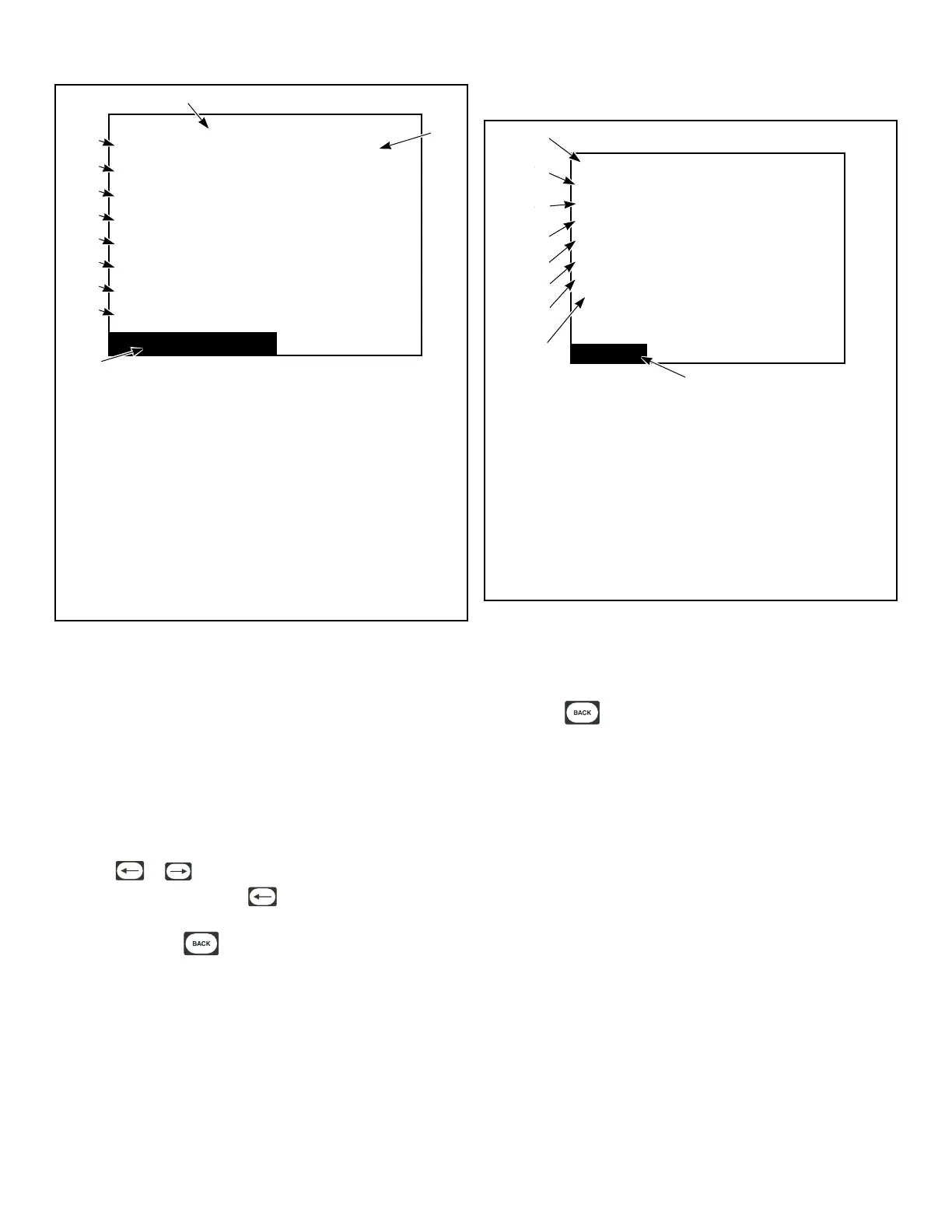
Alarms (3 of 3)
ALARM COUNTS
Fan Motor Contactor Count:
Fan Motor Centrifugal Sw Count:
ICM Lockout Alarm Count:
Heat Count:
Rotation Count:
Moisture Sensor Count:
IR Count:
Network Count: 18
0
5
0
1
1
0
1
TMB1363R_SVG1
11
5
6
7
3
4
8
9
10
2
1
1. Count
2. Alarms (3 of 3)
3. Network
4. IR
5. Moisture Sensor
6. Rotation
7. Heat
8. ICM Lockout Alarm
9. Fan Motor Centrifugal Switch
10. Fan Motor Contactor
11. ALARM COUNTS
Figure 47
The Alarms Menu contains three screens of information. On the
first screen, Alarms (1 of 3), the eight most recent alarms will
contain Cycle Number, Segment Number, Alarm Type, and the
Date/Time of the Alarm.
The second screen, Alarms (2 of 3), alarm counts list 1 through 8.
Alarm counts consist of how many times a specific alarm has oc-
curred.
The third screen, Alarms (3 of 3), is a continuation of the alarm
counts 9 through 16.
Press the or keypad to navigate to the different screens
in the Alarms Menu. Press the keypad to go from screen 1 to
screen 3. The actual menus are informational only and cannot be
navigated. Press the keypad to return to display to Diagnos-
tic Menu or the Run Diagnostic Menu.
Machine ID Menu
Machine ID
Model: UT030NUOG2K0W01
Serial #: 1107002759
Install Date: 07/01/2011
Machine Type: 30
Control SN: 11410113
Front End SW: 1
Display SW: 1
Node Number: 250
9
8
6
7
5
4
3
2
1
TMB1332R_SVG
1. Model
2. Serial #
3. Install Date
4. Machine Type
5. Control SN
6. Front End SW
7. Display SW
8. Node Number
9. Machine ID
Figure 48
The Machine ID Menu provides several different types of manu-
facturing and machine information that can be useful to the user
and technician. The Machine ID Menu cannot be navigated.
Pressing the keypad will return to Diagnostic Menu or the
Run Diagnostic Menu.
Diagnostics
©
Copyright, Alliance Laundry Systems LLC -
DO NOT COPY or TRANSMIT
38





 To Next Page