Installation
Opus Operator's Manual 3-3
3.4 Connecting the Applicator
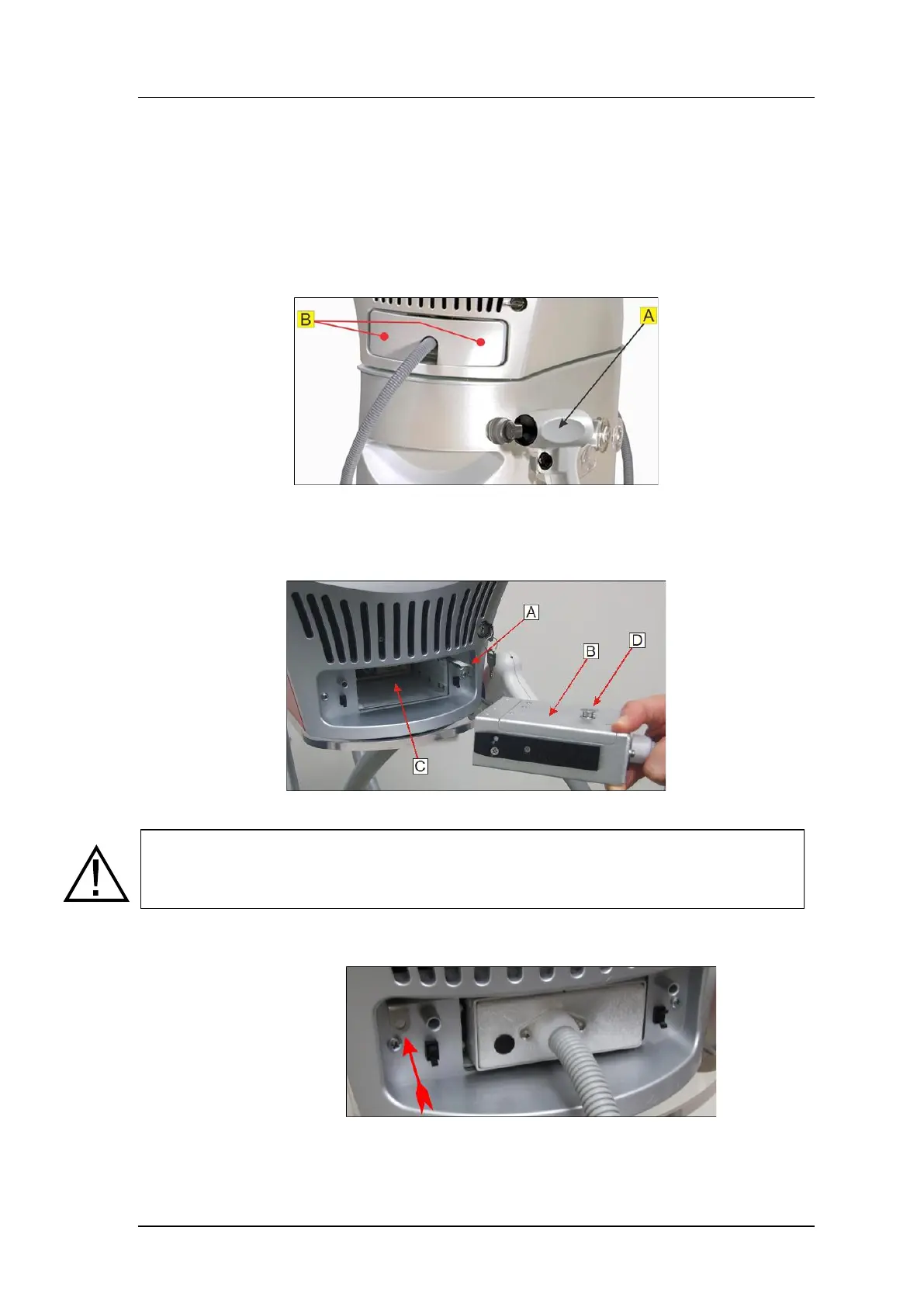
The applicators are normally placed in the cradle on the right side of the system.
The connector is attached to the system's connection port under the front cover.
1. Place the applicator in its cradle (A).
2. Remove the front cover: press both spots indicated by the red dots (B) to
unlatch the cover, and pull it off.
Figure 3-1: Applicator Connection Procedure (1)
3. Pull the locking lever out to the unlatched position (A).
4. Insert the applicator connector (B) into the port (C).
Figure 3-2: Applicator Connection Procedure (2)
Caution
Insert the connector so that the guiding pin (D) is facing up. Inserting the connector in the
wrong orientation will damage the system!
5. Close the locking lever to lock the applicator connector in position and
ensure that it is closed all the way, as shown by the arrow:
Figure 3-3: Applicator Connection Procedure (3)
6. Reinstall the front cover by pressing the same two points to latch in into place.


 To Next Page