BOOM BARRIER BV58681818
SETUP
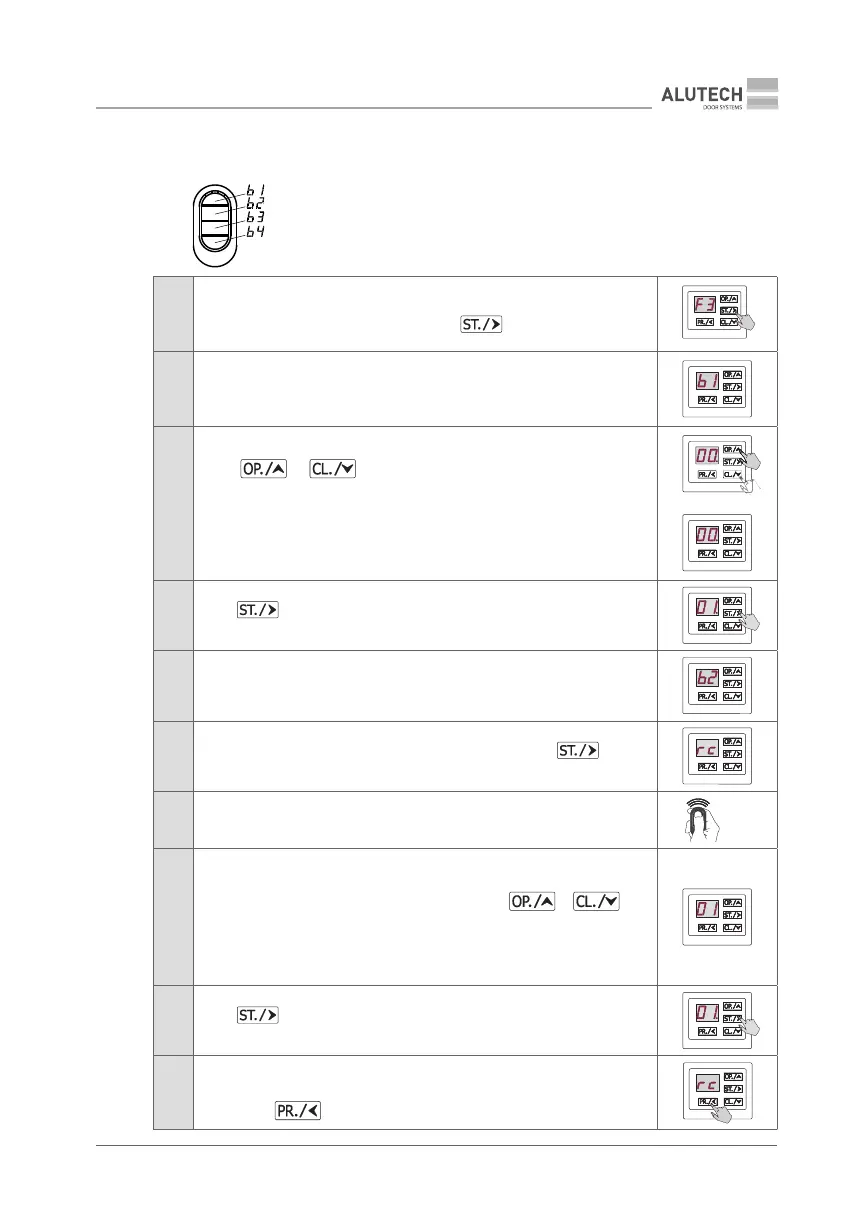
F3 — Recording four remote control buttons
with any control command selected in the settings
When entering setup, the default control command value for all 4remote
control buttons (b1–b4) is 00 (Table 6).
Table 8
1
Enter setup menu (Table 5) and select P2. Select setting F3.
When the desired setting is displayed, press button
2
Display will show the rst button b1 of the remote for ~2 s, indicating that
the control command for this button will be selected
3
Using OR button, select the desired command (Table 6)
IMPORTANT! If you do not want to assign a control command to the button,
leave the value 00
4
Press button to conrm the selected value (e.g., 01);
once the button is pressed, the display will show the number with a dot
5
Display will show the b2 button of the remote for ~2 s, indicating that the
control command for this button will be selected. Repeat steps 3 and 4 for
control buttons b2, b3, b4
6
Once the selected command for b4 is conrmed by pressing button,
the display will show rc, which means waiting for the remote control signal
7 Press any button on the remote control 3 times
×3
8
The display will show automatically:
• number without a dot, to be assigned to an unrecorded remote control
in the drive memory (select unused number using or
button)
• number with a dot. The remote control is already recorded and after
conrmation, the commands of the remote control with the specied
number will be completely overwritten!
9
Press button to conrm; once the button is pressed, the display will
show the number with a dot (e.g., number 01.).
10
In ~2 s the system will automatically switch to recording the next remote control
with a preset combination of b1–b4 buttons (repeat steps 7 to 9). To exit setup
menu, press button 3 times
×3



 To Next Page