BOOM BARRIER BV5868 1717
SETUP
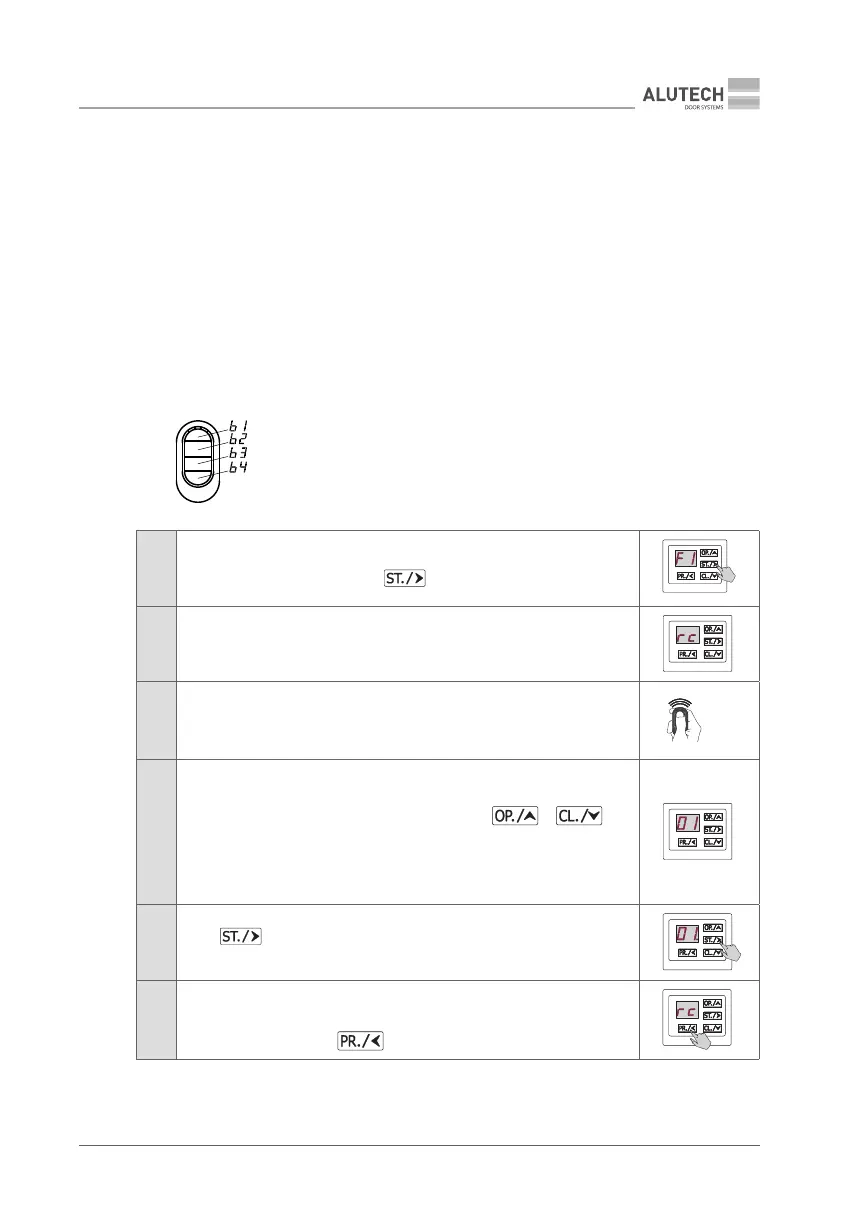
7.1.1. ENTERING / RECORDING A REMOTE CONTROL
Y
If apreviously recorded remote control is entered, the button(s) of such remote control will be
overwritten, new control commands will be assigned!
The entry numbers of the remote control units are displayed as two alphanumeric characters,
from 01 to FA (characters used: 0, 1, 2, 3, 4, 5, 6, 7, 8, 9, A, , , D, E, F).
Indication no when entering remote controls means that the maximum number of remote
controls (250 units) has already been entered.
F1 — Recording any button on the remote with the STEP BY STEP control command
The default value is 01 (Table 6) — STEP-BY-STEP (EXIT)
F2 — Recording of three buttons with control commands
OPEN (b1 button), STOP (b2 button), CLOSE (b3 button).
The default value for OPEN is 02 (see Table 6) — OPEN (EXIT).
Table 7
1
Enter setup menu (Table 5) and select P2. Select F1 or F2 setting. When the
desired setting is displayed, press
2 The display will show rc, which means waiting for the remote control signal
3
Press at least 3 times on the remote control:
• to set F1 — the selected control button
• to set F2 — any button
×3
4
The display will show automatically:
• number without a dot, to be assigned to an unrecorded remote control
in the drive memory (select unused number using or
button)
• number with a dot. The remote control is already recorded and after
conrmation the commands of the remote control with the specied
number will be completely overwritten!
5
Press to conrm; once the button is pressed, the display will show
the number with a dot
6
In ~2 s the system will automatically switch to recording the next remote
control (repeat steps 3 to 5).
To exit setup menu, press button 3 times
×3



 To Next Page