BOOM BARRIER BV58682020
SETUP
F5 — Changing a command for the recorded remote control button
Y
Physical presence of arecorded remote control is required!
Table 10
1
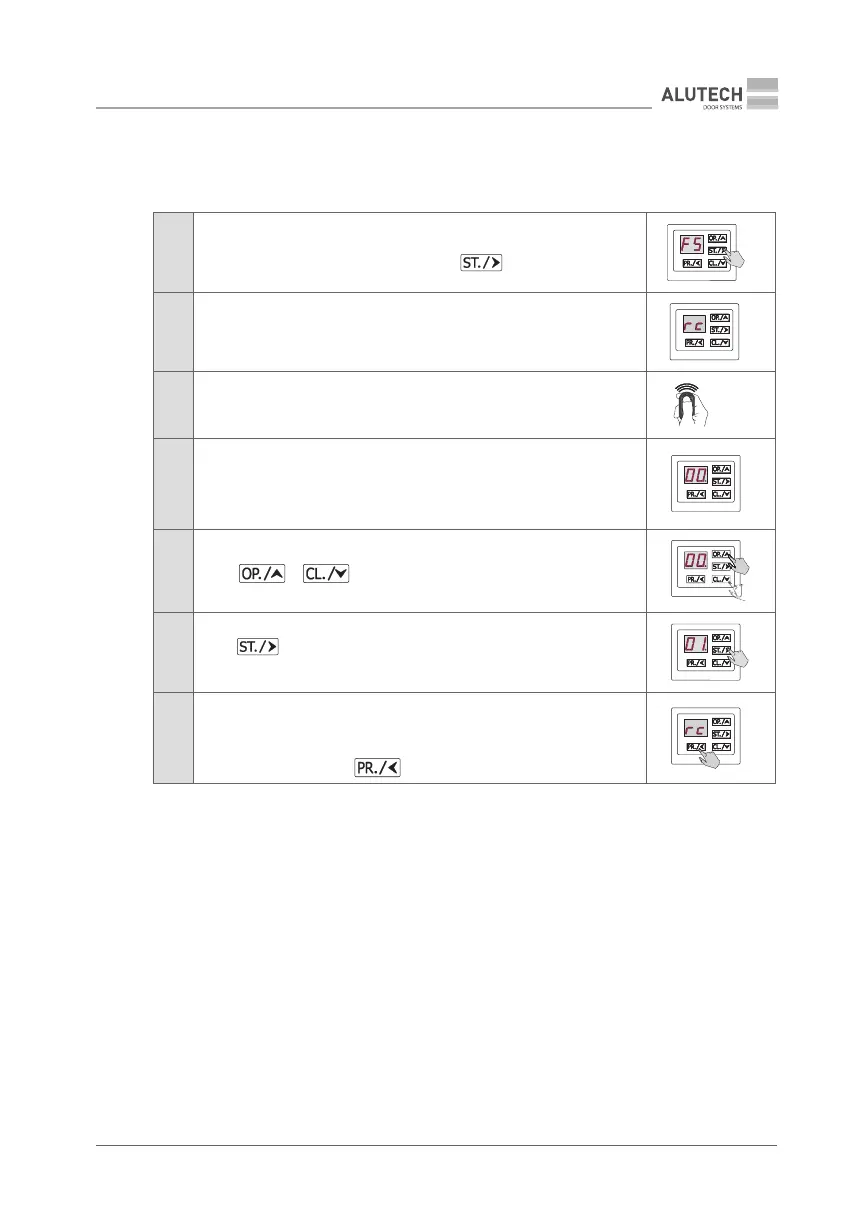
Enter setup menu (Table 5) and select P2. Select F5 setting.
When the desired setting is displayed, press
2 The display will show rc, which means waiting for the remote control signal
3
Press 3 times the remote control button on which the command is to be
changed
×3
4
Display will show the pressed button (b1-b4) number for ~2 s, followed by
current value of the control command for this remote control (with a dot,
e.g.00).
If the remote is not recorded, the display will show no
5
Using or button, select the desired command (Table 6)
6
Press button to conrm the selected command; once the button
ispressed, the display will show the number with a dot (e.g., 01.)
7
After ~2 s, the system will automatically switch to waiting for the remote
control signal. If necessary, edit the button command on this or another
recorded remote control (repeat steps 3 to 6).
To exit setup menu, press button 3 times
×3



 To Next Page