BOOM BARRIER BV5868 2121
SETUP
7.1.3. DETERMINING THE NUMBER OF RECORDED RE MOTE CONTROLS
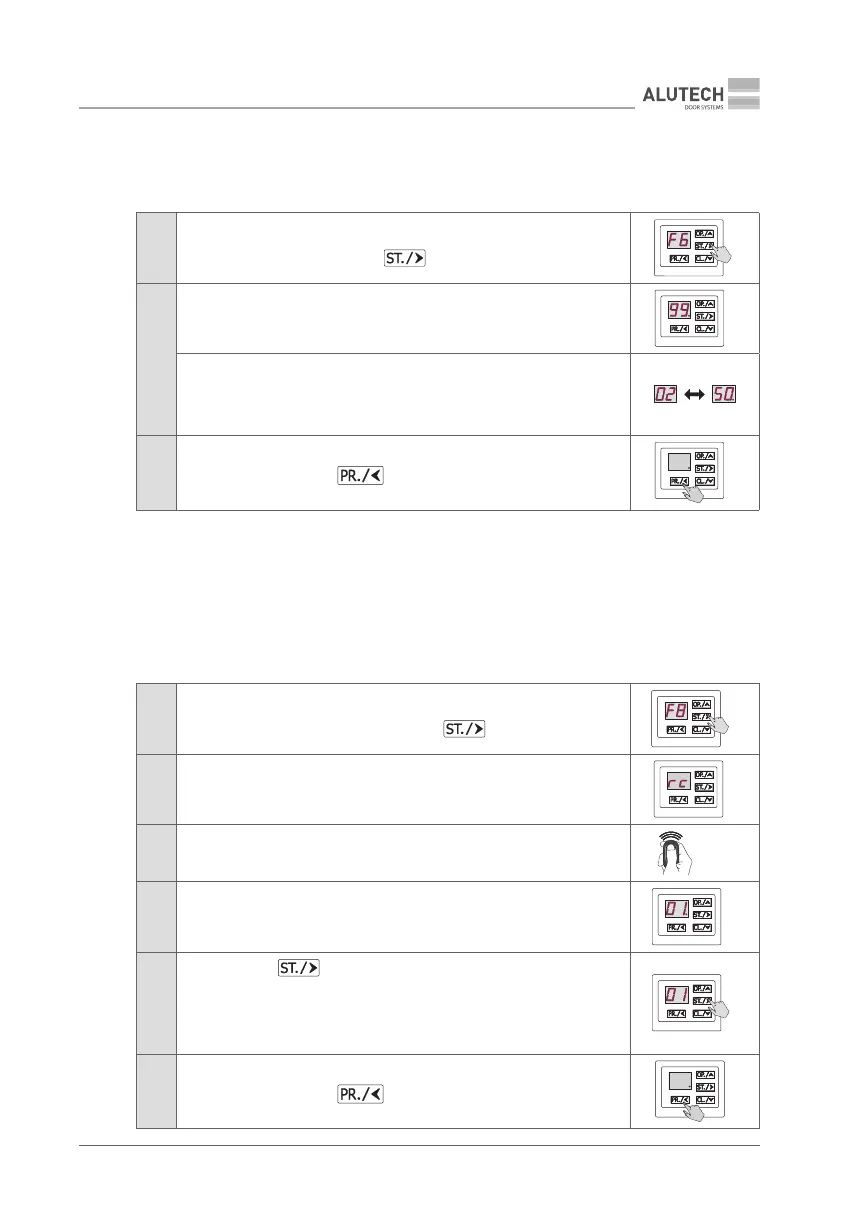
F6 — Determining the number of recorded remote controls
Table 11
1
Enter setup menu (Table 5) and select P2. Select F6 setting. Once the
desired setting is displayed, press button
2
If the number of recorded remotes does not exceed 99, the display will
show a numeric value always followed by a dot (e.g., 99. means 99 remotes
recorded).
If the number of recorded remotes exceeds 99, the display will show
numeric values with and without a dot alternatively at 1 s periods
(e.g., 02 ➞➞ 50. means 250 remotes recorded).
If there are no recorded remotes, the display will show no
3
To exit setup menu, press button three times
×3
7.1.4. DELETING AND IDENTIFYING A REMOTE CONTROL
F7 — Identifying the remote control entry number in the memory
F8 — Deleting a remote control by code
Y
Physical presence of aremote control is required!
Table 12
1
Enter setup menu (Table 5) and select P2. Select F7 or F8 setting.
When the desired setting is displayed, press button
2 The display will show rc, which means waiting for the remote control signal
3 Press any button on the remote control three times
×3
4
The display will automatically show the remote control entry number
in the memory (number with a dot, e.g., number 01.).
If the remote is not recorded, the display will show no
5
To set F8, press button. The dot on the display will disappear,
meaning that the remote has been deleted.
In 2 s, the system will automatically switch to waiting for a signal from the
remote control. The display will show rc. You may now proceed to deleting
the next remote control (repeat steps 3 to 5)
6
To exit setup menu, press button 3 times
×3



 To Next Page