BOOM BARRIER BV58682222
SETUP
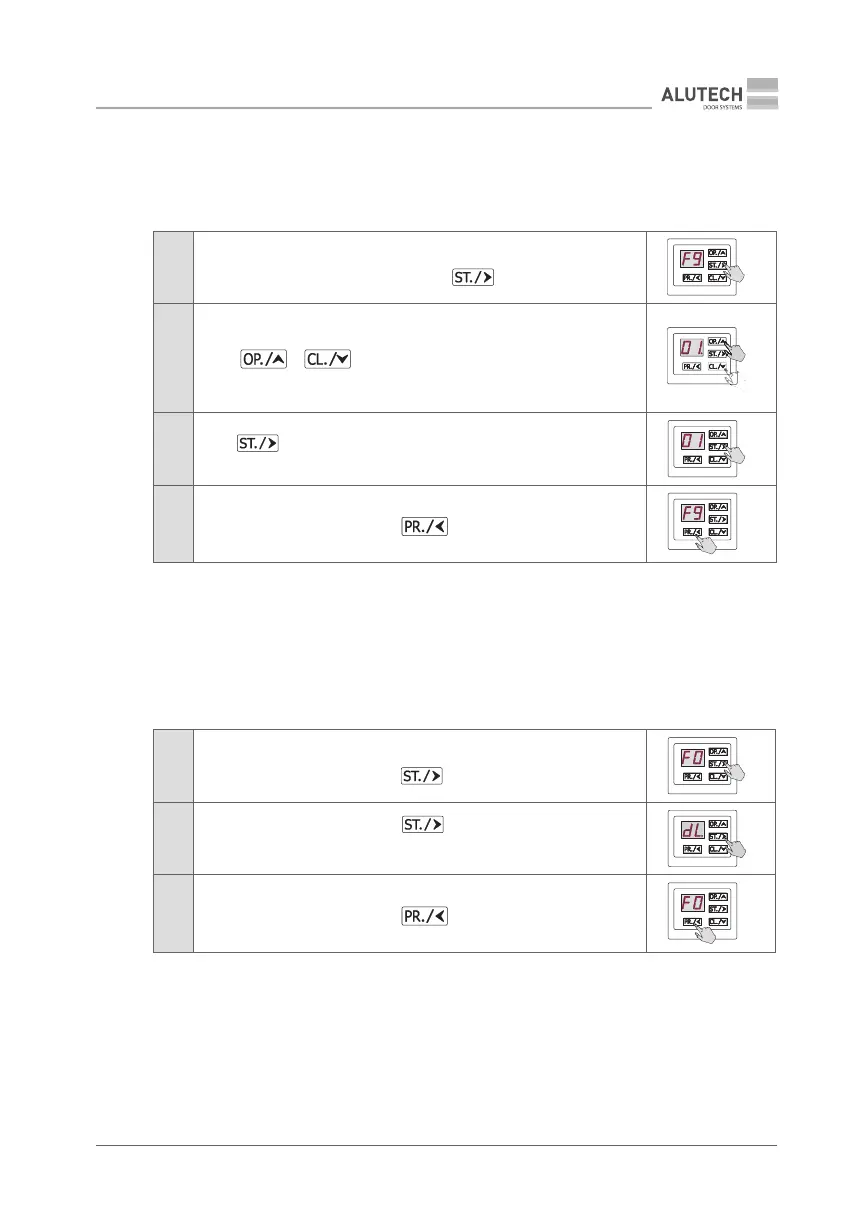
F9 — Deleting a remote control with a known entry number
Y
You will need to know the remote control entry number in the control box memory!
No physical presence of the remote control is required.
Table 13
1
Enter setup menu (Table5) and select P2. Select F9 setting.
After the desired setting is displayed press button
2
The display will automatically show the rst recorded remote control entry
number (e.g., number 01.).
Using or button, select the desired remote control to be
deleted.
If there are no recorded remotes, the display will show no
3
Press button. The dot next to number will disappear from display,
meaning that the remote control has been deleted
4
After F9 appears on display, press button twice to exit setup menu
×2
7.1.5. DELETING ALL REMOTE CONTROLS
F0 — Deleting all remote controls
Y
All remote controls recorded in the control unit memory will be deleted!
Table 14
1
Enter setup menu (Table 5) and select P2. Select F0 setting. When the
desired setting is displayed, press
2
After dL appears on display, press button and hold for ~5 s until
adot appears on display, meaning that all remotes have been deleted from
memory
5s
3
After F0 appears on display, press button twice to exit setup menu
×2



 To Next Page