www.amgmicro.com 18
EVOS
fl
User Guide
REV B Published 20 SEP 2010
ADVANCED OPERATION
COUNTING CELLS
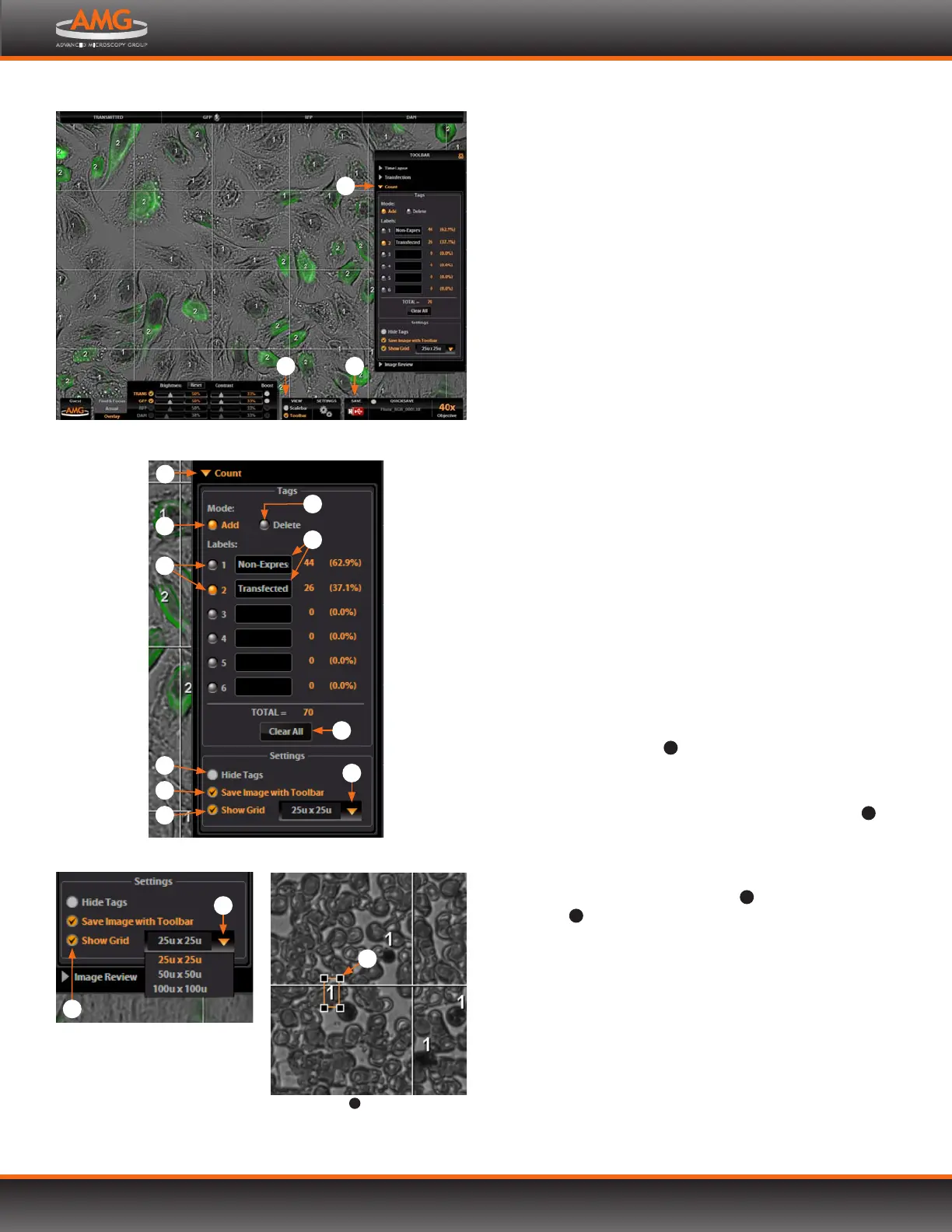
The Count tool streamlines cell counting by marking items with
up to 6 labels onscreen. As you tag items, EVOS will keep a
running tally of counts with percentages for each label assigned.
Document your results simply by saving the tagged image, with
the Count tool displaying the totals.
1. Acquire an image. See BASIC OPERATION (p.9) for
detailed instructions.
2. Open the Toolbar and expand the Count tool .
Note: Use the Add mode , which is active by default.
The Delete mode is for removing tags that
have already been added.
3. Click in a black Label text field to name a label. You
may use up to 6 labels.
4. Under Settings, you may choose a grid size in the drop-
down menu or leave the Show Grid option inactive.
5. Select a Label button and left-click at each point
onscreen to tag the items for that category. Switch
labels as desired; EVOS will tag for the selected label.
Note: To use Digital Zoom while counting cells, first
suspend the Count tool. Either select the Hide
Tags setting , click the triangle to minimize
the Count tool, or click the Toolbar option to
minimize the whole Toolbar. When the Count
tool is suspended, the left mouse button will
behave according to the rules described in
Using Digital Zoom (p.20). After zooming,
reactivate the Count tool by deselecting Hide
Tags or reopening the tool.
6. To move a tag, select
10
and drag it. Left-click anywhere
else onscreen to deselect.
7. To delete a tag, right-click it, or choose the Delete mode
and left-click it. You may also use the Clear All button
11
to
delete all tags for all labels.
8. To save an image showing the labels, counts and
percentages as shown in the Count tool, select the
Save Image with Toolbar option
12
and click the Save
button
13
. Deselecting this option will produce an
image saved with the tags only.
Detail of grid size menu and
Show Grid option
6
7
Selected tag
10
; drag to move
10
Count tool
3
5
8
9
2
11
12
7
6
4
Toolbar option and Count tool
1
2
13


 To Next Page